🧠 AI Quiz
Think you really understand Artificial Intelligence?
Test yourself and see how well you know the world of AI.
Answer AI-related questions, compete with other users, and prove that
you’re among the best when it comes to AI knowledge.
Reach the top of our leaderboard.

















VideoFlux
What is VideoFlux?
There’s something exciting about typing a simple idea and watching it turn into a real, moving video just minutes later. This tool makes that happen in a way that feels almost magical. You describe a scene, add a reference image if you want, and it delivers smooth, high-quality footage that often looks better than you expected. I’ve used it to create quick social media clips, product teasers, and even short story visuals, and the results consistently surprise me with how natural the motion and lighting feel. It’s the kind of tool that turns “I wish I could show this” into “here it is.”
Introduction
Creating video content used to mean hours of filming, editing, and polishing. VideoFlux changes the game by letting anyone generate professional-looking videos from simple text prompts or images. Whether you’re a marketer needing a quick ad, a creator building Reels, or a storyteller bringing an idea to life, it handles the heavy lifting while keeping the output polished and engaging. The platform uses advanced AI models that understand cinematic flow, making the videos feel directed rather than randomly generated. It’s fast, approachable, and delivers results that make you want to create more.
Key Features
User Interface
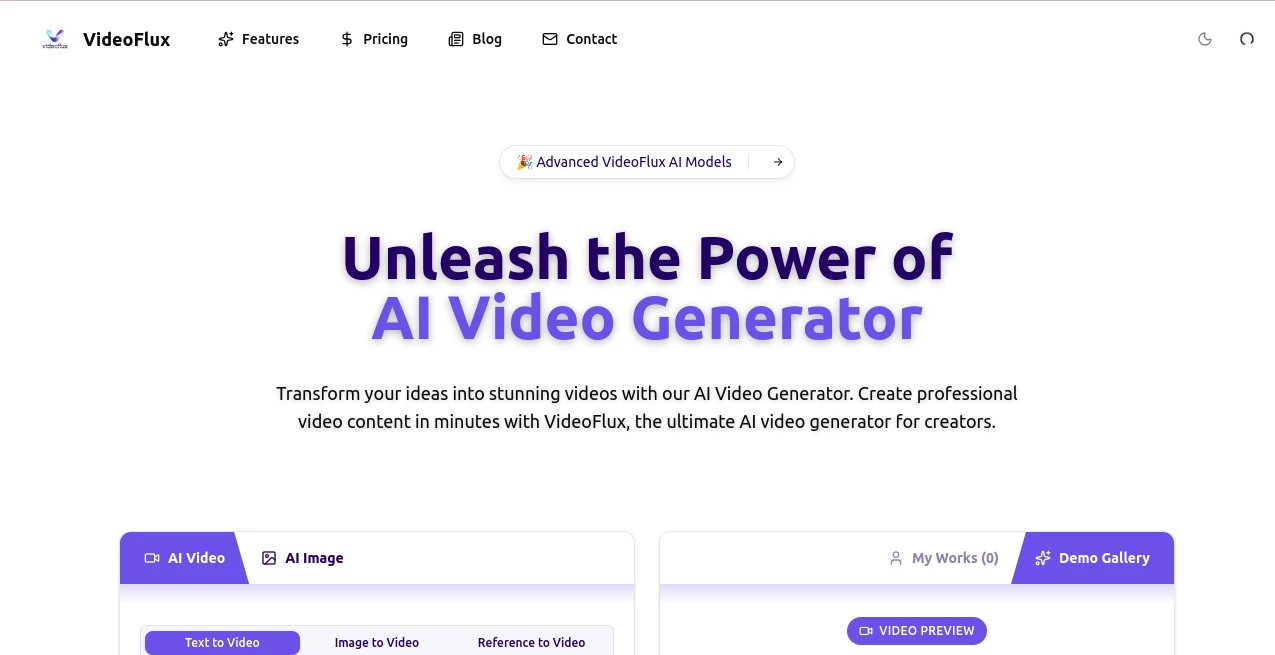
The interface is clean and welcoming. A big prompt box invites you to describe your vision, with options to upload a reference image for stronger guidance. You choose aspect ratio, duration, and style preferences, then hit generate. Previews load quickly so you can iterate without frustration. Everything is designed to keep you in the creative flow rather than fighting with complicated settings. Even first-time users can create something impressive within minutes.
Accuracy & Performance
The model excels at understanding your intent. Text prompts turn into coherent scenes with natural movement, while image references help maintain character consistency and visual style. Generation times are reasonable, often just 30–90 seconds for a solid clip. The output quality is high, with good lighting, smooth transitions, and motion that doesn’t feel robotic. It handles both simple concepts and more detailed scenes effectively, making it reliable for real creative work.
Capabilities
You can generate videos from text descriptions alone or combine them with reference images for more control. It supports different aspect ratios for social media, YouTube, or presentations. The AI creates fluid motion, respects the mood of your prompt, and produces clips ready for social sharing or further editing. It’s particularly strong at turning static ideas into dynamic, watchable content that captures attention quickly.
Security & Privacy
Your prompts and generated videos are handled with care. The platform focuses on delivering your content without unnecessary data collection or long-term storage of personal projects. This gives creators peace of mind when working on client projects or personal ideas they’re not ready to share yet.
Use Cases
Marketers create eye-catching product videos from a single description and reference photo. Content creators produce daily Reels or TikToks without filming themselves. Educators turn lesson concepts into short explanatory animations. Storytellers prototype scenes for scripts or books. Small businesses make professional-looking promotional clips on a budget. The versatility makes it useful whenever you need video fast but want it to look intentional and high-quality.
Pros and Cons
Pros:
- Turns simple text or images into surprisingly polished videos very quickly.
- Good motion quality and scene coherence compared to many AI tools.
- Easy enough for beginners yet flexible for more experienced creators.
- Helpful for rapid prototyping and content creation under tight deadlines.
Cons:
- Clip lengths are best for short-form content rather than long videos.
- Very complex or highly specific scenes may need prompt refinement.
- Advanced features and higher usage limits require a paid plan.
Pricing Plans
The free tier lets you test the quality with several generations per day, giving you a real sense of what the tool can do. Paid plans unlock more daily credits, faster processing, higher resolutions, and additional features for heavier users. The pricing is reasonable for the time and creative possibilities it opens up, especially for creators and small teams producing regular video content.
How to Use VideoFlux
Start by typing a clear description of the scene you want (“a young woman walking through a cherry blossom park at sunset, gentle camera pan”). Optionally upload a reference image to guide the style or characters. Choose your preferred aspect ratio and video length. Click generate and wait a short moment for the result. Review the clip—if needed, adjust your prompt and try again. Once you’re happy, download the video and use it directly or edit further in your favorite software. The whole process is fast enough to experiment with multiple ideas in one session.
Comparison with Similar Tools
While many AI video tools produce jerky motion or inconsistent results, VideoFlux stands out for its smoother transitions and better understanding of cinematic flow. It balances ease of use with quality output better than many alternatives, especially for short, engaging content. It’s not trying to replace full video production suites but excels at quick, high-impact clips that look professional with minimal effort.
Conclusion
VideoFlux makes video creation feel accessible and fun again. It removes the technical barriers that used to stop good ideas from becoming visible content. Whether you need a quick social media post, a product teaser, or a creative experiment, it delivers results that look intentional and polished. In a world where video rules attention, having a tool that helps you create it quickly and effectively is a real advantage. If you’ve been hesitating to make videos because of time or skill, this might be the nudge you’ve been waiting for.
Frequently Asked Questions (FAQ)
How long does it take to generate a video?
Usually 30–90 seconds depending on complexity and current demand.
Can I use my own images as reference?
Yes, uploading reference images helps guide style, characters, and composition.
What video lengths are supported?
Best suited for short clips (5–15 seconds); longer videos can be created by combining multiple generations.
Is there a free way to try it?
Yes, the free tier allows several generations per day so you can test the quality.
Are the videos suitable for commercial use?
Paid plans typically include commercial rights—check current terms for details.
AI Animated Video , AI Image to Video , AI Video Generator , AI Text to Video .
These classifications represent its core capabilities and areas of application. For related tools, explore the linked categories above.
VideoFlux details
Pricing
- Free
Apps
- Web Tools
Categories

VideoFlux Alternatives Product

Seedance AI …

Seedance Art

Blinkly AI

Ltx 2.3

Kling Motion
RightAI

Kling 3.0

AudioVideoGe…

VO4 AI