
🧠 AI Quiz
Think you really understand Artificial Intelligence?
Test yourself and see how well you know the world of AI.
Answer AI-related questions, compete with other users, and prove that
you’re among the best when it comes to AI knowledge.
Reach the top of our leaderboard.


















Video Upscaler

What is Video Upscaler?
There's something truly satisfying about watching an old, grainy clip suddenly look crisp and modern—like rediscovering a favorite memory in high definition. This tool makes that happen effortlessly: drop in any video, and it delivers sharper, cleaner footage that feels like it was shot yesterday. I recently pulled up a family video from 2010—blurry, noisy, full of nostalgia but tough to watch. After a quick run through here, it was transformed into something I'd proudly share again. The difference was night and day, and it took almost no effort on my part.
Introduction
Video quality matters more than ever these days, whether you're preserving personal memories, prepping content for social media, or breathing new life into old footage for clients. This platform specializes in exactly that—taking videos of any resolution and upscaling them to 4K with remarkable clarity. What sets it apart is how straightforward the whole process is: no complicated settings to fiddle with, just upload and let it work its magic. Users love how it handles everything from vintage home videos to professional shoots, delivering results that look natural rather than overprocessed. It's become my go-to whenever I want footage to pop without spending hours in editing software.
Key Features
User Interface
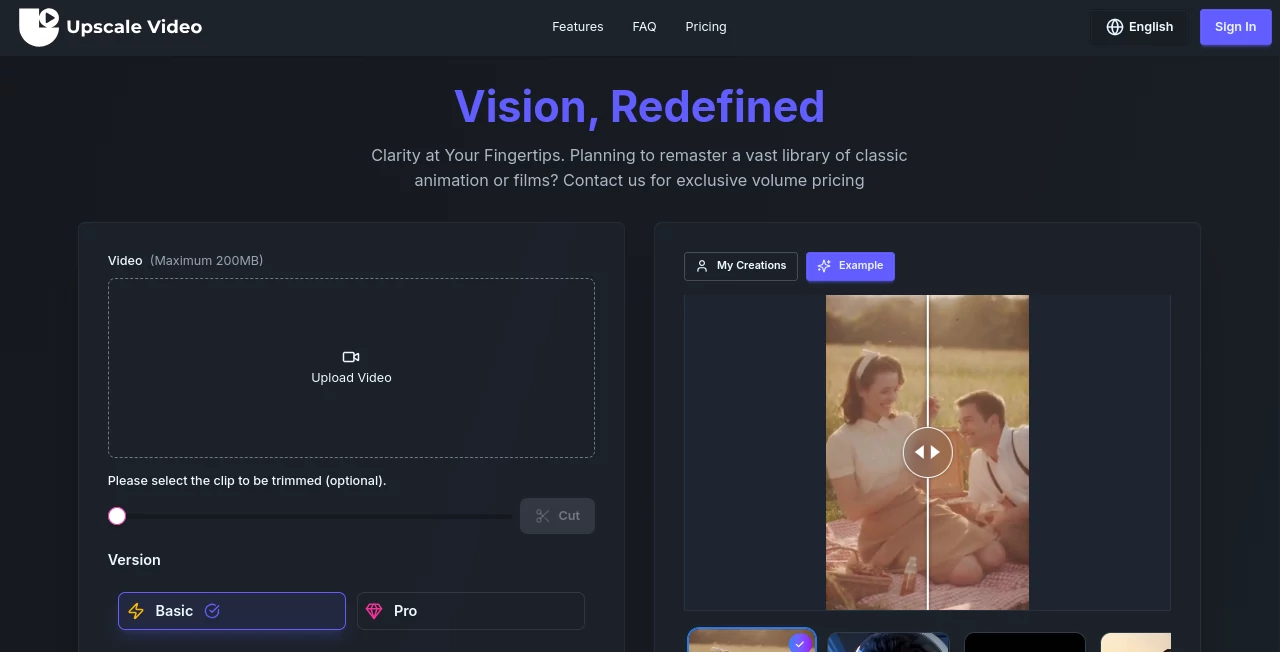
The layout is refreshingly simple: a big central upload area that practically invites you to drop your file, a few clear options for resolution and enhancement strength, and a progress bar that keeps you informed without overwhelming you. There's no clutter of menus or hidden toggles—just the essentials, beautifully presented. I've recommended it to non-technical friends who were intimidated by other upscalers, and they all came back saying how easy it was to get great results the first time.
Accuracy & Performance
It excels at preserving the original look while sharpening details—faces stay natural, textures don't turn plastic, and motion remains smooth. Even with tricky footage (low light, fast movement), it avoids the common artifacts that plague lesser tools. Processing times are impressively quick for the quality you get, and it handles large files without choking. In my tests, a 10-minute 720p clip came out looking like it was filmed on a modern camera, with no noticeable artifacts or unnatural sharpening.
Capabilities
From 480p to 4K, it scales beautifully while adding intelligent noise reduction and detail enhancement. You can choose between different upscaling models depending on the content—great for everything from old home videos to drone footage or even animations. The output is always clean and professional-looking, with options to preview before committing. It's versatile enough for both personal archiving and professional use cases where quality is non-negotiable.
Security & Privacy
Your videos are processed securely and deleted from their servers shortly after completion—no lingering files, no data mining. For anyone working with sensitive or personal content, that's a big plus. The whole system is built with privacy in mind, so you can upload without worrying about who might see your footage later.
Use Cases
Family archivists love it for restoring old camcorder tapes—suddenly those childhood birthdays look vibrant again. Content creators use it to upscale archive footage for YouTube videos, making everything look consistent and modern. Small production houses breathe new life into client-provided assets without expensive re-shoots. Even photographers upscale time-lapse sequences for smooth 4K playback. It's the kind of tool that quietly makes a huge difference across all sorts of creative work.
Pros and Cons
Pros:
- Results look natural, not over-sharpened or artificial
- Fast processing even for longer clips
- Simple interface that anyone can use
- Strong noise reduction without losing detail
- Secure handling of your files
Cons:
- Free tier limits you to shorter clips
- Best results come from decent source material
Pricing Plans
The free plan lets you try it with short clips, perfect for testing the waters. Paid plans start at a very reasonable rate for unlimited access and longer videos, with options that scale as your needs grow. It's priced fairly—enough value that even occasional users feel good about upgrading. No hidden fees, just straightforward tiers that match how often you actually need high-quality upscaling.
How to Use Video Upscaler
Head to the main page, drag your video file into the upload area or click to browse. Choose your desired output resolution (up to 4K) and enhancement level. Hit "Process" and wait a few minutes—grab a coffee, come back, and download the result. For best outcomes, start with the highest quality source you have, but even lower-res footage comes out looking surprisingly good. I usually preview the first few seconds to make sure the enhancement matches what I want, then let it run full length.
Comparison with Similar Tools
Unlike some upscalers that leave artifacts or make footage look unnaturally sharp, this one focuses on natural enhancement—great for both archival and creative work. Others might be faster on tiny clips but struggle with longer videos or introduce weird shimmer. Here, the balance of speed, quality, and ease makes it stand out, especially for people who just want great results without becoming video editing experts.
Conclusion
Bringing old footage back to life has never been easier or more satisfying. This tool strikes that perfect balance between power and simplicity, delivering results that make you smile every time you watch. Whether you're preserving memories or polishing professional work, it's a quiet powerhouse that quietly elevates everything it touches. Give it a try—you'll be amazed at how quickly your videos go from "good enough" to genuinely stunning.
Frequently Asked Questions (FAQ)
How long does processing take?
Usually just a few minutes, depending on length and resolution—shorter clips are done in under 60 seconds.
What's the maximum video length?
Free tier has limits, but paid plans support longer videos—perfect for full home movies or event footage.
Does it work with any format?
Most common formats (MP4, MOV, AVI, etc.) are supported, and the output is always clean MP4.
Is the free version watermarked?
No watermarks at all—even on free clips. Just resolution and length limits.
Can I upscale multiple videos at once?
Yes, batch processing is available on paid plans—great for larger projects.
AI Video Editor , AI Video Enhancer , AI Video to Video , AI Video Generator .
These classifications represent its core capabilities and areas of application. For related tools, explore the linked categories above.
Video Upscaler details
This tool is no longer available on submitaitools.org; find alternatives on Alternative to Video Upscaler.
Pricing
- Free
Apps
- Web Tools
Categories

Video Upscaler Alternatives Product

Seedance 2.0

Leonardo.ai

soro2

VidiOne

Seedance 2 V…

CinemaDrop

Seedance 2.0

KKV AI
Kling 3.0
