
🧠 AI Quiz
Think you really understand Artificial Intelligence?
Test yourself and see how well you know the world of AI.
Answer AI-related questions, compete with other users, and prove that
you’re among the best when it comes to AI knowledge.
Reach the top of our leaderboard.


















VideoWeb AI

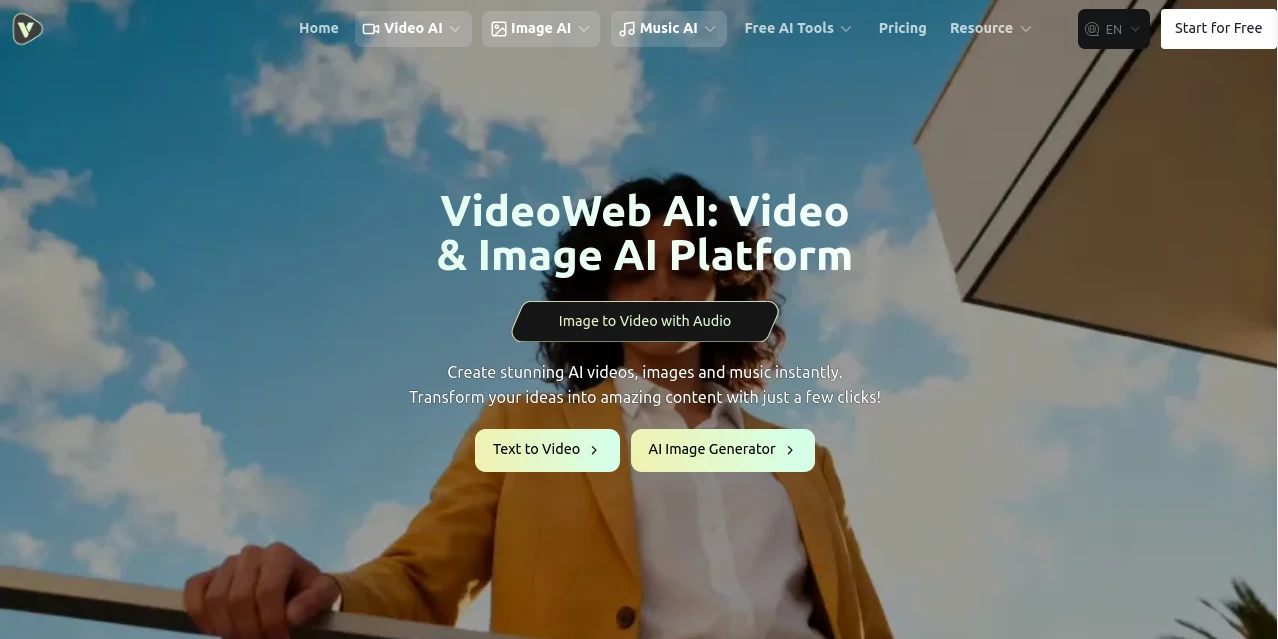
What is VideoWeb AI?
There's something downright thrilling about typing a wild idea or uploading a simple photo and watching it morph into a full-fledged video clip, complete with smooth motion and effects that look like they took hours to craft. This all-in-one hub pulls together the best of what's out there, letting you play with top models without juggling tabs or apps. I tried animating an old family photo into a dancing scene once—just for kicks—and the result had everyone laughing and asking how I did it. It's that kind of easy magic that keeps creators hooked, delivering pro-level outputs without the pro-level hassle.
Introduction
When the flood of AI content tools hit, most felt scattered or limited, forcing you to hop between sites for different needs. This platform changes the game by bundling video, image, and music creation into one spot, powered by heavy hitters like Kling, Runway, Luma, and Hailuo. Start free with credits that refill daily, no card required, and dive into transformations, dances, or custom soundtracks that feel tailor-made. It's built for the everyday dreamer—marketers whipping up ads, social posters chasing virals, or hobbyists bringing silly ideas to life—all while keeping things fast, watermark-free on paid, and surprisingly private.
Key Features
User Interface
The dashboard lays out clean sections for video, image, and music tools, with upload spots and prompt boxes that guide without overwhelming. Pick a model, drop your reference, tweak a few sliders for resolution or style, and previews load quick to nudge you toward perfection. It's the sort of straightforward flow that had me generating a hugging effect clip in under five minutes, grinning at how little fuss it took.
Accuracy & Performance
Backed by GPU muscle, it churns out clips in minutes—often seconds for simpler runs—with motion that feels natural and details that hold up in high res. Consistency across characters or effects shines, especially in transformations or dances, avoiding those awkward glitches that ruin the vibe. From my plays with muscle growth or venom swaps, it nailed the progression smooth and believable, far outperforming scattered freebies.
Capabilities
Text or images into dynamic videos, photo animations with kisses or hugs, video-to-video tweaks, plus image bursts via Flux and music tracks from prompts—it's a full creative suite. Dive into specials like old photo revivals, kung fu poses, or action figure spins, all pulling from premium models for cinematic polish. The breadth means one stop for everything from quick memes to branded shorts.
Security & Privacy
No data harvested from your uploads or outputs—it's a firm promise that lets you upload personal snaps without a worry. Processed clean and quick, with commercial rights on all tiers, it's the thoughtful safeguard that builds real trust for sharing or selling your creations.
Use Cases
Social folks animate selfies into superhero leaps or ghost dances for reels that rack up views. Brands craft product zooms or holiday greetings that feel custom without the cost. Educators revive historical portraits into talking avatars, while musicians pair tracks with synced visuals for promo clips that pop. It's endless—turning a labubu toy photo into a bouncy adventure or inflating effects for fun challenges.
Pros and Cons
Pros:
- One roof for video, images, and tunes—saves endless switching.
- Top models at your fingertips, delivering standout quality fast.
- Generous free start with daily top-ups and no watermarks on upgrades.
- Fun effects library that sparks ideas you didn't know you had.
Cons:
- Credits fly quick on premium models, though bundles help.
- Queue waits on free for peak times, but paid skips the line.
Pricing Plans
Kick off free—40 credits for newbies, 20 daily check-ins, covering basics and some premium tastes. One-time packs load you up affordably for bursts, while monthly subs unlock unlimited queues and private runs. Yearly shaves costs nicely, and it's all stripe-secure with flexibility to scale as your creations grow.
How to Use VideoWeb
Browse to your chosen tool—say, image-to-video—upload your snap, craft a prompt for the action, select a model like Kling for smoothness. Queue it up, grab a drink while it brews, then preview and download clean. Tweak prompts for reruns, or chain effects for layered fun; soon you're stacking clips like a seasoned editor.
Comparison with Similar Tools
Scattered sites force model-hopping with inconsistent results, but this gathers the leaders in one polished spot, adding extras like music and effects that others skim. It's less about one trick and more about reliable variety, edging out with speed, privacy, and that all-together convenience that saves real time.
Conclusion
This hub turns the overwhelming world of AI creation into a playground that's actually fun to visit, delivering clips and visuals that surprise with their quality and ease. It's the bridge for ideas stuck in your head to land on screens shared wide, without the usual barriers or letdowns. Give it a spin with those free credits—you'll likely find yourself hooked on bringing the impossible to life, one click at a time.
Frequently Asked Questions (FAQ)
What models are available?
Heavyweights like Kling, Runway, Luma, Hailuo, plus Flux for images and music options.
Free outputs have watermarks?
Only on the free tier—upgrades strip them clean.
How private is my stuff?
No collection or storage beyond processing—your creations stay yours.
Best for what length?
Short bursts that pack punch, ideal for social and ads.
Commercial use okay?
Full rights across plans, go ahead and monetize.
AI Photo & Image Generator , AI Video Generator , AI Music Generator , AI Text to Video .
These classifications represent its core capabilities and areas of application. For related tools, explore the linked categories above.
VideoWeb AI details
This tool is no longer available on submitaitools.org; find alternatives on Alternative to VideoWeb AI.
Pricing
- Free
Apps
- Web Tools
Categories

VideoWeb AI Alternatives Product

Wan 2.7

MixHub AI

Nano Banana …

Wan 2.7

AI Best
SkyReels-V4

Mp3ToMidi

seedance 3.0

ViewMax Stud…
