
🧠 AI Quiz
Think you really understand Artificial Intelligence?
Test yourself and see how well you know the world of AI.
Answer AI-related questions, compete with other users, and prove that
you’re among the best when it comes to AI knowledge.
Reach the top of our leaderboard.


















wan video

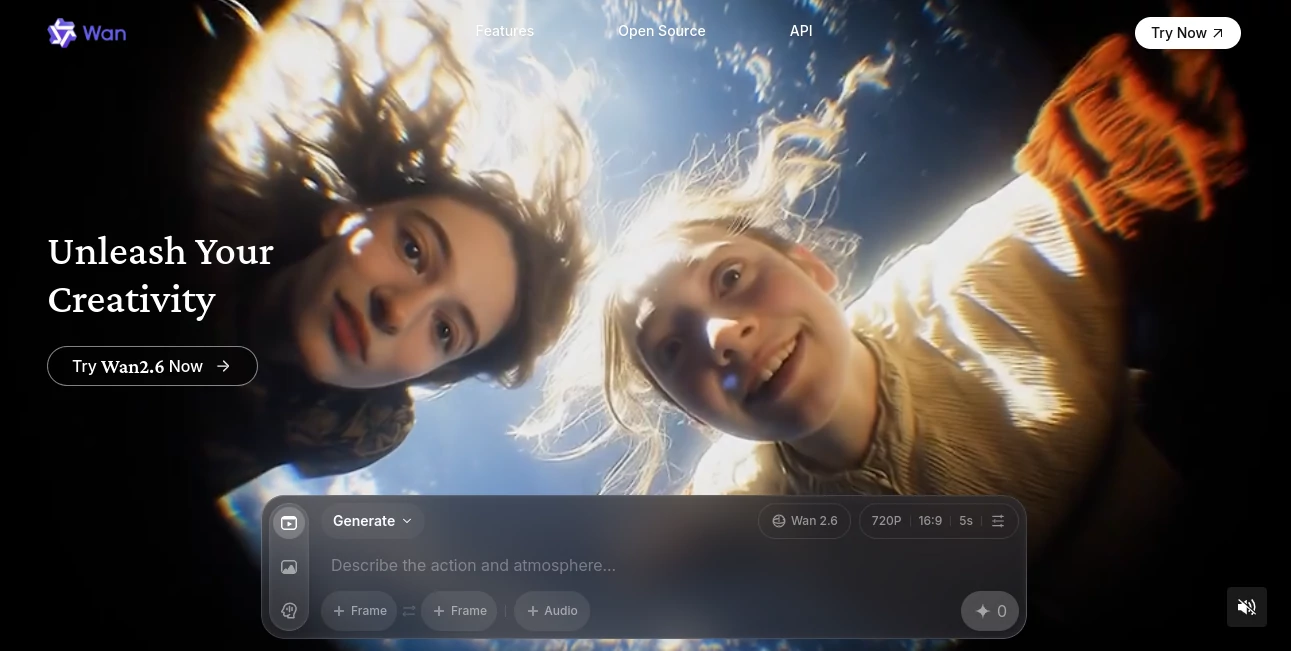
What is wan video?
Have you ever tried generating a video from text and ended up with something that looks like a fever dream? This one is different. It actually understands what you’re asking for, keeps characters consistent across scenes, and delivers clips that feel like someone spent hours in an editing suite—except it takes minutes. I’ve thrown some pretty wild prompts at it (like a cat DJing in a neon club), and the results were shockingly coherent. It’s the kind of tool that makes you feel like you’re cheating the system, in the best possible way.
Introduction
Most AI video tools promise the moon and deliver a blurry mooncake. This platform quietly raises the bar by focusing on what actually matters: making videos that look good, move smoothly, and don’t fall apart after two seconds. It’s built for people who want cinematic quality without a Hollywood budget or a steep learning curve. Early adopters (myself included) keep coming back because it’s one of the few that reliably nails character consistency, lip-sync, and natural motion—all while being generous with free daily generations. It feels like the team actually uses it themselves and keeps tweaking based on real feedback.
Key Features
User Interface
The dashboard is clean, modern, and doesn’t overwhelm you with 47 sliders and checkboxes. You type your prompt, optionally upload a reference image or audio, choose resolution, and hit go. Everything is where you expect it to be. Even the advanced settings are tucked away neatly so beginners aren’t scared off, but power users can still dig in when needed. It’s rare to find a tool this polished and still this intuitive.
Accuracy & Performance
Here’s where it really shines. Characters look like the same person across scenes, movements are fluid, and lip-sync actually matches the audio (a miracle in this space). Generations are fast—often under a minute for a short clip—and the quality holds up at 1080p. I’ve seen it handle complex prompts like “a woman in a red dress dancing in a rainy Tokyo street at night” with impressive fidelity. It rarely produces the weird artifacts or melting faces that plague other tools.
Capabilities
Text-to-video, image-to-video, video-to-video, multi-shot storytelling, native audio sync, lip-sync, character consistency, and even the ability to extend videos or remix them with new prompts. You can upload your own music and have it perfectly aligned to the beat. It’s surprisingly versatile—great for quick social media clips, music visualizations, product demos, or even short narrative films.
Security & Privacy
Your videos are processed securely, and the platform follows strict privacy standards. Paid plans offer private generations, meaning your creations aren’t accidentally shared or used for training. For creators working on sensitive projects or branded content, that’s a big deal. It feels like they actually care about not leaking your ideas.
Use Cases
Content creators use it to whip up viral Reels or TikToks with consistent characters and perfect music sync. Marketers generate product showcases or explainer videos without hiring a video team. Musicians visualize their tracks with beat-matched visuals that actually enhance the song. Small businesses create polished ads in-house. Even filmmakers use it to prototype scenes or create animatics quickly. The range is impressive for a tool that’s still relatively new.
Pros and Cons
Pros:
- Best-in-class character consistency and motion quality
- Native audio sync and lip-sync that actually work
- Generous free tier with daily generations
- Fast generation times even for complex prompts
- Clean, intuitive interface that doesn’t overwhelm
Cons:
- Free videos have a watermark (removable on paid plans)
- Maximum clip length is around 15 seconds (though extensions are possible)
- Still in active development, so occasional bugs appear (but updates are frequent)
Pricing Plans
The free plan gives you a solid number of generations per day with watermarks—enough to play around and see the quality. Paid plans start at a reasonable monthly rate for unlimited generations, watermark removal, higher resolution, and priority processing. There’s also a pay-as-you-go option for occasional users. It’s one of the more fairly priced tools in the space, especially considering the output quality.
How to Use WAN
Sign up (takes seconds), head to the dashboard, and type your prompt. For best results, be specific: “A confident woman in her 30s with long dark hair, wearing a leather jacket, walking through a rainy cyberpunk city at night, cinematic lighting, smooth camera movement.” Upload a reference image if you want character consistency. Add audio if you want lip-sync or beat matching. Choose 720p or 1080p, hit generate, and wait a bit. Preview, download, or remix with a new prompt. It’s that straightforward.
Comparison with Similar Tools
Unlike many competitors that produce jerky motion or inconsistent characters, this one delivers coherent storytelling with natural movement and reliable sync. It’s not the longest video generator out there, but for the quality it produces in the 10–15 second range, it’s tough to beat. Tools that offer longer clips often sacrifice polish, while this one prioritizes quality over quantity. For most social media, marketing, or creative use cases, that trade-off feels smart.
Conclusion
If you’re tired of AI video tools that promise everything and deliver blurry nonsense, this one is a breath of fresh air. It actually works, consistently, and the results look like they came from a real editor with a real budget. Whether you’re a creator, marketer, musician, or just someone who wants to make cool stuff, it’s hard to find a better starting point right now. Give it a spin—you’ll probably end up with something you’re proud to share.
Frequently Asked Questions (FAQ)
How long can the videos be?
Up to about 15 seconds of coherent, multi-shot video. Perfect for Reels, TikTok, Shorts, or product demos.
Does it support audio upload?
Yes, and it syncs lip movements and beat-matching beautifully when you upload music.
Are the videos watermark-free?
Free generations have a small watermark; paid plans remove it completely.
What resolutions are available?
720p on free, up to 1080p on paid plans.
Can I use it commercially?
Yes, especially on paid plans—your videos are yours to use however you like.
AI Animated Video , AI Image to Video , AI Text to Video , AI Video Generator .
These classifications represent its core capabilities and areas of application. For related tools, explore the linked categories above.
wan video details
This tool is no longer available on submitaitools.org; find alternatives on Alternative to wan video.
Pricing
- Free
Apps
- Web Tools
Categories

wan video Alternatives Product

gpt video
Render of Dr…
VO4 AI

Seedance2 Vi…

Framepack AI

vei4 ai

WonderShare …

Sora 2 AI
Veo 3.2
