
🧠 AI Quiz
Think you really understand Artificial Intelligence?
Test yourself and see how well you know the world of AI.
Answer AI-related questions, compete with other users, and prove that
you’re among the best when it comes to AI knowledge.
Reach the top of our leaderboard.


















Wan 2.6 AI

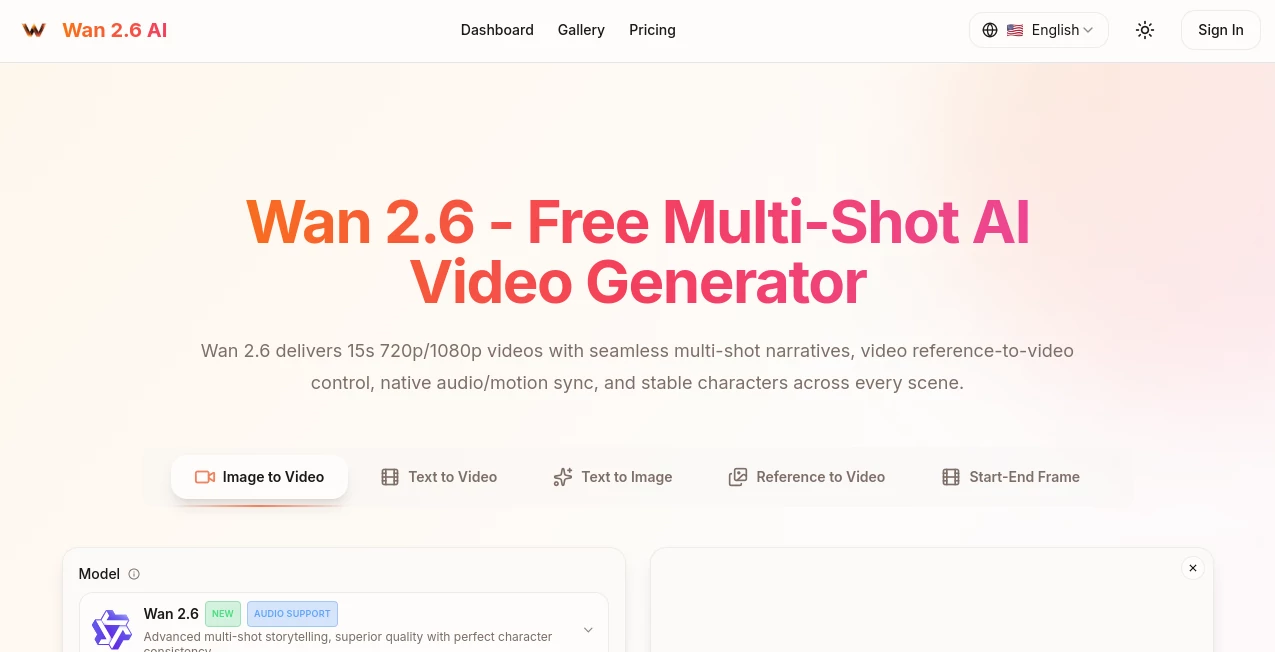
What is Wan 2.6 AI?
Imagine typing out a simple story idea, tossing in a reference clip or photo, and watching a polished, multi-scene video come together in minutes—complete with smooth transitions, consistent characters, and even audio that syncs perfectly to the beat. That's the kind of effortless creativity this tool unlocks, turning anyone into a mini filmmaker without the headaches of traditional editing. I've watched friends go from "I wish I could make that" to sharing pro-looking shorts on socials the same afternoon, and the results hold up surprisingly well against big-budget stuff.
Introduction
In a world flooded with short-form content, standing out means nailing storytelling fast—and this platform delivers exactly that with its clever multi-shot approach. It breaks down your prompt into connected scenes, keeps characters looking the same across cuts, and layers in native audio sync that feels natural right out of the gate. What hooked me first was the video reference feature: upload a clip, and it reuses elements intelligently, even handling interactions between subjects. Free to start with a daily quota, it's built for creators, marketers, and hobbyists who want cinematic flair without the learning curve or watermark woes on paid runs. It's refreshing how it prioritizes polish—95% first-try success, they say—and backs it with solid certifications for peace of mind.
Key Features
User Interface
Everything flows from a clean dashboard where you drop your prompt, pick resolution, and upload references or audio with zero clutter. Options like concurrency for multiple generations sit neatly, and the preview loads quick so you can tweak on the spot. It's intuitive enough that my non-techy friend whipped up a music-synced clip on her first try, grinning the whole time—no endless menus, just straightforward controls that get out of your way.
Accuracy & Performance
Character consistency is where it really shines: faces, outfits, and vibes stay locked across scenes, even when pulling from references, avoiding those jarring jumps that plague lesser tools. Generations clock in under 30 seconds often, scaling smoothly for batches, and the motion feels fluid with beat-aware pacing that doesn't need post tweaks. From my tests, it nails complex prompts with dual subjects or specific actions far better than expected, delivering that "wow" factor consistently.
Capabilities
Up to 15 seconds of multi-shot magic in 720p or 1080p, with intelligent breakdowns, seamless transitions, and built-in audio alignment—plus video-to-video control for reusing people or objects. Upload your own tracks for perfect sync, or let it handle the rhythm. It's versatile for storytelling, ads, or animations, turning text or images into ready-to-post clips that feel professionally directed.
Security & Privacy
Backed by SOC 2, GDPR, and ISO 27001 compliance, your creations stay private by default on higher plans, with no unnecessary data lingering. It's the kind of robust setup that lets you experiment freely, especially for commercial work, knowing everything's handled responsibly behind the scenes.
Use Cases
Social creators craft viral Reels with synced music and consistent avatars that build their brand across posts. Marketers spin product demos into engaging ads, reusing actors for cohesive campaigns without reshoots. Filmmakers prototype storyboards that feel alive, testing pacing before full production. Even musicians visualize tracks with beat-perfect visuals, turning songs into shareable stories that hook listeners deeper.
Pros and Cons
Pros:
- Unmatched character consistency that keeps narratives believable across shots.
- Native audio sync saves hours of editing, delivering polished results fast.
- Video reference control opens creative doors for precise storytelling.
- Free entry with solid daily quota, scaling smoothly for pros.
Cons:
- 15-second cap keeps it focused on shorts, not long-form epics.
- Watermark on free outputs, though easy to upgrade past.
Pricing Plans
Start free with a generous daily allowance—no card needed—to test the waters and see the quality firsthand. Basic kicks in around $21 monthly for watermark-free 720p clips and faster queues, Standard at $25 unlocks 1080p and more credits, while Pro at $50 handles heavy volume with max concurrency. Yearly saves half, and pay-as-you-go fits sporadic needs—flexible enough that you only pay for the power you crave.
How to Use Wan26
Jump into the dashboard, describe your scene or story in the prompt box, pick 720p or 1080p, and upload any reference video or audio if you want that extra control. Hit generate, wait a short spell, and preview the multi-shot result—tweak prompts if needed for another spin. Download clean for paid, or share straight to platforms; batch a few ideas, and you'll have a reel-ready library before the day's out.
Comparison with Similar Tools
While others deliver single clips or struggle with consistency, this one weaves true multi-shot narratives with reference smarts and audio sync that feel leagues ahead. It's less about raw length and more about refined shorts that punch above their weight, outshining scattershot competitors with deliberate polish and reliability that pros appreciate.
Conclusion
This tool captures the thrill of video creation without the grind, handing you cinematic shorts that tell stories beautifully and consistently. It's a breath of fresh air for anyone chasing engaging content fast, proving that smart tech can feel almost magical when it just works. Dive in, play with a prompt, and watch your ideas move—it's the kind of spark that turns casual creators into confident storytellers.
Frequently Asked Questions (FAQ)
How long are the videos?
Up to 15 seconds of seamless multi-shot glory, perfect for shorts and reels.
Can I use my own audio?
Absolutely—upload tracks for native sync that matches beats flawlessly.
What's the quality like?
720p or crisp 1080p at 24fps, with pro transitions and motion.
Free videos have watermarks?
Yes on the free tier, but gone with any paid plan.
How consistent are characters?
Industry-leading—same look and feel across every scene, even with references.
AI Animated Video , AI Image to Video , AI Text to Video , AI Video Generator .
These classifications represent its core capabilities and areas of application. For related tools, explore the linked categories above.
Wan 2.6 AI details
This tool is no longer available on submitaitools.org; find alternatives on Alternative to Wan 2.6 AI.
Pricing
- Free
Apps
- Web Tools
Categories

Wan 2.6 AI Alternatives Product
Seedance 2.0
Seedance Pro…
DomoAI

Seedance AI

Veo

Sora2 AI Vid…

ImagineToVid…

Nano Banana …

Genmi AI
