🧠 AI Quiz
Think you really understand Artificial Intelligence?
Test yourself and see how well you know the world of AI.
Answer AI-related questions, compete with other users, and prove that
you’re among the best when it comes to AI knowledge.
Reach the top of our leaderboard.


















XIMAGIN
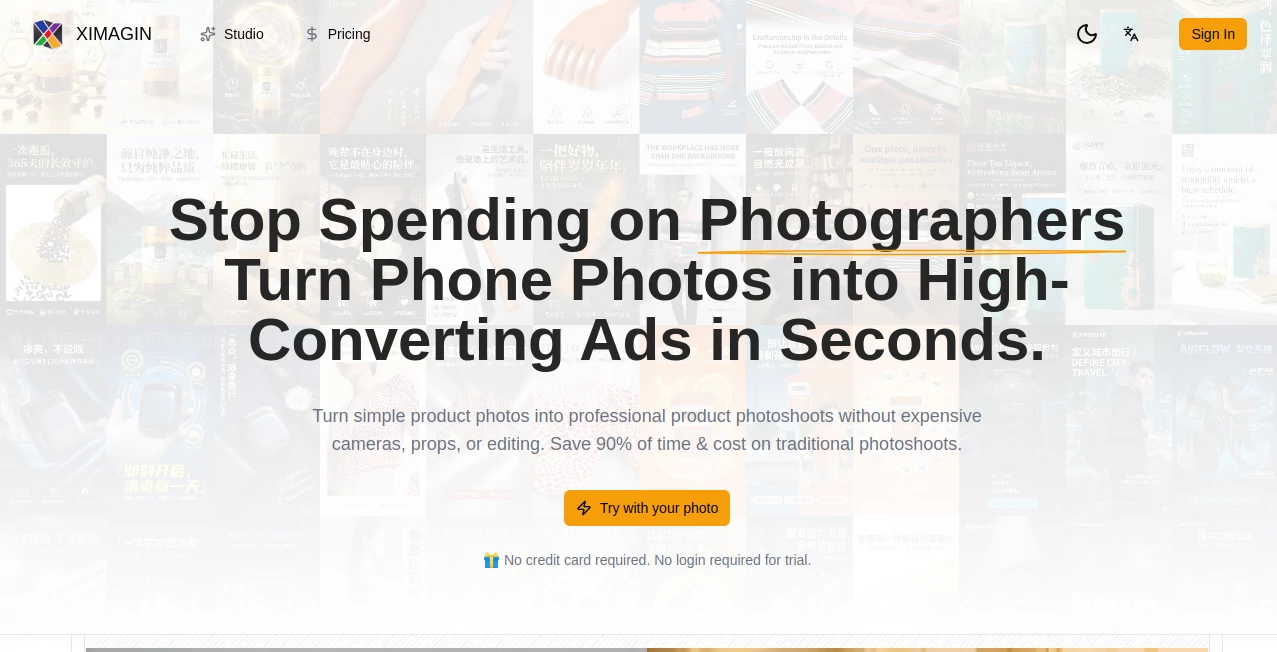
What is XIMAGIN?
There’s something quietly thrilling about typing a half-formed idea and watching it bloom into a full, breathtaking image moments later. This tool has that rare ability to take your vague thoughts—maybe a moody forest at twilight or a cyberpunk street with rain-slicked neon—and deliver visuals so sharp and evocative they feel like they’ve always existed somewhere in your mind. I’ve lost count of how many times I’ve sat down intending to write and ended up lost in experimenting with prompts instead, because the results keep surprising me in the best way.
Introduction
What makes this stand out isn’t just speed or polish (though both are excellent); it’s the feeling that the AI actually listens. You describe a scene, tweak a mood, throw in a style reference if you want, and it brings everything together with a coherence that many tools still struggle to achieve. Early users quickly spread the word in creative circles because the outputs don’t look like generic AI slop—they carry personality, lighting that feels intentional, and compositions that hold together even when you push the prompt hard. It’s become a quiet favorite for people who want professional-grade art without spending hours in Photoshop or waiting days for a freelancer.
Key Features
User Interface
The dashboard is one of those rare places where less really is more. A wide prompt box sits front and center, flanked by simple sliders for aspect ratio, quality level, and a few style presets if you’re in a hurry. No overwhelming sidebar menus or pop-ups—just a clean workspace that lets you focus on the idea rather than the tool. I particularly appreciate the real-time preview thumbnails that update as you refine the prompt; it’s like having a collaborator who sketches faster than you can think.
Accuracy & Performance
Prompt adherence here is genuinely impressive. Ask for “a lone samurai standing on a cliff at sunrise, cinematic lighting, Studio Ghibli style,” and you’ll get exactly that—soft golden light bleeding across armor, wind gently moving the cape, no random extra swords or floating heads. Generations are quick (often under 15 seconds even at higher quality), and the model handles complex descriptions without collapsing into chaos. It’s the kind of reliability that makes you trust it more with every use.
Capabilities
Beyond basic text-to-image, it offers image-to-image refinement (upload a rough sketch and guide the style), inpainting to fix or expand sections, and outpainting to grow the canvas naturally. Style transfer works beautifully—feed it a painting reference and your prompt, and it blends them thoughtfully instead of just slapping a filter on top. Upscaling and variation options let you polish favorites or explore directions without starting from scratch. It’s surprisingly versatile for concept art, book covers, social media visuals, mood boards—pretty much anything visual you need fast.
Security & Privacy
Your prompts and generated images stay private by default—no public gallery unless you choose to share. There’s no aggressive data harvesting, and the team has been upfront about not training on user content without explicit consent. For creators working on client projects or personal concepts, that matters a lot.
Use Cases
A novelist struggling with a cover brief uploads character descriptions and gets three strong directions in under a minute—enough to show the designer exactly what’s in their head. A small business owner creates consistent product lifestyle shots without hiring a photographer. A game dev prototypes UI concepts and enemy designs in an afternoon instead of weeks. Even casual users end up with striking phone wallpapers or gifts that look far more expensive than they were to make. The speed-to-quality ratio keeps surprising people.
Pros and Cons
Pros:
- Exceptional prompt understanding—rarely needs heavy rewording.
- Clean, distraction-free interface that respects your focus.
- Strong image-to-image and editing tools for iterative work.
- Fast enough to feel like real-time brainstorming.
Cons:
- Free tier is limited—serious users will want a plan quickly.
- Occasional style bleed when mixing very different references.
Pricing Plans
The free tier gives you a generous taste—enough daily generations to fall in love with the tool. Paid plans are sensibly priced for the quality: a basic monthly unlocks significantly more credits and faster queue times, while the pro tier adds priority processing, higher resolutions, and unlimited slow generations for overnight batch work. Annual billing shaves off a nice chunk, and there’s no aggressive upselling once you’re in. It feels fair—pay for the value you’re actually getting.
How to Use It
Sign up (takes seconds), land on the generator page, and start typing. Be descriptive but natural—“a quiet bookstore at midnight, warm lamplight, rain on the windows, cozy yet slightly mysterious” works better than keyword stuffing. Adjust aspect ratio if needed, choose quality level, hit generate. Like the result? Use variations or upscale. Want to change something? Use inpainting to edit small areas or image-to-image to steer the whole direction. Download, share, iterate—it’s designed to feel like sketching, not engineering.
Comparison with Similar Tools
Where many competitors still produce muddy compositions or ignore half your prompt, this one consistently delivers coherent scenes with thoughtful lighting and mood. It’s not the absolute fastest on raw generation time, but the quality-to-speed balance is among the best I’ve used. The editing tools (inpainting, outpainting, img2img) are more intuitive than most, and the lack of heavy-handed censorship lets you explore wider creative territory. For anyone serious about visual storytelling, it quickly becomes the default.
Conclusion
This isn’t just another image generator—it’s a creative partner that respects your ideas and elevates them faster than you could alone. Whether you’re designing, dreaming, or simply playing, it gives you that rare feeling of “yes, that’s exactly what I pictured.” In a crowded field, it quietly stands out by being thoughtful where others are rushed, and beautiful where others are merely passable. If you’ve been waiting for an AI art tool that feels like it’s on your side, this is it.
Frequently Asked Questions (FAQ)
How detailed should my prompt be?
The more specific you are about mood, lighting, and composition, the better—though it still does surprisingly well with shorter, poetic descriptions.
Can I use the images commercially?
Yes, on paid plans you own the generations outright with full commercial rights.
Does it support image references?
Absolutely—upload style images, sketches, or photos to guide the output.
How fast are generations?
Usually 8–20 seconds depending on settings and queue; paid plans jump the line.
Is there a learning curve?
Very gentle. Most people get strong results within their first few tries.
AI Text to Image , AI Image to Image , AI Art Generator , AI Design Generator .
These classifications represent its core capabilities and areas of application. For related tools, explore the linked categories above.
XIMAGIN details
Pricing
- Free
Apps
- Web Tools
Categories

XIMAGIN Alternatives Product

VIGGLE

meta ai image
Ghibli Image…

MakeMyOC

Nano Banana 2

BeYourCover

MuseCraft.AI

ChatGPT Imag…
chibi art