🧠 AI Quiz
Think you really understand Artificial Intelligence?
Test yourself and see how well you know the world of AI.
Answer AI-related questions, compete with other users, and prove that
you’re among the best when it comes to AI knowledge.
Reach the top of our leaderboard.

















Z-Image Free
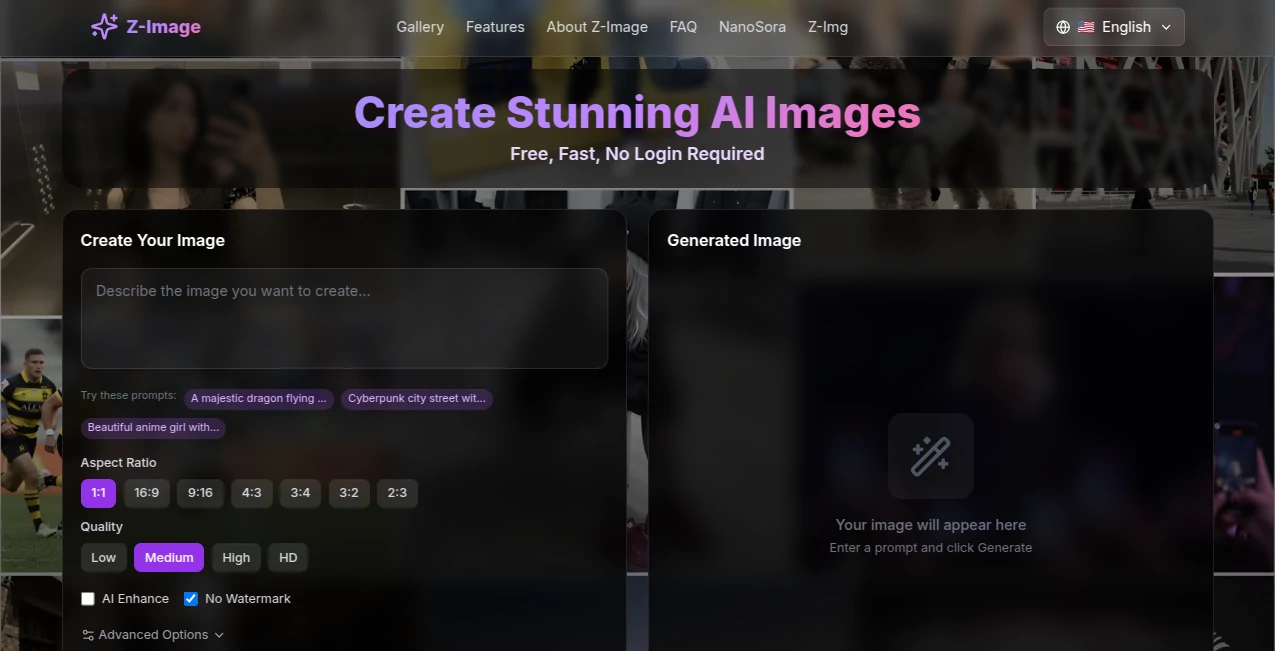
What is Z-Image Free?
There's something genuinely exciting about typing a few lines of description and watching a crisp, detailed picture emerge—one where the words in the scene actually read right, no garbled nonsense. This tool nails that tricky bit better than most, blending photorealistic flair with spot-on typography that makes posters or ads look legit from the first try. I remember fiddling with a concept for a book cover; threw in some bilingual quotes, and out came versions that felt ready for print, saving me a headache I'd usually have with fixes in Photoshop.
Introduction
Built on a lean model that punches way above its weight, this platform keeps things lightweight yet powerful, churning out high-quality visuals without hogging resources. It's a breath of fresh air for anyone who's battled blurry text or off-style renders in other generators—the focus here on accurate English and Chinese lettering, plus strong adherence to your instructions, means less tweaking and more creating. Free to jump in with daily credits, it's drawn a crowd of designers, marketers, and casual experimenters who appreciate the speed and reliability. What stands out is how it balances efficiency with aesthetics, making pro-grade images feel within reach, even if you're just messing around on a lunch break.
Key Features
User Interface
It's all about keeping the barrier low: a straightforward prompt box, options for aspect ratios or styles tucked neatly, and a generate button that delivers quick previews you can refine on the fly. No overwhelming panels or hidden settings—just enough controls to guide the output without slowing you down. That simplicity hooked me; uploaded a reference once, and adjusting from there felt like directing a patient artist who gets it right away.
Accuracy & Performance
The real win is in the details: text renders sharp and legible, compositions follow your layout cues closely, and the whole process wraps in seconds thanks to optimized steps. It handles complex scenes with multiple elements without dropping the ball, producing consistent results that hold up on closer inspection. From my plays, it rarely veers into weird artifacts, delivering clean files that scale well for everything from web thumbs to full posters.
Capabilities
Photorealism sits front and center, but it stretches to artistic styles, bilingual prompts, and even image-to-image tweaks that respect your source. Lock in seeds for repeats, fine-tune with negatives, or layer references for character consistency—it's versatile enough for marketing mocks, social graphics, or personal projects that need that polished edge.
Security & Privacy
Generations stay contained, with no unnecessary lingering of your inputs or outputs beyond the session, giving you control over what's saved or shared. It's designed with everyday users in mind, keeping things straightforward and discreet so you can focus on the fun part without background worries.
Use Cases
Marketers craft eye-catching ads with overlaid slogans that read perfectly in dual languages, testing variants fast for campaigns. Designers prototype packaging where brand names pop clear against busy backgrounds. Content folks whip up thumbnails or illustrations for posts, blending text seamlessly for higher engagement. Hobbyists explore fantasy scenes or portraits, enjoying the reliable text for quotes or titles that tie it all together.
Pros and Cons
Pros:
- Exceptional text handling that saves endless edits downstream.
- Quick generations keep the creative momentum going strong.
- Free daily access lowers the entry for trying bold ideas.
- Strong prompt following reduces frustrating rerolls.
Cons:
- Daily limits on free use nudge toward credits for heavier sessions.
- Best with detailed prompts—vague ones might need a second pass.
Pricing Plans
Dive in free with credits refreshed daily, plenty for casual exploration or testing concepts. For more volume, credit packs or subscriptions unlock higher limits and priority queues, scaling gently as your needs grow. It's approachable pricing that rewards regular use without locking core fun behind walls.
How to Use Z-Img
Start with a solid description—subject, style, colors, and any text you want featured. Drop in a reference image if you're building on something specific, adjust ratios or steps, then generate. Scan the results, upscale favorites or vary seeds for options, and download clean. A quick loop of refine-and-regen usually lands the keeper, turning initial sketches into finals faster than you'd expect.
Comparison with Similar Tools
Bigger names might boast broader styles, but this one's edge in precise text and efficient runs makes it a standout for anything involving lettering or bilingual needs. It trades sheer volume for targeted excellence, often outperforming on clarity and speed where others fuzz out or wander off-prompt.
Conclusion
When a tool gets the little things right—like readable text in a busy composition—it opens up so much more room for big ideas to shine. This one's that reliable partner, blending speed, smarts, and accessibility to make image creation feel less like work and more like play with payoff. Give it a spin next time a visual's stuck in your head; chances are, it'll pull it out clearer than you imagined.
Frequently Asked Questions (FAQ)
How does it handle text in images?
With impressive accuracy for English and Chinese, keeping letters sharp and correctly formed even in complex layouts.
Is it completely free?
Daily credits cover plenty, with options to expand for bigger projects.
What styles work best?
Photorealistic thrives, but it adapts well to artistic or illustrative prompts too.
Can I use references?
Yes, upload images to guide style, composition, or consistency.
How fast are generations?
Often seconds to minutes, depending on settings, with turbo modes for quick hits.
AI Text to Image , AI Photo & Image Generator , AI Art Generator , AI Design Generator .
These classifications represent its core capabilities and areas of application. For related tools, explore the linked categories above.
Z-Image Free details
Pricing
- Free
Apps
- Web Tools
Categories

Z-Image Free Alternatives Product
KissPixel

string art g…

AI Photo Edi…

Banana AI

Sovibe AI

meta ai image

Lexica AI

Fine Image

Fiddl.art