
🧠 AI Quiz
Think you really understand Artificial Intelligence?
Test yourself and see how well you know the world of AI.
Answer AI-related questions, compete with other users, and prove that
you’re among the best when it comes to AI knowledge.
Reach the top of our leaderboard.


















AIBackgroundRemover
Erase Backgrounds in Seconds, Free and Effortless

What is AIBackgroundRemover?
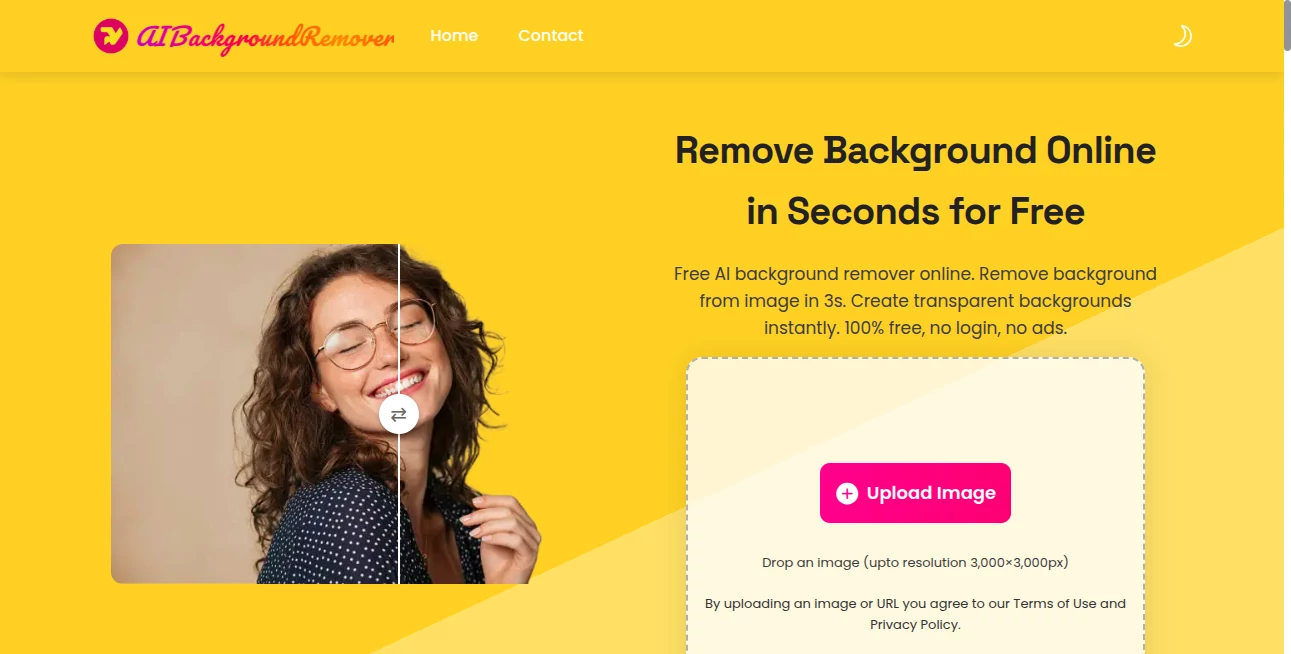
AIBackgroundRemover slips into your workflow like a trusty pocket knife, slicing away cluttered backdrops from photos with a whisper of tech. Picture this: you snap a quick shot of your latest craft or gadget, and in a blink, it's floating clean against nothing, ready to drop into any scene. Small business owners and weekend warriors alike grab it for those moments when perfection can't wait, turning ordinary snaps into eye-catchers that demand a second look.
Introduction
AIBackgroundRemover came about a few years ago, born from the gripes of folks knee-deep in online shops and social feeds who hated fiddling with clunky editors just to clean up a pic. A small team of tinkerers threw it together to cut the cord on expensive apps, and word spread like wildfire through craft forums and seller groups. Suddenly, what used to eat up afternoons became a three-second ritual, and users started sharing before-and-afters that looked straight out of a magazine. It's that rare find—simple enough for a kid's school project, sharp enough for a pro's pitch deck—proving you don't need a fat wallet for visuals that pop.
Key Features
User Interface
You hit the site and it's all business: a big upload button front and center, no sign-up walls or sidebar noise to trip you up. Drag your file in, wait a heartbeat, and boom—a preview pops with your subject crisp and solo. From there, a handful of toggles let you slap on a fresh backdrop, be it plain white for listings or a funky gradient for fun, all without menus that bury the good stuff. It's the kind of setup that feels like chatting with an old pal who gets it right away, keeping you moving without a single eye-roll.
Accuracy & Performance
Give it a go with a tricky shot—say, curly hair against a busy wall—and it carves out the edges smooth as butter, leaving no fuzzy halos or chopped strands behind. Jobs fly through in under three seconds flat, even on a creaky laptop, and the output holds its own against pricier setups, with colors that stay true and details that don't blur. Regular users nod to how it nails the nuances time after time, turning potential headaches into "oh, that's it?" moments that keep the coffee cold.
Capabilities
At its core, it zaps the old scene clean, but then invites you to play: swap in solids, fades, or even pull from your own stash for hybrids that surprise. It chews through everyday formats without a hiccup, spitting out ready-to-use files that slot right into your toolkit. Whether you're prepping a dozen product angles or just one family portrait punch-up, it scales without sweat, handling the fiddly bits so you can chase the big picture.
Security & Privacy
Your uploads hit the server, get their quick makeover, and poof—gone like they were never there, with no sneaky saves or account hooks to reel you back. No login nonsense means no data trails, and it all unfolds in your browser where you call the shots. Folks handling sensitive snaps, like custom jewelry close-ups, sleep sound knowing their stuff stays under wraps, just a fleeting visit to the tool without leaving footprints.
Use Cases
Online sellers stage their wares against spotless whites to make listings leap off the page, watching carts fill faster than before. Social butterflies layer selfies onto dream backdrops for posts that rack up hearts, while teachers whip up clean diagrams for lessons that actually stick. Crafters mock up Etsy thumbnails on the fly, and even real estate agents crop property pics to highlight the hero features, turning browsers into bidders with a polished nudge.
Pros and Cons
Pros:
- Blazing quick—under three seconds per snap, no waiting games.
- Totally free, unlimited runs without the nickel-and-dime traps.
- No fuss with accounts or ads cluttering the ride.
Cons:
- Sticks to basics—no deep dives into resizing or filters beyond swaps.
- Tethered to the web, so spotty signals throw a curveball.
- Batch uploads aren't built-in, so big loads need a steady hand.
Pricing Plans
Here's the beauty: it's all yours for zero, no tiers or teasers to chase. Dive in unlimited, watermark-free, and ad-light from the jump, a breath of fresh air in a world of "pay to play" pitches. No trials needed because the whole feast is on the table, letting you scale from hobby hacks to daily grinds without ever hitting a paywall.
How to Use AIBackgroundRemover
Start simple: hunt down your pic—PNG, JPG, or the like—and drag it to the upload spot. Let the system do its thing for a few ticks, then eyeball the clean cutout. Fancy a twist? Pick a color wash or your own overlay, tweak if it tickles, and snag the file straight to your folder. Rinse and repeat for the next one, building a stash of standouts in the time it takes to brew a cup.
Comparison with Similar Tools
Stack it against the usual suspects, and AIBackgroundRemover pulls ahead with its no-strings-free vibe, dodging the watermarks and waitlists that bog down others. Where some shine in fancy extras, this one bets on speed and simplicity, trading bells for a buttery flow that fits tight schedules. It's the pick for folks who want pro cuts without the pro price tag or the learning hump, edging out the pack for everyday wins.
Conclusion
AIBackgroundRemover quietly revolutionizes the snap-and-share game, handing over studio tricks to anyone with a browser and a hunch. It strips away the barriers between idea and impact, letting visuals breathe free and fierce. In a feed full of flat, this tool nudges yours to the top, proving that the sharpest edges come from the simplest strokes.
Frequently Asked Questions (FAQ)
Is there really no cost to this?
Dead on—free as the breeze, no catches or creeping fees down the line.
Do I have to make an account?
Not a bit; jump in anonymous and out the same way, no strings.
What file types does it take?
PNG, JPG, JPEG, WEBP, BMP—your usual suspects, all welcome.
Can I get a see-through file out?
You bet, drops as a PNG with full transparency for layering fun.
How fast is the turnaround?
Zippier than a zip line—most under three seconds, no kidding.
Any worries on the safe side?
Your pics process private and vanish quick, no hoarding here.
Works on my phone?
Smooth as silk on any screen with a browser, desk or dash.
These classifications represent its core capabilities and areas of application. For related tools, explore the linked categories above.
AIBackgroundRemover details
This tool is no longer available on submitaitools.org; find alternatives on Alternative to AIBackgroundRemover.
Pricing
- Free
Apps
- Web Tools
Categories

AIBackgroundRemover Alternatives Product
remove bg vi…

Beard Remover

Picsart

AI Photo Edi…

Change-BG

Pixelfox AI

Picnana

Quitar Fondo

ModelsLab
