
🧠 AI Quiz
Think you really understand Artificial Intelligence?
Test yourself and see how well you know the world of AI.
Answer AI-related questions, compete with other users, and prove that
you’re among the best when it comes to AI knowledge.
Reach the top of our leaderboard.


















AI Clothes Changer

What is AI Clothes Changer?
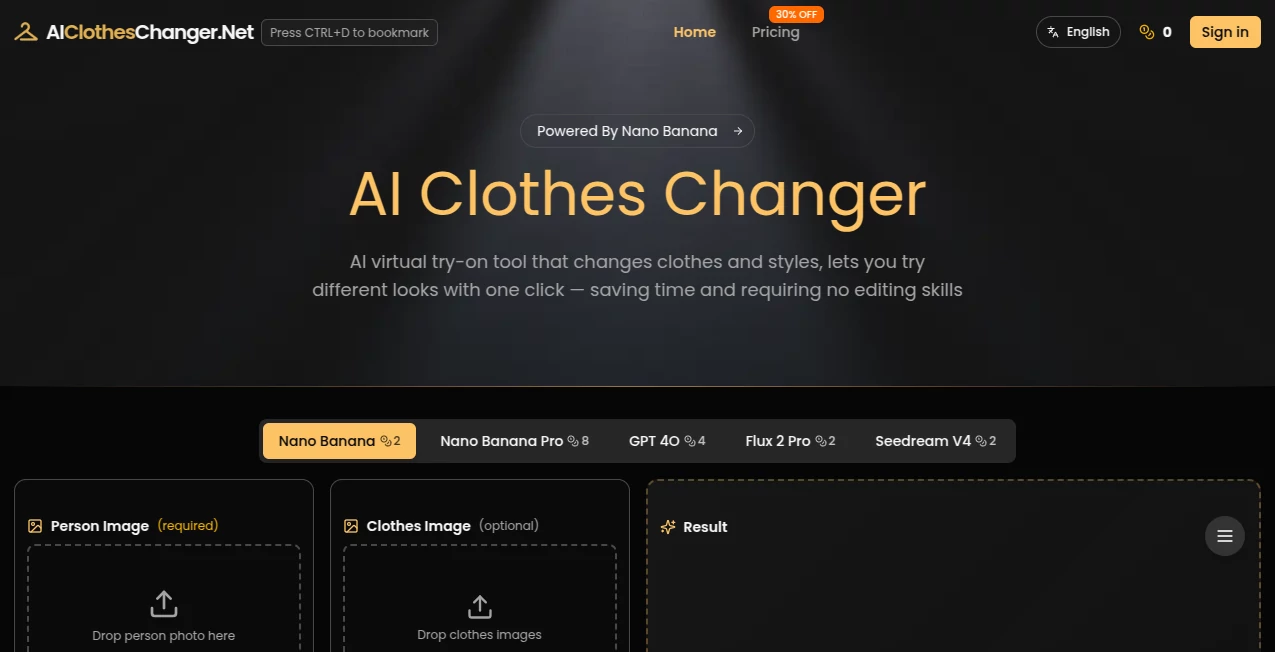
Picture standing in front of your closet, wishing you could see how that new dress or jacket would actually look on you without the hassle of trying everything on. This clever little tool does exactly that, letting you upload a photo and swap outfits in seconds with results that feel surprisingly real. I remember helping a friend visualize her wedding guest look last month—she uploaded a pic from last summer, added a few clothing shots, and within minutes we were debating colors like it was a real fitting room. It's one of those things that makes you wonder how we ever shopped without it.
Introduction
Gone are the days of endless changing rooms and mirror selfies that never quite capture the vibe. This platform uses smart AI to virtually dress anyone in any outfit you throw at it, blending clothes and accessories seamlessly onto your photos. What started as a fun way to experiment with fashion has become a go-to for anyone who loves trying new styles without the commitment—or the mess. From mixing tops with skirts you already own to previewing full looks for big events, it saves time and sparks ideas you might not have thought of. The realism is impressive; even tricky poses or lighting don't throw it off much, and the fact that you can layer multiple pieces makes it feel like having a personal stylist on call.
Key Features
User Interface
The whole thing is built around simplicity—drag your photo in, add clothing images if you want, tweak a prompt if you're feeling creative, and hit generate. No cluttered menus or confusing settings; everything lives in one clean workspace. It's mobile-friendly too, so I've caught myself playing around on my phone during lunch, seeing instant previews without any lag. The layout just makes sense, and that ease is what keeps pulling me back.
Accuracy & Performance
It nails the fit and drape of fabrics in a way that looks natural, not like a bad Photoshop job. Shadows fall right, folds move with the body, and skin tones stay consistent. Speed is another highlight—generations come through fast, even when you're combining multiple items. I've tried it with everything from casual tees to fancy dresses, and the results hold up surprisingly well, even on group shots or slightly tricky angles.
Capabilities
You can upload one to four clothing pieces at once—think a shirt, pants, shoes, and a bag—and it automatically mixes them into a cohesive outfit. Add custom prompts for lighting or poses, choose from different AI models like Nano Banana Pro or GPT-4o, and get high-res outputs ready for sharing or selling. It's built for both personal fun and pro use, with commercial rights included on paid plans so e-commerce folks can create product shots without hiring models.
Security & Privacy
Your photos are handled carefully—processed quickly and only kept for 14 days if you want to revisit them. No unnecessary data is stored, and everything stays between you and the tool. It's reassuring when you're uploading personal pics or client work, knowing the focus is on getting the job done without lingering traces.
Use Cases
Fashion enthusiasts play around with trends before buying, seeing how a new coat pairs with their favorite jeans. E-commerce sellers generate fresh product images without reshoots, mixing outfits on models to fill catalogs fast. Influencers create content showing multiple looks in one session, and even bridal parties preview dresses for events. It's become my go-to for quick mood boards or when friends ask "would this look good on me?"—the answers come instantly and look convincing.
Pros and Cons
Pros:
- Incredibly realistic results that save tons of time on photoshoots.
- Super easy to layer multiple clothing items for complete looks.
- Choice of AI models means you can pick the best fit for your style.
- Commercial license on paid plans opens doors for business use.
Cons:
- Free tier limits you to just a few tries before needing to upgrade.
- Best results come from clear, well-lit photos—blurry ones can be hit-or-miss.
Pricing Plans
You can start free with a handful of credits to test the waters—no card required. Basic plan gives you thousands of generations per year for a low monthly fee, while Standard doubles that with even faster processing. Yearly billing saves a nice chunk, and unused credits roll over. It's fair pricing that lets you scale up as you get hooked, without feeling like you're overpaying for the power.
How to Use AI Clothes Changer
Head to the main page, upload your base photo (you or a model), then drag in one to four clothing items. Tweak the prompt if you want specific lighting or vibe, choose your AI model, and hit generate. Preview pops up, you download what you love, or tweak and try again. It's so straightforward I've done it while waiting for coffee—upload, generate, share the results with friends in under five minutes.
Comparison with Similar Tools
Other try-on apps often struggle with consistency or look fake, but this one delivers natural fits and fabric drape that feels premium. The ability to combine multiple items sets it apart, and the model choices give flexibility that many competitors lack. For the price and ease, it's hard to beat when you want reliable, realistic swaps without headaches.
Conclusion
This tool quietly changes how we play with fashion, making it easy to experiment, visualize, and create without the usual barriers. Whether you're refreshing your wardrobe, building content, or selling products, it delivers results that look good and save real time. Give it a spin—you'll probably find yourself coming back for "just one more" look long after your first try.
Frequently Asked Questions (FAQ)
Do I need perfect photos to start?
Clear, well-lit ones work best, but it handles a lot—even slightly tricky angles come out nicely.
Can I use it for business?
Paid plans include commercial rights, perfect for product photos or content creation.
How many items can I combine?
Up to four at once—great for full outfits with accessories.
What about mobile use?
Fully supported on phones, so you can play anywhere.
Are generated images saved?
They stick around for 14 days if you want to revisit or download later.
AI Clothing Generator , Photo & Image Editor , AI Design Generator , AI Image to Image .
These classifications represent its core capabilities and areas of application. For related tools, explore the linked categories above.
AI Clothes Changer details
This tool is no longer available on submitaitools.org; find alternatives on Alternative to AI Clothes Changer.
Pricing
- Free
Apps
- Web Tools
Categories

AI Clothes Changer Alternatives Product

Seedream 4.5
HD Photo Con…

PaperYak

Just Christm…

Normal Map G…

RGB to CMYK …
genie3

WonderShare …

MuseArt AI
