
🧠 AI Quiz
Think you really understand Artificial Intelligence?
Test yourself and see how well you know the world of AI.
Answer AI-related questions, compete with other users, and prove that
you’re among the best when it comes to AI knowledge.
Reach the top of our leaderboard.


















AI Image Translator
Translate Text in Images Effortlessly

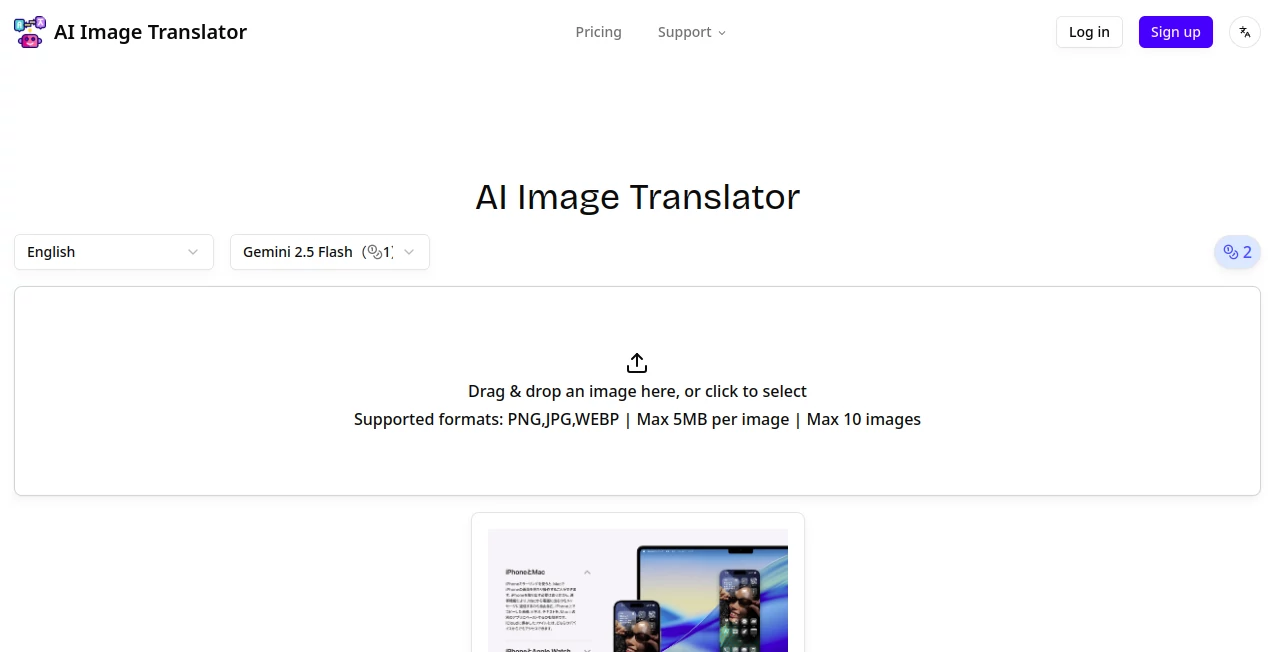
What is AI Image Translator?
ImageTranslator steps up as a handy go-to for anyone dealing with pictures full of foreign words, letting you swap them out for something you can actually read while keeping the whole look intact. It's the kind of thing that saves a headache during travel snaps or work docs, turning a confusing label into a clear one in seconds. People who've used it often mention how it feels like having a quick translator buddy who doesn't mess up the picture's vibe, making those multilingual moments a lot less frustrating.
Introduction
ImageTranslator popped up not too long ago, dreamed up by folks who got tired of squinting at signs in other languages or fumbling with clunky apps that left weird blanks in photos. It started as a simple fix for everyday mix-ups but quickly turned into something pros could lean on for bigger batches, like updating product shots for different markets. Users swap stories about pulling it out mid-trip to decode a menu pic or prepping a presentation with global slides, and it's that reliability that keeps it in the rotation. Over time, it's grown to handle trickier stuff like sideways writing or mixed-up scripts, proving it's more than a one-off trick—it's a steady sidekick for when words in pictures throw you a curve.
Key Features
User Interface
You land on a page that's all about getting down to business, with a big open spot right in the middle that says drag your picture here or just click to pick one. It throws in a sample to play with if you're testing the waters, and little notes pop up about what files work—nothing fancy, just enough to keep things moving without a tutorial wall. As you drop in a file or two, the screen shifts smooth to show progress, and results line up neat for a quick grab, feeling more like a casual handoff than a formal form.
Accuracy & Performance
It picks up on the words tucked in corners or stacked sideways without much fuss, swapping them out so they fit just like before, colors and all. Jobs wrap up in a flash, even if you're tossing in a handful at once, and it holds steady without slowing down when things get busy. Those who've run it through real tests talk about how it nails the flow of sentences that twist around images, avoiding those awkward patches that scream "fixed" and keeping the end result looking like it was always there.
Capabilities
Handling over a hundred tongues from left-to-right to those that run the other way, it spots mixes on its own and even straightens out vertical bits without a hitch. You can pile on up to ten files at a pop, watching them churn through side by side, and it patches up the spots where words sat so nothing looks slapped on. From quick single swaps to bulk runs for shop catalogs, it covers the spread, always aiming to leave the picture's charm untouched while the message lands clear.
Security & Privacy
Your uploads get a quick once-over and then they're out, no hanging around in some digital drawer unless you choose to save the output. It keeps things straightforward, focusing on the job without extra tracking that might make you pause. Users like that no-nonsense vibe, letting them toss in personal travel shots or work proofs without a nagging doubt about where the files end up after the swap.
Use Cases
A traveler snaps a street sign in Tokyo and flips it to English over coffee, turning a potential wrong turn into a smooth stroll. Shop owners refresh listings for overseas buyers, swapping labels on product pics to match local lingo without reshooting everything. Teams prepping global handouts run a stack of slides through it, ensuring everyone follows along no matter the starting script. Even hobby cooks decode imported recipe cards, keeping the dish's look while reading steps in their own words.
Pros and Cons
Pros:
- Blends translations right into the image, no obvious edits.
- Covers a ton of languages without making you pick each one.
- Handles groups of files fast, great for when you're in a rush.
- Starts free, easing you in before any big commitments.
Cons:
- Caps on file size and numbers might cramp bigger jobs.
- Sticks to certain formats, so oddballs need a quick convert.
- Free runs are limited, nudging toward paid for steady use.
Pricing Plans
The free spot gives you a handful of tries to see if it clicks, no cost to start small. From there, the pro level around ten bucks a month opens up hundreds of swaps with full backing, while the top tier doubles that for folks knee-deep in daily batches. It lets you dip yearly for a break on the tab, and everything plays nice with work projects right from the jump.
How to Use ImageTranslator
Head over and drag your pic into the open slot, or tap to hunt it down from your files—keep it under five megs and in the usual suspects like JPEG. If you're doing a bunch, stack up to ten and let it roll; otherwise, a single does fine. Sit back as it spots the words, flips them, and patches the scene—grab the fresh version when it pops, tweak if needed with a retry, and you're set to share or save.
Comparison with Similar Tools
Next to apps that just pull text out and leave you to paste it back, ImageTranslator keeps the whole package together, though those might win for super-simple pulls. Against bigger suites that layer on extras like editing suites, it stays light and laser-focused, skipping the sprawl but perhaps missing bells for broad tweaks. It shines for straight-up swaps where speed and seamlessness steal the show.
Conclusion
ImageTranslator turns the tangle of text in pictures into a tidy bridge across languages, handing you results that look right at home. It cuts through the clutter of global glances, proving a smart swap can open up worlds without rewriting the view. As more folks mix borders in their feeds, this one's poised to keep smoothing those edges, one seamless scene at a time.
Frequently Asked Questions (FAQ)
What kinds of pictures does it take?
Standard ones like JPEG or PNG, as long as they're not too hefty.
How many languages are on deck?
A bunch—over a hundred, spotting mixes on its own.
Does it work for sideways or backward scripts?
Yep, handles vertical and right-to-left without breaking a sweat.
Can I do this for work stuff?
Sure, even the free plan lets you use outputs commercially.
What if the swap looks off?
Give it another go—it's built to retry and refine on the spot.
AI Translate , Photo & Image Editor , AI Image to Image , AI Content Detector .
These classifications represent its core capabilities and areas of application. For related tools, explore the linked categories above.
AI Image Translator details
This tool is no longer available on submitaitools.org; find alternatives on Alternative to AI Image Translator.
Pricing
- Free
Apps
- Web Tools
Categories

AI Image Translator Alternatives Product

Picture to L…

Nano Banana 2

Rephrazy

Yodayo AI

Professional…

Square Image

Reztune

Z image AI

Beardless Fi…
