
🧠 AI Quiz
Think you really understand Artificial Intelligence?
Test yourself and see how well you know the world of AI.
Answer AI-related questions, compete with other users, and prove that
you’re among the best when it comes to AI knowledge.
Reach the top of our leaderboard.


















Pose AI

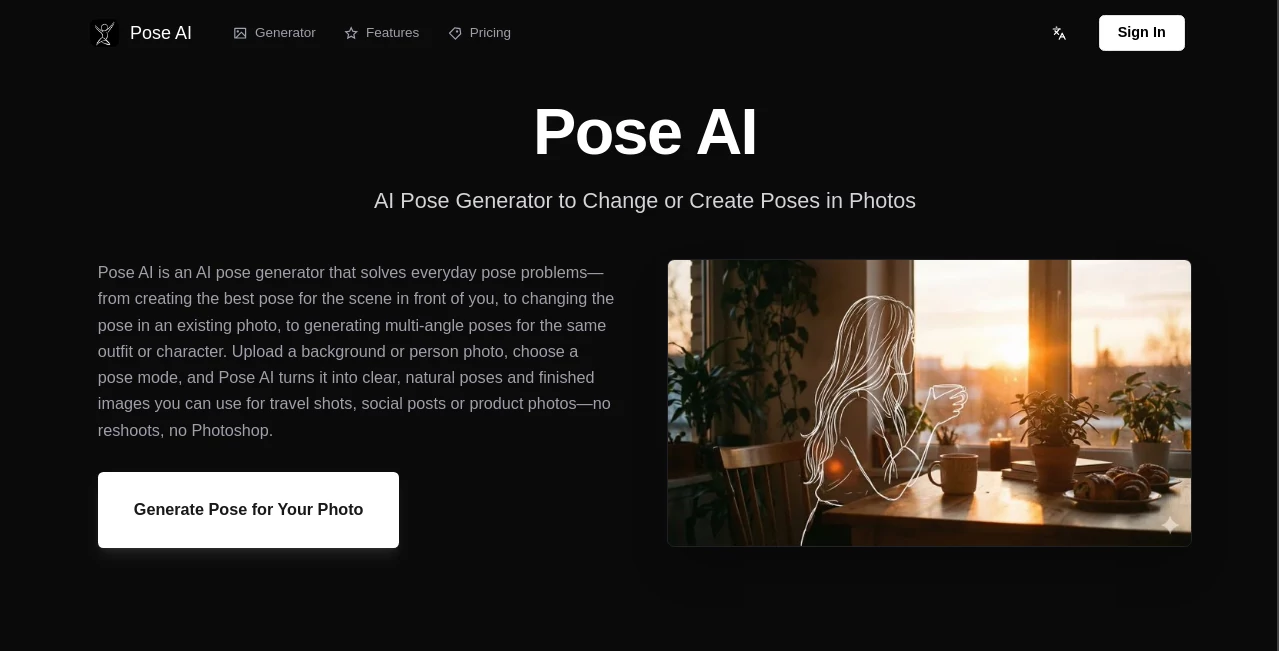
What is Pose AI?
There’s a quiet thrill in seeing your character sketch suddenly strike exactly the pose you pictured in your head—no more flipping through reference photos for hours or wrestling with 3D rigs. You drop your own drawing or photo, describe (or just point to) the desired pose, and seconds later it’s there: limbs in the right place, weight balanced, gesture full of life. I’ve watched illustrators who normally dread posing go from frustrated to grinning after their first try. The exaggeration feels natural, the anatomy stays believable, and the result looks like they drew it themselves. That’s the kind of shortcut that keeps creativity flowing instead of stalling.
Introduction
Pose reference is one of those evergreen pain points in character art. Good photos are hard to find, live models aren’t always available, and 3D posing can eat entire afternoons. This platform cuts straight through all of that. Upload your character (line art, colored, even a photo), pick a pose from their library or upload your own reference, and the AI warps your figure into position while keeping style, proportions, and clothing details intact. It’s become a daily habit for comic artists, concept designers, animators, and even roleplay character creators who need quick, expressive figures without sacrificing personality. The speed and fidelity make it feel less like a tool and more like a sketching partner who never gets tired.
Key Features
User Interface
The workspace is clean and focused. Left side: upload your base character (or start with a blank pose). Right side: choose or upload a reference pose. A few simple sliders for strength, detail preservation, and style fidelity sit below. Generate button is prominent. Previews appear fast so you can tweak and re-run without losing momentum. It’s designed so you spend time creating, not configuring—beginners get results in under a minute, veterans appreciate the lack of bloat.
Accuracy & Performance
It understands anatomy surprisingly well—knees bend correctly, shoulders don’t collapse, hands don’t melt into blobs. Style transfer is strong: line weight, shading direction, even hatching patterns carry over without turning muddy. Generation times hover around 5–20 seconds depending on complexity, and outputs stay consistent even when you push extreme angles or foreshortening. The model rarely produces the classic “broken wrist” or “extra finger” disasters that still haunt many pose tools.
Capabilities
Single-image pose transfer, multi-character support (up to 3–4 figures), openpose-style skeleton guidance (optional), style & detail preservation controls, background removal/refinement, batch generation on paid plans, and export in high-res PNG with transparent background. It handles everything from realistic portraits to anime/chibi styles, comic ink work, and even semi-abstract concepts. The ability to combine your character with any reference pose (photo, drawing, 3D render) opens up endless experimentation without redrawing from scratch.
Security & Privacy
Uploads are processed in memory and deleted shortly after generation—no permanent storage unless you explicitly save the output. No account required for basic use, so your character designs don’t get linked to a profile unless you choose to. For concept artists handling IP-sensitive work or personal projects, that clean, no-strings approach feels essential.
Use Cases
A comic artist needs their lead character in a dramatic fighting stance—uploads a standing sketch, grabs a martial-arts reference photo, generates, gets a usable panel base in seconds. A VTuber designer tests multiple dance poses without rigging an entire 3D model. A tabletop RPG creator builds expressive token portraits for NPCs by posing quick headshots. An animator roughs keyframe extremes before moving to full animation software. Wherever you need believable poses fast and don’t want to redraw the same figure over and over, it quietly saves hours.
Pros and Cons
Pros:
- Pose transfer is accurate and preserves artistic style remarkably well.
- Extremely fast iteration—tweak and regenerate without frustration.
- Works on almost any character style: realistic, anime, cartoon, semi-abstract.
- High-res transparent PNG output ready for compositing or printing.
- Generous free tier lets you test real workflow value before paying.
Cons:
- Very complex multi-character scenes can occasionally lose coherence.
- Extreme foreshortening or unusual angles sometimes need prompt guidance.
- Unlimited generations and batch processing require paid plan.
Pricing Plans
Free tier offers several high-quality generations per day—enough for testing, daily sketching, or small projects. Paid plans remove limits, unlock batch mode, higher resolutions, priority queue, and commercial rights without attribution. Pricing is modest—many freelancers and indie creators say one month pays for itself after skipping a single commissioned pose sheet or stock reference pack.
How to Use Normal Map Generator
Upload your character sketch or colored base (PNG/JPG). Choose a reference pose from the library or upload your own (photo, drawing, 3D render). Adjust strength (how strictly to follow the reference) and detail preservation (how much original style to keep). Hit generate—preview appears quickly. Tweak sliders or swap reference if needed, then download high-res PNG with transparency. For multiple poses, paid users can batch upload references and process in one go. Simple, fast, repeatable.
Comparison with Similar Tools
Older pose tools often distort proportions, ignore artistic style, or produce stiff results. This one keeps anatomy believable while respecting line weight, shading direction, and overall aesthetic—rare at this speed. Where some require complex 3D rigging or heavy manual cleanup, this delivers usable art in seconds. It sits in a sweet spot: better quality than free online gimmicks, faster and simpler than full 3D posing suites.
Conclusion
Pose reference shouldn’t be a bottleneck—it should be a launchpad. This tool turns that bottleneck into a quick, reliable step so you can spend your energy on storytelling, expression, and composition instead of fighting anatomy from scratch. When your character can strike any pose you imagine in under a minute, while still looking unmistakably yours, creativity opens up in ways that feel almost unfair. For illustrators, animators, game devs, and anyone who draws people, that’s the kind of shortcut worth keeping in your back pocket.
Frequently Asked Questions (FAQ)
How many free generations per day?
Several high-quality ones—enough for daily sketching or testing multiple ideas.
Can I use my own pose reference?
Yes—upload photos, drawings, 3D renders, even stick-figure sketches work surprisingly well.
Does it preserve my art style?
Very well—line weight, shading, color palette all carry over with minimal loss.
Commercial use allowed?
Yes—paid plans include full commercial rights; free tier for personal/non-commercial.
What file types for output?
High-res transparent PNG, perfect for Photoshop, Clip Studio, Procreate, etc.
AI Fun Tools , Photo & Image Editor , AI Design Generator , AI Image to Image .
These classifications represent its core capabilities and areas of application. For related tools, explore the linked categories above.
Pose AI details
This tool is no longer available on submitaitools.org; find alternatives on Alternative to Pose AI.
Pricing
- Free
Apps
- Web Tools
Categories

Pose AI Alternatives Product
OC-Maker

img2img.net
AI Ease AI P…

OutfitSwap S…

CapCut

Seedream 5.0

MakeMyOC

Image To Ima…

Professional…
