🧠 AI Quiz
Think you really understand Artificial Intelligence?
Test yourself and see how well you know the world of AI.
Answer AI-related questions, compete with other users, and prove that
you’re among the best when it comes to AI knowledge.
Reach the top of our leaderboard.

















AyeCreate

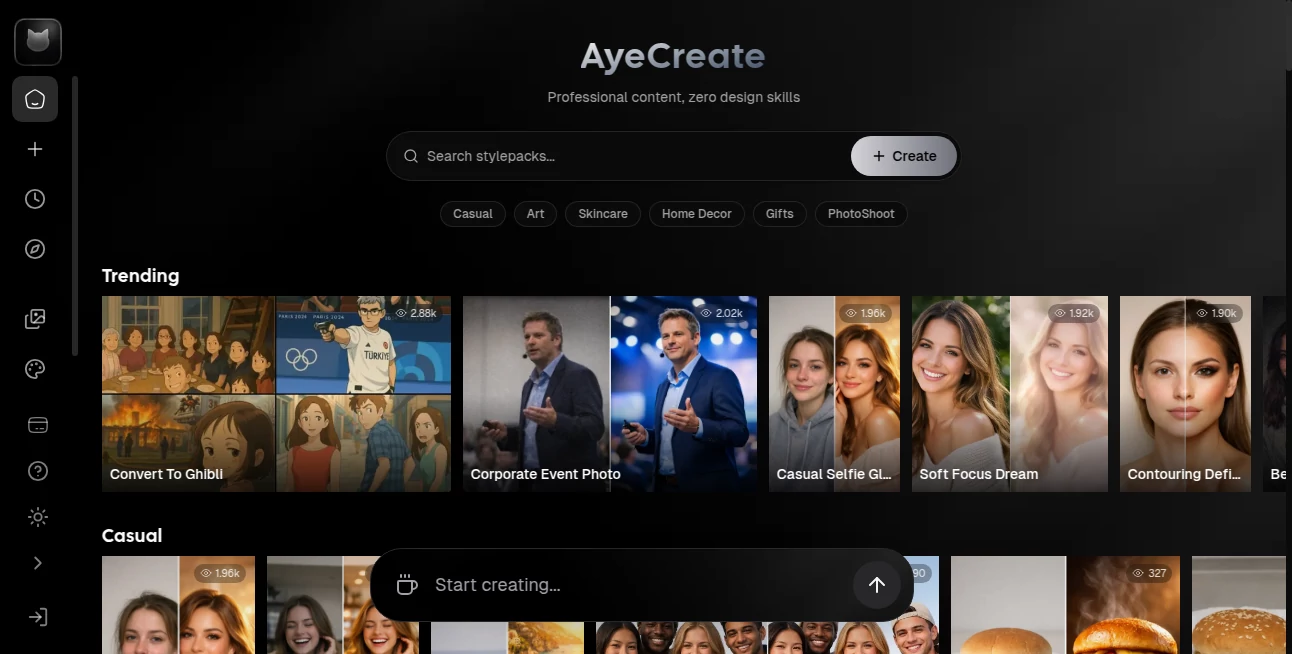
What is AyeCreate?
There's something quietly exciting about having an idea in your head—one of those late-night sparks—and seeing it take shape on screen in seconds instead of days. This platform captures that feeling better than most. You describe what you want (a logo, a poster, a social media visual, a book cover), maybe throw in a reference image or mood board, and it delivers clean, thoughtful designs that actually feel intentional. I've watched small business owners turn vague "I want something modern but warm" thoughts into cohesive branding kits that look like they hired a designer. The results aren't just pretty—they're usable, on-brand, and surprisingly close to what you pictured.
Introduction
Most AI image generators spit out random art; this one aims higher. It understands creative briefs, respects brand guidelines when you give them, and produces visuals that work in real contexts: Instagram posts, product mockups, pitch decks, merchandise. It's built for people who need professional-looking graphics fast—freelancers, startups, content creators, small agencies—without the budget or time for custom design every single time. The difference is in the details: typography that doesn't fight the image, color palettes that feel harmonious, compositions that guide the eye naturally. When you compare before-and-afters of a rushed Canva attempt versus what this delivers, the gap is obvious and motivating.
Key Features
User Interface
The workspace is calm and focused. A generous prompt box at the top, a clean reference upload area, style and aspect ratio presets below, and a prominent generate button. Results appear in a tidy grid with instant zoom and variation buttons. No overwhelming sidebars or cryptic icons. You can iterate by tweaking the prompt or adjusting strength sliders without starting over. It feels like sketching with a very talented assistant who never gets tired.
Accuracy & Performance
It follows instructions with impressive discipline—stick to brand colors when told, place text legibly, keep compositions balanced. Generation speed hovers around 10–30 seconds per set of variations, fast enough to stay in creative flow. The model rarely produces the usual AI artifacts (extra fingers, melting text, impossible physics) on well-written prompts. Consistency across multiple generations is strong; you can ask for variations and actually get usable options instead of wild departures.
Capabilities
Text-to-image, image-to-image refinement, style transfer, logo & branding kits, social media templates, product mockups, book covers, posters, UI concepts, illustrations, and even simple animations on higher plans. It handles typography intelligently (readable text, proper kerning), multi-subject scenes, specific art styles (minimalist, retro, cyberpunk, watercolor, etc.), and brand-consistent outputs when given guidelines. The upscaling and variation tools let you take a good result and polish it further without losing the original feel.
Security & Privacy
Images are processed ephemerally—nothing stored long-term unless you explicitly save to your account. No training on user uploads. For freelancers handling client work or brands protecting visual IP, that clean separation is a genuine advantage. Paid plans add private generations and watermark removal for extra control.
Use Cases
A startup founder generates a complete visual identity (logo variations, social templates, pitch deck slides) in an afternoon instead of weeks with a designer. A content creator builds a consistent Instagram aesthetic by feeding brand photos and getting matching posts every week. An author mocks up multiple book cover directions to test with beta readers. A small e-commerce shop creates lifestyle product shots from plain white-background photos, boosting conversion without a photoshoot. Wherever visuals need to be fast, on-brand, and high-quality, it quietly removes the bottleneck.
Pros and Cons
Pros:
- Results feel thoughtfully composed—not random AI chaos.
- Strong typography and layout understanding for real-world graphics.
- Fast iteration with variations and refinements that stay on target.
- Brand consistency when given guidelines or reference images.
- Generous free tier lets you test real projects without paying upfront.
Cons:
- Complex multi-element scenes can still require prompt refinement.
- Higher resolutions and animation features live behind paid plans.
- Very niche or hyper-specific styles may need several tries.
Pricing Plans
Free plan offers daily credits for meaningful testing—enough to create several polished assets. Paid tiers unlock unlimited generations, higher resolutions, faster priority queue, private mode, commercial-use rights, and advanced features like animation and batch processing. Pricing is competitive; many small creators and businesses say the monthly cost is less than one freelance design gig, yet delivers consistent output every day.
How to Use AyeCreate
Start with a clear, descriptive prompt (“minimalist logo for eco-friendly coffee brand, forest green and cream, simple leaf icon, modern sans-serif type”). Upload brand reference images or color palette if you have them. Choose aspect ratio and style preset if desired. Generate—review the variations, upscale your favorite, or refine with follow-up prompts (“make the leaf more abstract, increase negative space”). Download in high-res PNG or JPG. For branding projects, save the style as a preset for consistent future outputs. The loop is fast and forgiving.
Comparison with Similar Tools
Many generators excel at wild art but struggle with usable design—typography breaks, compositions feel random, branding consistency is weak. This one prioritizes real-world applicability: readable text, balanced layouts, brand adherence. It sits between pure art tools and rigid template builders—more flexible than Canva-style apps, more practical than abstract AI art platforms. For creators who need graphics that work, not just look cool, it hits a sweet spot.
Conclusion
Visual content is no longer a luxury—it’s table stakes. Yet good design still takes time most people don’t have. This tool closes that gap without sacrificing quality or personality. It turns “I need something that looks professional” into assets you’re proud to share, often in minutes. For entrepreneurs, creators, marketers, and side-hustlers who want to punch above their weight visually, it’s one of those rare tools that quietly changes how much you can accomplish in a day.
Frequently Asked Questions (FAQ)
How many free generations do I get?
Daily credits are generous—enough for several meaningful designs per day.
Can I use the outputs commercially?
Yes—paid plans include full commercial rights; free tier allows personal & non-commercial use.
Does it handle text well?
Very well—readable, properly kerned text is a strength compared to many competitors.
What file formats can I download?
High-res PNG and JPG; transparent backgrounds available on many styles.
Can I keep a consistent style across multiple images?
Yes—save prompts, references, and settings as presets for future use.
Photo & Image Editor , AI Art Generator , AI Design Generator , AI Image to Image .
These classifications represent its core capabilities and areas of application. For related tools, explore the linked categories above.
AyeCreate details
This tool is no longer available on submitaitools.org; find alternatives on Alternative to AyeCreate.
Pricing
- Free
Apps
- Web Tools
Categories

AyeCreate Alternatives Product

grok imagine…

Pixel Art Vi…
free ai face…
Ai logo maker

AI Raphael
HD Photo Con…

MAGIK FACE

Yodayo AI

Nano Banana 2