
🧠 AI Quiz
Think you really understand Artificial Intelligence?
Test yourself and see how well you know the world of AI.
Answer AI-related questions, compete with other users, and prove that
you’re among the best when it comes to AI knowledge.
Reach the top of our leaderboard.


















Brat Generator
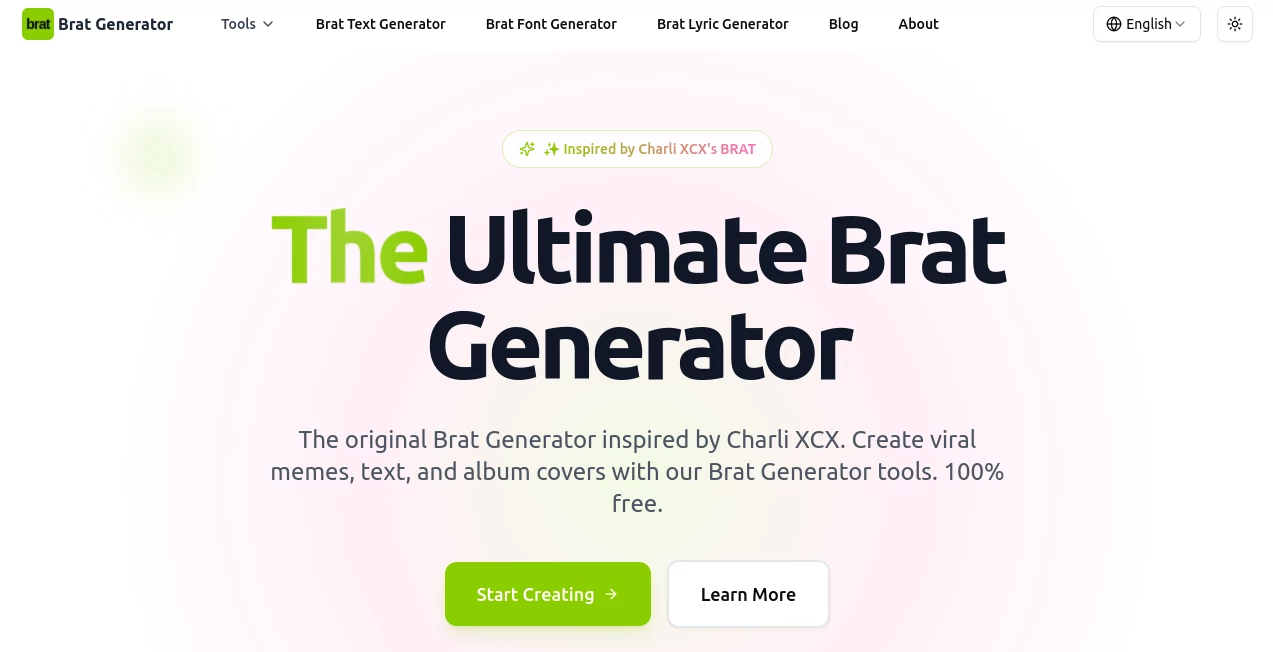
What is Brat Generator?
There’s something irresistibly playful about seeing a friend’s face suddenly plastered on that iconic lime-green background with bold white text screaming “brat”. This little gem lets you do exactly that in seconds—upload a photo, pick your vibe, and out comes a meme-ready image that captures the chaotic, confident energy of the moment. I’ve watched group chats explode with laughter after someone dropped a version of their boss looking effortlessly bratty; it’s the kind of silly, spot-on fun that spreads like wildfire.
Introduction
When that one album cover aesthetic took over feeds last summer, people started craving ways to put themselves (or their friends, pets, crushes, enemies) right into it. This tool was born from that exact craving. It doesn’t overcomplicate things—just gives you clean, high-quality versions of the famous lime-green portrait style with customizable text that actually looks good. No watermarks on the free tier, no forced sign-ups, no nonsense. It’s the kind of fast, focused creation that feels like a gift to anyone who loves memes but hates spending twenty minutes in Photoshop to get the font right.
Key Features
User Interface
You land on a single, no-fluff page. Big upload area, preview box, text input field, generate button. That’s it. The moment you drop a photo it starts processing; you type whatever bratty phrase you want and hit go. Results appear instantly below. Clean, mobile-friendly, zero distractions. My favorite part? It remembers your last text input so you can quickly swap faces without retyping the caption.
Accuracy & Performance
Face detection is shockingly good—even with weird angles, hats, glasses, or half-hidden faces it usually nails the crop and centering. The green background stays perfectly uniform, the font weight and spacing are spot-on every time. Generation takes 2–5 seconds depending on server load. I once tried it with ten different group photos in a row during a party and every single one came out usable. That kind of reliability is rare for free meme tools.
Capabilities
Core job is turning any portrait into the signature “brat” look, but you also get full text control (upper/lower case, multiple lines), optional shadow effects, and a few alternate colorways if you want to branch out from classic lime. High-res downloads are free, perfect for stories, posts, profile pics, or printing on stickers if you’re feeling extra. It handles selfies, pet pics, cartoons, even paintings surprisingly well.
Security & Privacy
Photos are processed in memory and discarded immediately after generation—no permanent storage, no sneaky databases. No login required to use it. That simplicity is actually one of its biggest strengths: you’re not handing over data to yet another platform that might train models on your face later. Just upload, generate, download, gone.
Use Cases
Friends roast each other by turning everyone into the ultimate brat version for birthday group chats. Influencers drop limited-edition “brat mode” profile pics to ride the wave. Event organizers make custom staff badges or party invites with the same vibe. Even teachers have quietly admitted using it to create silly “most likely to…” superlatives for end-of-year slideshows. It’s light, it’s fast, and it lands the joke every time.
Pros and Cons
Pros:
- Dead simple—one page, one flow, zero learning curve.
- Excellent face detection and centering even on tricky shots.
- No watermark, high-res downloads, completely free.
- Fast enough to spam your friends in real time.
Cons:
- Only one core style (though that’s kind of the point).
- Occasionally crops too tightly on very wide faces.
- No batch mode (yet) if you want to do 20 at once.
Pricing Plans
It’s completely free. No hidden premium version, no ads, no credit system. The creator built it for fun and kept it open for everyone. That kind of generosity is rare these days and makes every download feel like a tiny win.
How to Use Brat Generator
Open the page, drag or click to upload any portrait (selfie, pet, meme, painting—whatever). Wait 2–4 seconds for processing. Type your phrase in the box (“it’s me, I’m the brat”, “sorry I’m late I’m brat”, etc.). Click Generate. Right-click or long-press the result to save. Done. Takes about 15 seconds total once you get the hang of it. Pro tip: use well-lit, front-facing photos for the cleanest crop.
Comparison with Similar Tools
Plenty of meme makers exist, but most either slap filters on top, force watermarks, or make you fight with clunky editors. This one does one thing exceptionally well, skips the cruft, and gives you clean files instantly. It’s not trying to be a full Canva replacement—it’s just the best possible version of this exact joke, and that focus makes it unbeatable for its niche.
Conclusion
Sometimes the simplest ideas win because they’re executed perfectly. This tool captures a cultural moment, bottles it, and hands it back to you in seconds so you can share the laugh with everyone you know. It’s quick, it’s clean, it’s generous, and it just works. If you’ve been waiting for the perfect brat-era meme maker, you don’t need to wait anymore. Go make someone look iconic.
Frequently Asked Questions (FAQ)
Can I use cartoon or illustrated faces?
Yes—works surprisingly well on drawings, AI art, even low-res memes.
Is there a watermark?
None. Downloads are 100% clean.
What size are the output images?
1080×1080 pixels, perfect for Instagram, TikTok, Discord, etc.
Do I need to sign up?
Nope. No account, no email, no tracking.
Can I change the background color?
Not yet—just the classic lime green for now. Keeps it authentic.
Photo & Image Editor , AI Image to Image , AI Design Generator , AI Fun Tools .
These classifications represent its core capabilities and areas of application. For related tools, explore the linked categories above.
Brat Generator details
Pricing
- Free
Apps
- Web Tools
Categories

Brat Generator Alternatives Product

LongCat Image

Picture to L…
Change-BG
Video to GIF…

Caricature G…

BananaFrame

WonderShare …

MuseCraft.AI
Nano Banana …
