
🧠 AI Quiz
Think you really understand Artificial Intelligence?
Test yourself and see how well you know the world of AI.
Answer AI-related questions, compete with other users, and prove that
you’re among the best when it comes to AI knowledge.
Reach the top of our leaderboard.


















Certificate Maker AI
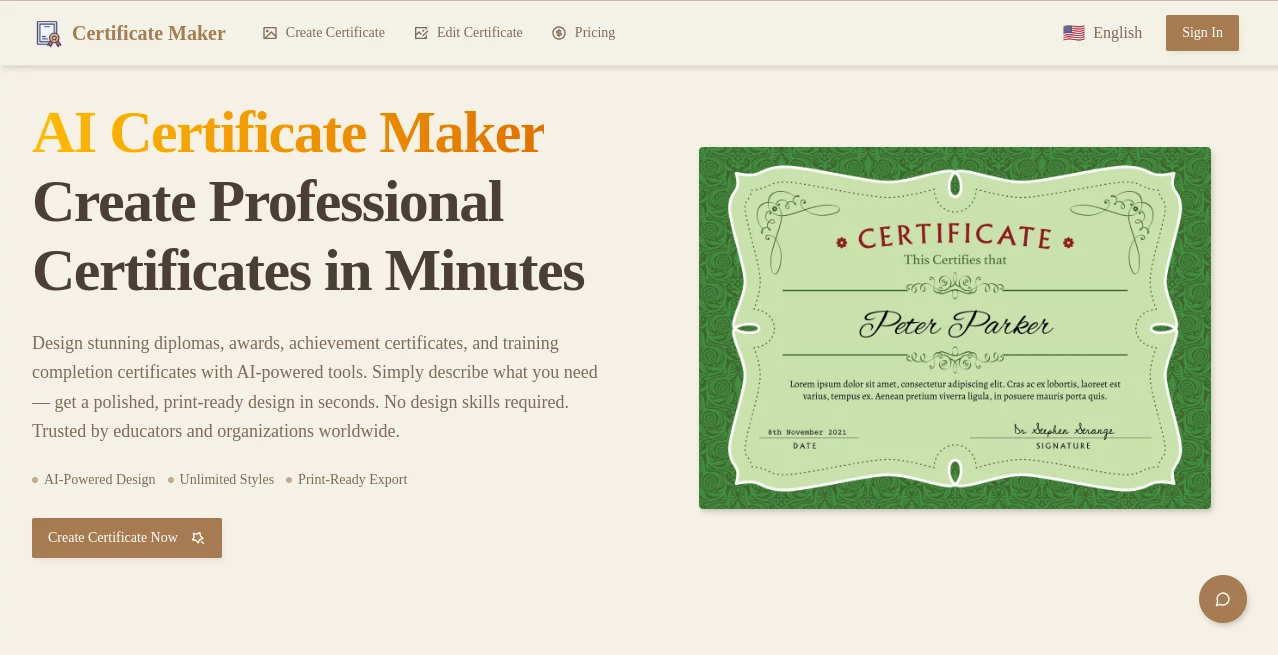
What is Certificate Maker AI?
There's something special about handing someone a well-designed certificate. Whether it's for completing a course, winning a competition, or recognizing an employee, a beautiful certificate makes the achievement feel official and memorable. This tool makes creating those certificates remarkably easy and professional. You don't need design skills or expensive software—just a few clicks and you have polished, ready-to-print or share documents that look like they came from a high-end designer.
Introduction
From teachers printing end-of-year awards to companies recognizing top performers, or online course creators issuing completion certificates, the need for good-looking credentials is everywhere. Traditional methods are either time-consuming or expensive. This platform solves that by offering a fast, intuitive way to design and generate certificates that look truly professional. What started as a simple need has grown into a favorite for educators, businesses, event organizers, and creators who want to celebrate achievements without the hassle. The best part? The results look custom-made, even though you created them in minutes.
Key Features
User Interface
The interface is clean and welcoming. You start with a wide selection of beautiful templates, then customize everything with simple clicks. Text fields, colors, fonts, and layout options are all easy to reach. You can upload logos, signatures, or background images without any technical headaches. The live preview updates instantly so you always know exactly what you're getting. It feels more like playing with a smart design assistant than wrestling with complicated software.
Accuracy & Performance
The tool handles details carefully—text alignment stays perfect, fonts render crisply, and layouts remain balanced even when you add multiple elements. Generation is fast, and the final PDFs look sharp whether printed or viewed digitally. Users often mention how surprised they are that something so quick can look this polished and professional.
Capabilities
You can create single certificates or generate hundreds at once using spreadsheet data for names, dates, and achievements. It supports custom text, signatures, QR codes, seals, and multiple layouts. Download options include high-resolution PDF for printing and digital sharing. The templates cover everything from academic achievements and employee recognition to sports awards, course completions, and event participation. Everything stays fully customizable so your branding stays consistent.
Security & Privacy
Your designs and data stay private. The platform doesn't store your certificate content longer than necessary, and you control everything. For schools, businesses, or anyone handling personal information, this respectful approach to privacy provides welcome peace of mind.
Use Cases
A teacher creates beautiful end-of-year certificates for 30 students in under ten minutes. A small business owner recognizes monthly top performers with branded awards that impress the team. An online course creator automatically generates completion certificates for hundreds of students. Event organizers print professional participation awards on the spot. Sports coaches hand out achievement certificates that kids proudly display at home. Wherever achievement deserves recognition, this tool makes the process smooth and impressive.
Pros and Cons
Pros:
- Professional-looking templates that save hours of design work.
- Bulk generation from spreadsheets makes large events effortless.
- Easy customization with live preview.
- High-quality PDF exports perfect for printing or digital sharing.
- Fast and intuitive enough for non-designers.
Cons:
- Free version has limitations on commercial use and advanced features.
- Very specific or highly custom designs may still benefit from manual tweaks.
Pricing Plans
The free plan lets you create and download several high-quality certificates to test the tool. Paid plans unlock unlimited creations, bulk generation, commercial usage rights, premium templates, and advanced customization options. Pricing is reasonable and scales nicely for individuals, small teams, or larger organizations.
How to Use Certificate Maker
Choose a template that matches your occasion. Replace the placeholder text with your details or upload a spreadsheet for bulk creation. Add your logo, signature, or custom images. Adjust colors and fonts until it feels right. Preview the result, then download high-resolution PDFs. For bulk work, map your spreadsheet columns to the certificate fields and generate all documents at once. The whole process is fast enough that you can create meaningful awards in the time it used to take just to open design software.
Comparison with Similar Tools
Many certificate tools are either too basic (limited templates, poor quality) or overly complicated with steep learning curves. This one strikes an excellent balance: beautiful professional designs combined with genuinely easy customization and bulk features. It feels more polished and practical than most free alternatives while remaining far more approachable than heavy design software.
Conclusion
Recognizing achievement should feel good—for both the giver and the receiver. This tool makes that recognition easy, beautiful, and professional without requiring design expertise or hours of work. Whether you're a teacher celebrating students, a manager motivating a team, or an organizer marking a special event, it helps you create certificates that people will actually be proud to display. In a world that sometimes moves too fast to celebrate wins, this simple tool makes it easier to pause and honor what matters.
Frequently Asked Questions (FAQ)
Do I need design experience?
Not at all. The templates and tools are designed for complete beginners.
Can I create certificates in bulk?
Yes—upload a spreadsheet and generate personalized certificates for everyone at once.
Are the PDFs high quality for printing?
Absolutely. Downloads are high-resolution and print beautifully.
Is commercial use allowed?
Yes on paid plans. Free tier is best for personal and testing use.
Can I add my own logo and signature?
Yes, uploading custom images and signatures is simple and encouraged.
AI PDF , AI Documents Assistant , AI Forms & Surveys .
These classifications represent its core capabilities and areas of application. For related tools, explore the linked categories above.
Certificate Maker AI details
Pricing
- Free
Apps
- Web Tools
Categories

Certificate Maker AI Alternatives Product
Fill PDF fro…

ReportMaker.…

TO MD

UPDF AI

Jotform AI A…

AntForms
The #1 Text …
ResumeFreePro

Myjourney
