
🧠 AI Quiz
Think you really understand Artificial Intelligence?
Test yourself and see how well you know the world of AI.
Answer AI-related questions, compete with other users, and prove that
you’re among the best when it comes to AI knowledge.
Reach the top of our leaderboard.


















ChatHawk

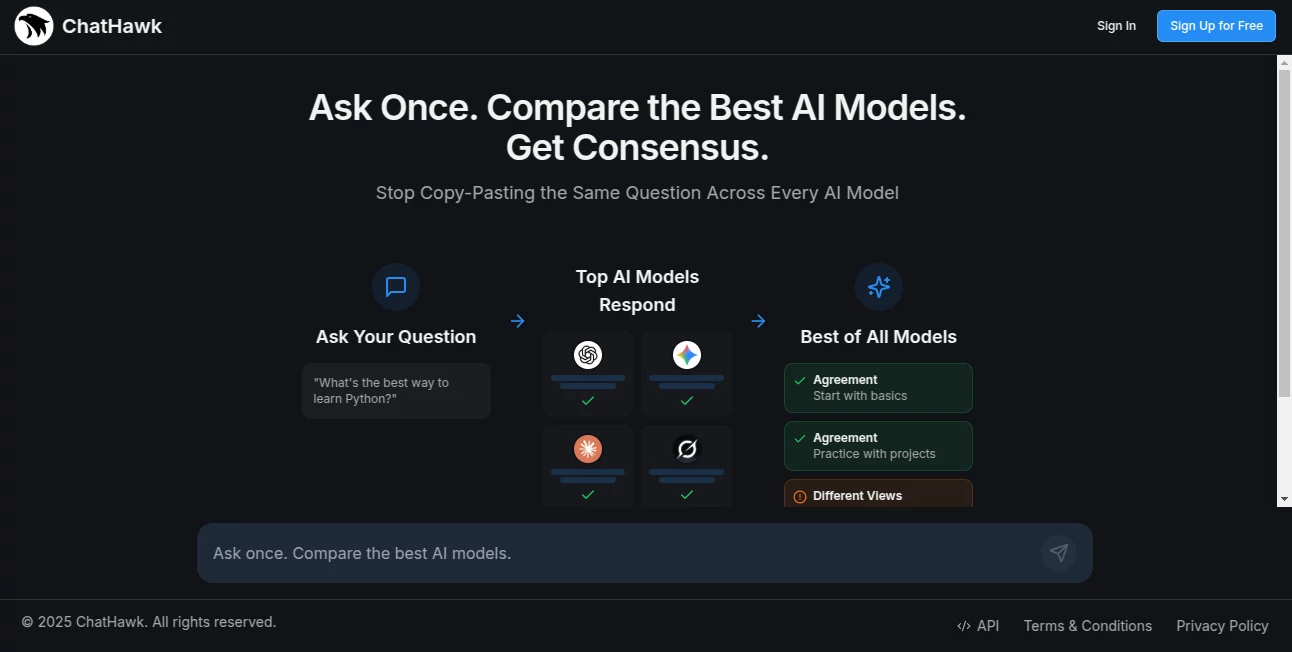
What is ChatHawk?
There's something genuinely satisfying about watching a chat window light up with answers the moment a customer hits send. This tool makes that happen without you lifting a finger, letting AI handle the first wave of questions while keeping everything feeling personal and on-brand. I’ve seen small support teams go from drowning in tickets to actually enjoying their day because the repetitive stuff just... disappears. It’s not about replacing people; it’s about giving them room to breathe and focus on the moments that really matter.
Introduction
Customer support has always been a balancing act—speed versus warmth, scale versus care. This platform steps in with a quiet confidence, blending smart automation with human oversight so teams can respond faster without sounding robotic. Built for companies that care about tone and consistency, it learns from your best replies, understands context across channels, and hands off complex cases seamlessly. What struck me first was how natural the conversations felt—customers often didn’t even realize they were talking to AI until the bot gracefully passed them to a human. For growing teams especially, it’s the kind of help that feels like a teammate who’s always on shift.
Key Features
User Interface
The dashboard is one of those rare ones that actually makes sense the first time you open it. Everything is where you’d expect it—live chats on the left, AI suggestions on the right, and a clean overview of open tickets without any visual noise. You can glance at a conversation and immediately see suggested replies that match your brand voice. I’ve watched support reps who usually dread new tools start using this one without even needing a walkthrough. That kind of clarity is rare.
Accuracy & Performance
The AI doesn’t just throw canned responses; it really gets the nuance of what customers are asking. Accuracy stays high even when questions get tricky or emotional, and the system learns quickly from corrections. Response times drop dramatically—often from minutes to seconds—without sacrificing quality. In busy periods, it handles spikes effortlessly, which is a huge relief when you’re short-staffed or launching something new.
Capabilities
It covers all the major channels—live chat, email, WhatsApp, Instagram DMs—and keeps context across them so you don’t have to repeat yourself. You can train it on your knowledge base, set custom rules for handoffs, and even create personalized workflows. The ability to generate replies that feel like they came from your most experienced agent is probably its strongest suit. Add in analytics that show you exactly where customers get stuck, and it becomes a tool for both immediate relief and long-term improvement.
Security & Privacy
Security here is taken seriously without being loud about it. End-to-end encryption, GDPR and CCPA compliance, and strict data handling policies mean your conversations stay private. For businesses dealing with sensitive customer info, that peace of mind is priceless. It’s reassuring to know that even when the AI is responding, nothing is being used in ways you didn’t approve.
Use Cases
E-commerce brands use it to handle order status questions and returns 24/7, freeing up their team for product feedback and upsells. SaaS companies lean on it for onboarding questions and troubleshooting, cutting resolution time in half. Agencies manage multiple client accounts from one place without losing brand voice. Even smaller startups with limited headcount find they can offer support that feels enterprise-level. It’s flexible enough to grow with you, whether you’re a one-person shop or a growing team.
Pros and Cons
Pros:
- Feels genuinely human—customers rarely notice it’s AI until you tell them.
- Handles multiple channels without dropping context.
- Setup is fast and intuitive, even for non-technical teams.
- Analytics give you real insights, not just vanity metrics.
- Scales beautifully from small teams to enterprise.
Cons:
- Initial training takes a bit of time to get perfect (but it’s worth it).
- Some advanced features are only in higher plans.
Pricing Plans
The free plan is generous enough for small teams or side projects to get real value right away. Paid tiers unlock more agents, channels, and advanced training options, starting at a reasonable price that scales with your growth. Annual plans give a nice discount, and you can always start small and upgrade when you’re ready. It’s priced in a way that feels fair—supporting your growth instead of punishing it.
How to Use ChatHawk
Sign up, connect your channels (live chat, email, WhatsApp, etc.), and let it pull in your existing help docs or FAQs. Spend a little time training it with your best replies—think of it like onboarding a new teammate. Once it’s running, you’ll get suggested replies in real time that you can edit or approve with one click. Set rules for when it should hand off to a human, and you’re good to go. The first few days you’ll probably be surprised how much it gets right out of the box.
Comparison with Similar Tools
While some competitors focus on speed alone, this one prioritizes tone and brand consistency, which matters a lot more than people admit. Others might be cheaper upfront but fall short on accuracy or channel coverage. What sets this apart is the balance—it’s powerful enough for serious teams but simple enough that you don’t need a dedicated admin. For most businesses, it’s the sweet spot between basic bots and enterprise-heavy solutions.
Conclusion
Customer support doesn’t have to be a grind. This tool takes the repetitive weight off your team’s shoulders while keeping every interaction warm and on-brand. It’s the kind of help that doesn’t just save time—it saves sanity. If you’ve ever felt overwhelmed by tickets or worried about response quality during busy periods, this is the upgrade you’ve been waiting for. Give it a try; you’ll wonder how you ever managed without it.
Frequently Asked Questions (FAQ)
How long does setup take?
Most teams are live in under an hour, with full training taking just a few days.
Does it work with WhatsApp and Instagram?
Yes, and it keeps context across all connected channels.
Can I customize the tone?
Absolutely—train it on your best replies and it adapts perfectly.
What happens when the AI can’t answer?
It hands off to a human seamlessly, with full context included.
Is there a free trial?
Yes, the free plan is fully functional for small teams and testing.
AI Reply Assistant , AI Chatbot , AI Email Assistant , AI Customer Service Assistant .
These classifications represent its core capabilities and areas of application. For related tools, explore the linked categories above.
ChatHawk details
This tool is no longer available on submitaitools.org; find alternatives on Alternative to ChatHawk.
Pricing
- Free
Apps
- Web Tools
Categories

ChatHawk Alternatives Product

Friendify

Helploom

Jasper

SciSpace

FlowGPT
ReviewRespon…

Customer Fee…
Bitterbot AI

Reloq
