🧠 AI Quiz
Think you really understand Artificial Intelligence?
Test yourself and see how well you know the world of AI.
Answer AI-related questions, compete with other users, and prove that
you’re among the best when it comes to AI knowledge.
Reach the top of our leaderboard.


















ds image
What is ds image?
There’s something satisfying about typing a quick idea or dropping in a rough photo and watching a clean, detailed 4K image appear in seconds. This tool makes that moment feel effortless. Whether you’re describing a scene in words or feeding it reference images, it delivers results that look polished and intentional, not overcooked or generic. I’ve used it to mock up product visuals for a small shop and was surprised how professional the output looked after just one try. It’s the kind of tool that turns “I wish I could visualize this” into “here it is, ready to use.”
Introduction
Most AI image generators still feel like a gamble: sometimes the results are stunning, sometimes they’re strange, and you end up tweaking prompts for half an hour. This one stands out by keeping things simple and reliable. It works entirely in your browser, needs no installation, and handles both text prompts and image references with a good sense of what you actually want. The output is consistently high-resolution (up to 4K), with balanced lighting and composition that doesn’t look artificial. For creators, marketers, or anyone who needs visuals fast, it removes a lot of the usual frustration and lets you focus on the idea instead of fighting the tool.
Key Features
User Interface
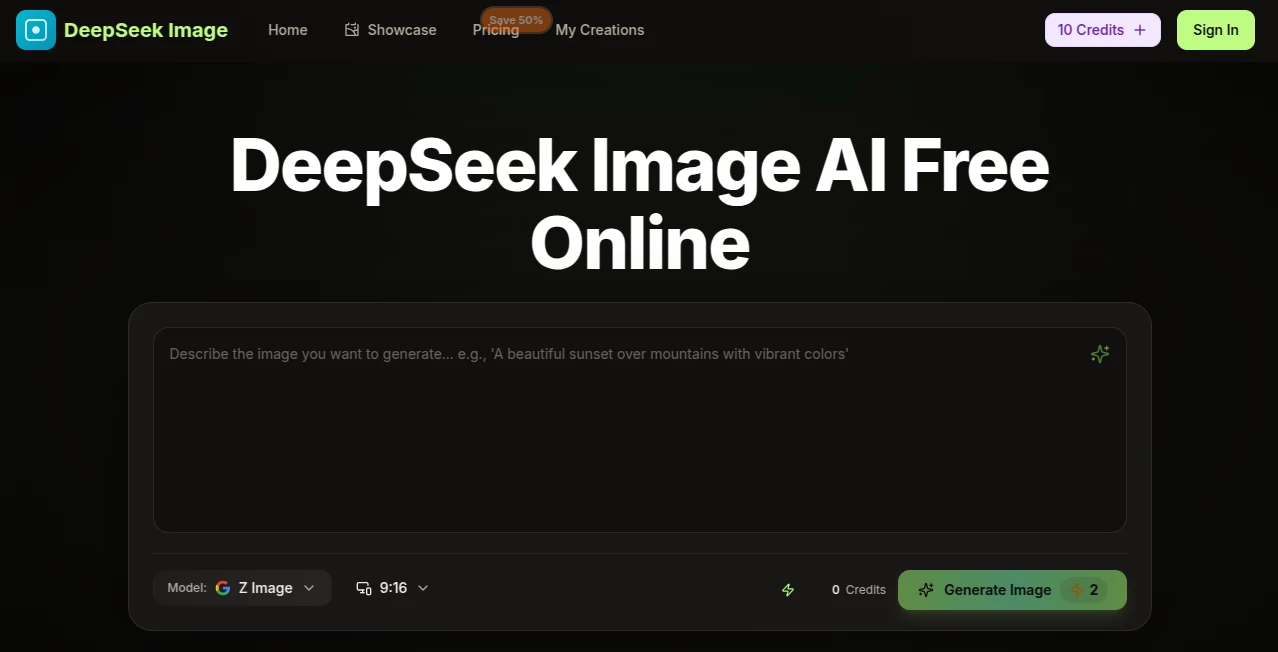
The interface is refreshingly straightforward. A big prompt box, an upload area for reference images, a few clear style options, and a prominent generate button. You can combine text and images easily, adjust basic settings without drowning in sliders, and see previews quickly. It feels designed for real use rather than demo mode—clean, fast, and never in your way. Even on mobile it stays usable, which is rare for creative tools.
Accuracy & Performance
It reads prompts and references with impressive understanding, keeping layouts logical and styles consistent. Faces stay recognizable, products look realistic when needed, and artistic directions (anime, watercolor, photoreal) land without major surprises. Generations usually finish in under 30 seconds, and the 4K output holds detail well for both web and print use. The balance between creativity and control is one of its strongest points.
Capabilities
You can start with pure text, upload one or multiple reference images for blending, or combine both. It supports style transfer, creative remixing, photo restoration, background removal, virtual try-on (on higher plans), in-image text editing, and consistent character generation. Outputs come in sharp 4K and work well for product shots, avatars, marketing visuals, concept art, or personal projects. The ability to mix subject, scene, and style in one go makes it more flexible than many single-mode tools.
Security & Privacy
Your images and prompts are processed securely without long-term storage unless you explicitly save them. No unnecessary data collection, and the browser-based approach means you stay in control. For anyone creating client work or personal art, that clean, low-risk setup is reassuring.
Use Cases
A small online shop owner uploads product photos and quickly generates clean lifestyle versions with better lighting and backgrounds—no studio session needed. A content creator turns rough sketches into polished thumbnails or social media visuals in minutes. Someone restoring old family photos brings faded memories back to life with natural colors and detail. A designer experiments with style variations for branding or marketing campaigns, testing ideas rapidly before committing to final work. It fits anywhere you need visuals fast without sacrificing quality.
Pros and Cons
Pros:
- Combines text and image inputs smoothly for precise creative control.
- Fast generations with consistently good 4K quality.
- Useful extras like background removal and photo restoration included.
- Browser-based with no installation—works anywhere.
- Generous free tier lets you test real results before upgrading.
Cons:
- Very complex or highly specific artistic visions may still need a few tries.
- Advanced features like virtual try-on are stronger on paid plans.
- Heavy daily use benefits from upgrading to avoid credit limits.
Pricing Plans
It starts with a free tier that gives you enough credits to create meaningful images and see the quality for yourself. Paid plans (monthly or yearly with nice discounts) unlock more credits, faster processing, higher limits, and priority features. The structure is fair—many users find the free plan sufficient for occasional needs, while the paid tiers make sense for regular creators or small businesses. You can cancel anytime, and there are no hidden surprises.
How to Use DeepSeek Image
Open the site in any browser, type your description in the prompt box or upload reference images (or both). Choose a style if you want something specific, then click generate. The image appears in seconds—use the preview to check details and regenerate with small tweaks if needed. Download the 4K result once you’re happy. For batch work or more control, paid plans give extra options, but the basic flow is the same and stays simple throughout.
Comparison with Similar Tools
Many image generators are either too slow, too generic, or require accounts and complicated setups. This one keeps things light and fast while delivering solid 4K quality and useful reference blending. It doesn’t try to do everything at once, which actually makes it more reliable for everyday creative tasks. The balance of simplicity, speed, and output quality makes it stand out for people who just want good visuals without the hassle.
Conclusion
Creating visuals shouldn’t feel like a technical battle. This tool brings the fun back by making high-quality image generation approachable and quick. Whether you’re building a brand, restoring memories, mocking up ideas, or just playing with concepts, it gives you results you can actually use. In a crowded space of AI image tools, its focus on clean, practical output and easy workflow makes it a genuine favorite for many creators. Give it a try with one prompt—you might be surprised how quickly it becomes part of your routine.
Frequently Asked Questions (FAQ)
Do I need to sign up to start?
No—you can generate right away in the browser with the free tier.
How good is the 4K quality?
It’s sharp and detailed enough for web, social media, and many print uses, with natural lighting and composition.
Can I use reference images?
Yes—uploading photos for style or subject blending often gives the best and most consistent results.
Is it suitable for commercial work?
Yes, especially on paid plans which include commercial licensing.
What if I don’t like the first result?
Just tweak the prompt or references and generate again—iteration is fast and usually improves things quickly.
AI Photo & Image Generator , Photo & Image Editor , AI Image to Image , AI Text to Image .
These classifications represent its core capabilities and areas of application. For related tools, explore the linked categories above.
ds image details
Pricing
- Free
Apps
- Web Tools
Categories

ds image Alternatives Product

WatermarkZero

Nano Banana …

Remove Water…

Gemini AI Ph…

ChatGPT Imag…

Image to Ima…
Z-Image Free

Gualele

MuseCraft.AI