
🧠 AI Quiz
Think you really understand Artificial Intelligence?
Test yourself and see how well you know the world of AI.
Answer AI-related questions, compete with other users, and prove that
you’re among the best when it comes to AI knowledge.
Reach the top of our leaderboard.


















Image Describer
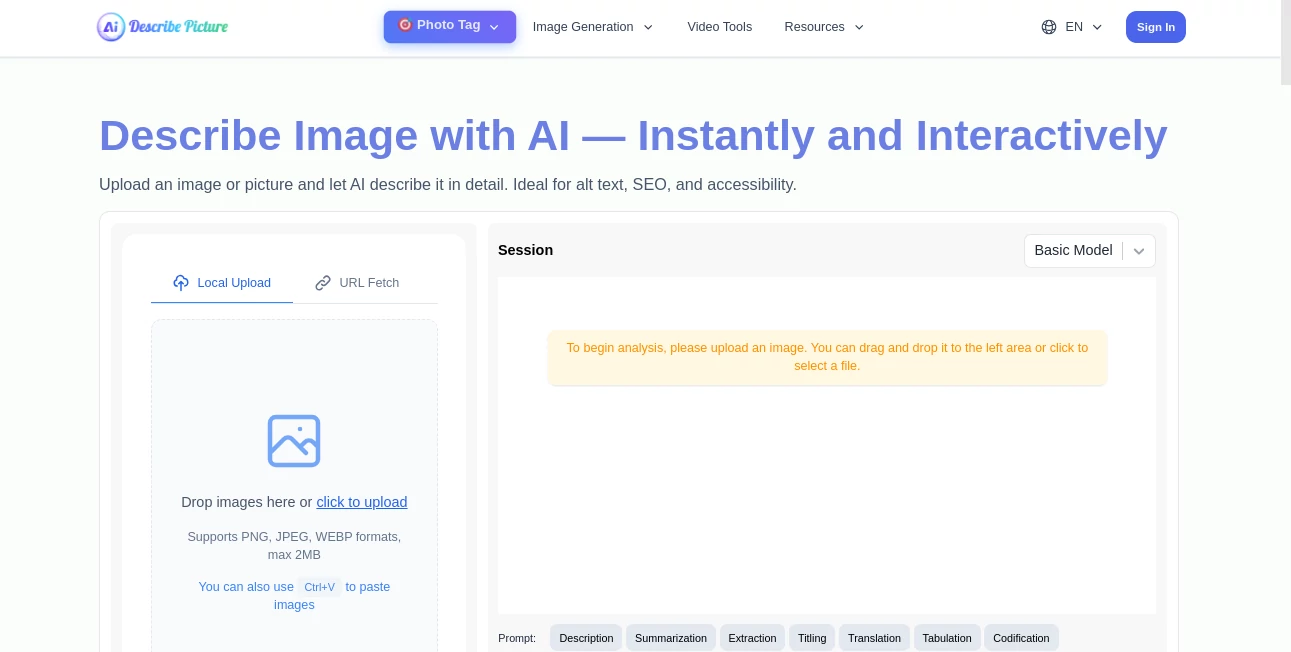
What is Image Describer?
There’s something quietly satisfying about uploading a photo and getting back words that actually feel like they were written by someone who looked at the same scene. Not robotic bullet points, not keyword-stuffed nonsense—just clear, flowing sentences that capture mood, detail, and story. This tool does exactly that. Drop in a family snapshot, a product shot, a travel pic, or a piece of art, and it returns text that reads like a thoughtful caption or a short story snippet. I’ve used it to write Instagram captions that actually got more engagement, alt text that felt human instead of mechanical, and even little descriptive passages for blog posts. The surprise is how often the wording lands perfectly on the first try.
Introduction
Most image captioning tools spit out dry facts: “a dog sitting on grass.” Useful for accessibility, maybe, but rarely inspiring. This one goes further. It sees the emotion in a glance, the story in a composition, the texture in light and shadow. Whether you need concise alt text, engaging social captions, detailed product blurbs, or creative writing prompts, it adapts tone and length to fit. For bloggers, marketers, e-commerce sellers, accessibility teams, or anyone who wants their images to speak through words, it’s become a small daily habit. The difference shows in how much more natural—and effective—the final text feels.
Key Features
User Interface
The page is intentionally calm: a generous upload area, a dropdown for style/tone (casual, professional, poetic, SEO-optimized, etc.), length presets (short caption, medium paragraph, detailed description), and one clear “Describe” button. Results appear instantly below with copy buttons and edit suggestions. No forced sign-up for basic use, no cluttered sidebar. It’s the kind of interface you forget about because it never gets in your way—just lets the image and words do the talking.
Accuracy & Performance
It reads context beautifully: recognizes subtle expressions, understands spatial relationships, catches cultural details, and avoids common AI mistakes (hallucinated objects, wrong genders, impossible physics). Descriptions stay faithful to what’s actually in the frame while adding just enough flair to feel alive. Processing is near-instant for single images—even complex scenes with multiple subjects come back in seconds. Consistency across photo types (portraits, products, landscapes, abstract art) is one of its strongest points.
Capabilities
Generates captions in multiple tones and lengths, creates SEO-friendly product descriptions, writes accessible alt text that’s actually descriptive, produces creative writing prompts from images, analyzes mood and atmosphere, identifies key visual elements, and supports batch processing on paid plans. It handles portraits (with tasteful emotion reading), product photography (highlighting features), travel shots (evoking place and feeling), memes (catching humor), and even abstract or artistic images (interpreting intent). Multilingual support covers major languages with natural phrasing.
Security & Privacy
Images are processed in memory and deleted immediately after generation—no permanent storage, no training on user uploads. No account required for basic use, so your photos aren’t tied to a profile unless you choose to save results. For personal photos, client work, or brand assets, that clean, ephemeral handling feels essential.
Use Cases
An Etsy seller uploads product photos and gets rich, conversion-focused descriptions that lift click-through rates. A travel blogger turns vacation shots into evocative captions that make followers feel like they were there. An accessibility specialist generates thoughtful alt text for museum images that actually describe the artwork instead of just naming it. A novelist uses abstract art as visual prompts and gets story starters that spark new chapters. A social media manager creates consistent, engaging post copy for brand accounts without burning out on writing. Wherever an image needs words to shine, this quietly makes it better.
Pros and Cons
Pros:
- Descriptions feel genuinely human—natural flow, emotional nuance, no robotic stiffness.
- Tone and length options let you match the exact use case (social, e-commerce, accessibility, creative).
- Handles complex scenes with multiple subjects and subtle details remarkably well.
- Free tier is generous—real value before you ever pay.
- Batch processing and saved favorites on paid plans save serious time for heavy users.
Cons:
- Very abstract or minimalist images can sometimes lead to over-interpretation.
- Unlimited generations and advanced tones require paid access.
- Occasional need to re-prompt for very specific stylistic voices (though rare).
Pricing Plans
Free tier offers several high-quality descriptions per day—enough for casual use, testing, or small projects. Paid plans unlock unlimited generations, batch processing, priority queue, premium tones, saved history, and commercial-use rights without attribution. Pricing stays approachable—many small businesses and creators say one month pays for itself after improving a few key listings or social posts.
How to Use DescribePicture
Drag your image into the upload area or click to select. Choose tone (casual, professional, poetic, SEO-focused, etc.) and desired length (short caption, medium paragraph, detailed). Hit “Describe.” Read the result—copy directly or tweak the prompt and regenerate if you want a different angle. For multiple images, paid users can upload batches. Download or save favorites for later. The whole process usually takes under 30 seconds per image.
Comparison with Similar Tools
Many image-to-text tools produce short, factual labels useful for accessibility but flat for marketing or creative work. This one stands out by offering tone control, emotional nuance, and natural phrasing that actually engages readers. Where others give generic output, the descriptions here feel written with intention. Speed, variety, and human-like quality make it the clear choice when words need to match the image’s feeling.
Conclusion
Images speak louder with the right words beside them. This tool makes that pairing effortless and surprisingly beautiful. It turns silent photos into stories, products into desire, memories into captions worth sharing. Whether you’re selling, storytelling, or simply making accessibility better, it quietly raises the bar on what “image description” can mean. Sometimes the smallest bridge—between seeing and saying—makes the biggest difference.
Frequently Asked Questions (FAQ)
How many free descriptions do I get?
Several high-quality ones per day—enough for personal use, testing, or small batches.
Can I use it for commercial projects?
Yes—paid plans include full commercial rights with no attribution required.
Does it handle multiple languages?
Yes—outputs natural descriptions in all major languages.
What if I want a very specific tone or style?
Use the tone dropdown or add custom instructions in the prompt box—works surprisingly well.
Are my images stored anywhere?
No—processed in memory and deleted immediately after generation.
AI Image Recognition , AI Content Generator , Photo & Image Editor , AI Design Generator .
These classifications represent its core capabilities and areas of application. For related tools, explore the linked categories above.
Image Describer details
Pricing
- Free
Apps
- Web Tools
Categories

Image Describer Alternatives Product

Nano Banana …

Face Shape D…

Create a Car…

AI Polaroid …

AI Signature…

square face …

ds image

Automateed

Before After…
