
🧠 AI Quiz
Think you really understand Artificial Intelligence?
Test yourself and see how well you know the world of AI.
Answer AI-related questions, compete with other users, and prove that
you’re among the best when it comes to AI knowledge.
Reach the top of our leaderboard.


















Editaimg
What is Editaimg?
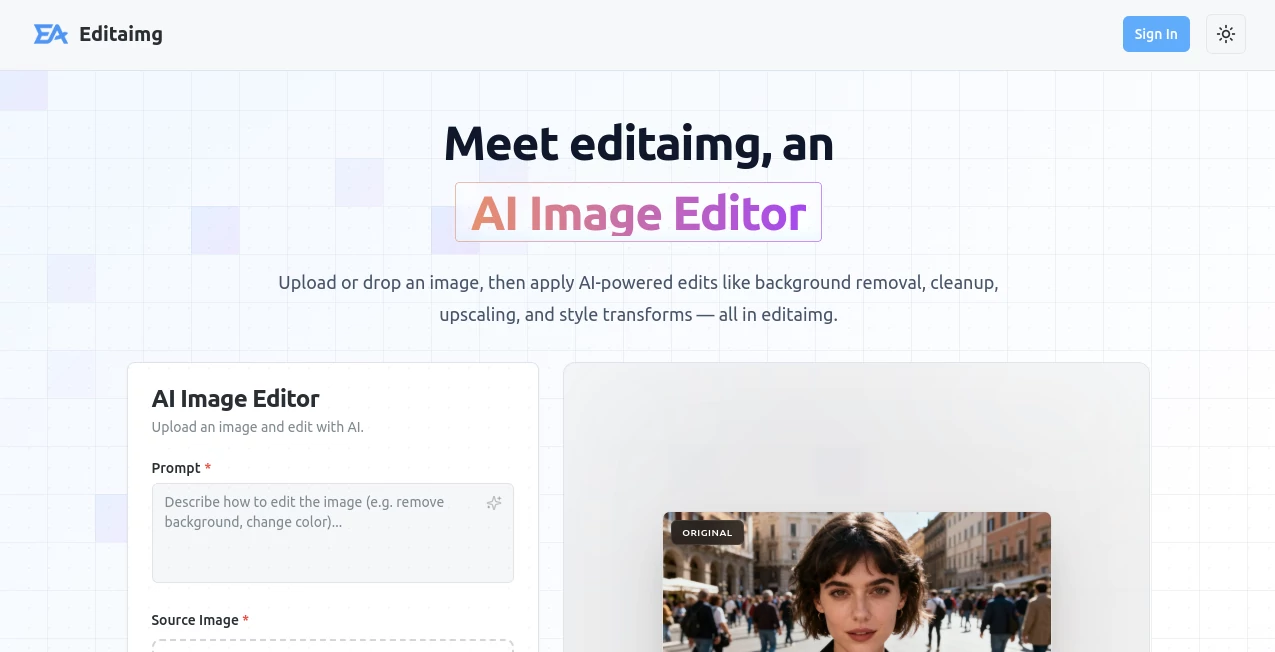
Editaimg transforms ordinary snapshots into stunning masterpieces with a touch of intelligent magic, making professional-level tweaks accessible to everyone. This standout platform empowers users to refine, restore, and reimagine their images effortlessly, delivering results that rival high-end studios. Photographers, social media enthusiasts, and casual creators alike rave about its intuitive power, turning time-consuming edits into joyful, lightning-fast experiences that elevate every shot.
Introduction
Editaimg burst onto the scene as a game-changer for image lovers everywhere, crafted by a team passionate about democratizing high-quality photo enhancement. From its inception, it has captivated users with its seamless blend of advanced algorithms and user-friendly design, quickly becoming the go-to choice for those seeking flawless results without the steep learning curve. Countless testimonials highlight how it revives faded memories or polishes product shots to perfection, fostering creativity that feels boundless and rewarding. In a digital age flooded with visuals, Editaimg shines as the ultimate ally, ensuring every image tells its story with crystal-clear brilliance and emotional depth.
Key Features
User Interface
The interface welcomes you like an old friend, with a clean dashboard that invites uploads via simple drag-and-drop or quick selection. Tools unfold intuitively across a responsive canvas, where sliders and previews respond in real-time, making adjustments feel natural and precise. Whether on desktop or mobile, navigation flows smoothly, eliminating frustration and letting your focus stay on the creative spark.
Accuracy & Performance
Powered by cutting-edge algorithms, Editaimg delivers pinpoint precision in every enhancement, from subtle color corrections to intricate detail recovery, ensuring outputs that look authentically improved rather than artificially altered. Processing times are impressively swift, handling high-resolution files in seconds while maintaining exceptional quality, even under heavy use—proving its reliability for professionals on tight deadlines.
Capabilities
Editaimg excels in a vast array of transformations, from one-click background removals and object erasures to sophisticated upscaling and style transfers that infuse artistic flair. It effortlessly handles portrait retouching, landscape restorations, and creative composites, all while preserving the original's essence. This versatility makes it indispensable for diverse projects, unlocking endless possibilities with just a few intuitive commands.
Security & Privacy
Your images are safeguarded with robust encryption and strict access controls, ensuring they remain private throughout the editing process and are never stored without consent. Compliant with top industry standards, Editaimg prioritizes user trust, allowing seamless sharing options while keeping sensitive content locked down—giving peace of mind to creators handling personal or proprietary visuals.
Use Cases
Social media influencers craft eye-catching posts that boost engagement, effortlessly airbrushing imperfections or adding vibrant filters. E-commerce sellers produce catalog-ready product images that drive conversions, with precise enhancements highlighting every detail. Hobby photographers restore cherished family albums, breathing new life into old prints for heartfelt sharing. Graphic designers accelerate workflows by generating mockups and variations, turning concepts into polished assets in record time.
Pros and Cons
Pros:
- Unmatched ease of use that empowers beginners and pros alike.
- Lightning-fast performance without compromising on quality.
- Versatile toolkit covering every editing need imaginably.
- Top-tier privacy measures that build unwavering trust.
Cons:
- Advanced features may require a premium upgrade for unlimited access.
- Best results shine with high-quality input images.
- Occasional learning for niche effects, though tutorials abound.
Pricing Plans
Editaimg offers a generous free tier packed with essential tools for casual users, allowing unlimited basic edits to get you started. The Pro plan, at an affordable $9.99 monthly, unlocks unlimited high-res exports and premium effects, while the Enterprise option at $29.99 caters to teams with collaborative features and priority support. Annual subscriptions save up to 20%, making it a smart investment for sustained creativity.
How to Use Editaimg
Begin by uploading your image directly to the intuitive dashboard, then select from a suite of AI-driven tools like enhance or remove. Adjust parameters with easy sliders, preview changes live, and apply with a single click. Download your perfected file in your preferred format, or share instantly—revisiting saved projects for ongoing refinements that keep your vision evolving.
Comparison with Similar Tools
Unlike bulkier alternatives that overwhelm with complexity, Editaimg strikes the perfect balance of power and simplicity, outperforming in speed and precision for everyday tasks. While some rivals boast more filters, none match its AI smarts for natural-looking results, positioning it as the superior choice for users craving efficiency without sacrifice.
Conclusion
Editaimg redefines photo editing excellence, blending innovative AI with heartfelt design to inspire and empower creators worldwide. Its ability to turn the mundane into magnificent has earned it a devoted following, and it's clear why—every feature is a testament to thoughtful innovation that celebrates your artistry. Dive in today and discover how Editaimg can elevate your visual storytelling to extraordinary heights.
Frequently Asked Questions (FAQ)
Is Editaimg suitable for beginners?
Absolutely—its intuitive design and guided tools make it a breeze for newcomers while delighting experts.
What file formats does it support?
It handles JPEG, PNG, and more, with seamless imports and exports for all your needs.
Can I edit on mobile?
Yes, the responsive app ensures flawless editing wherever inspiration strikes.
How secure are my uploads?
With end-to-end encryption, your images are protected at every step.
Does it offer batch editing?
Pro users enjoy efficient batch processing for high-volume workflows.
Photo & Image Editor , AI Photo Enhancer , AI Background Remover , AI Image to Image .
These classifications represent its core capabilities and areas of application. For related tools, explore the linked categories above.
Editaimg details
Pricing
- Free
Apps
- Web Tools
Categories

Editaimg Alternatives Product

PostPlus AI

Seedream 4.5

Yodayo AI

Nano banana …

deck cleaner

Image to URL…

Flux 2 Klein

ai banana

AI Photo Edi…
