
🧠 AI Quiz
Think you really understand Artificial Intelligence?
Test yourself and see how well you know the world of AI.
Answer AI-related questions, compete with other users, and prove that
you’re among the best when it comes to AI knowledge.
Reach the top of our leaderboard.


















FaceTo3D
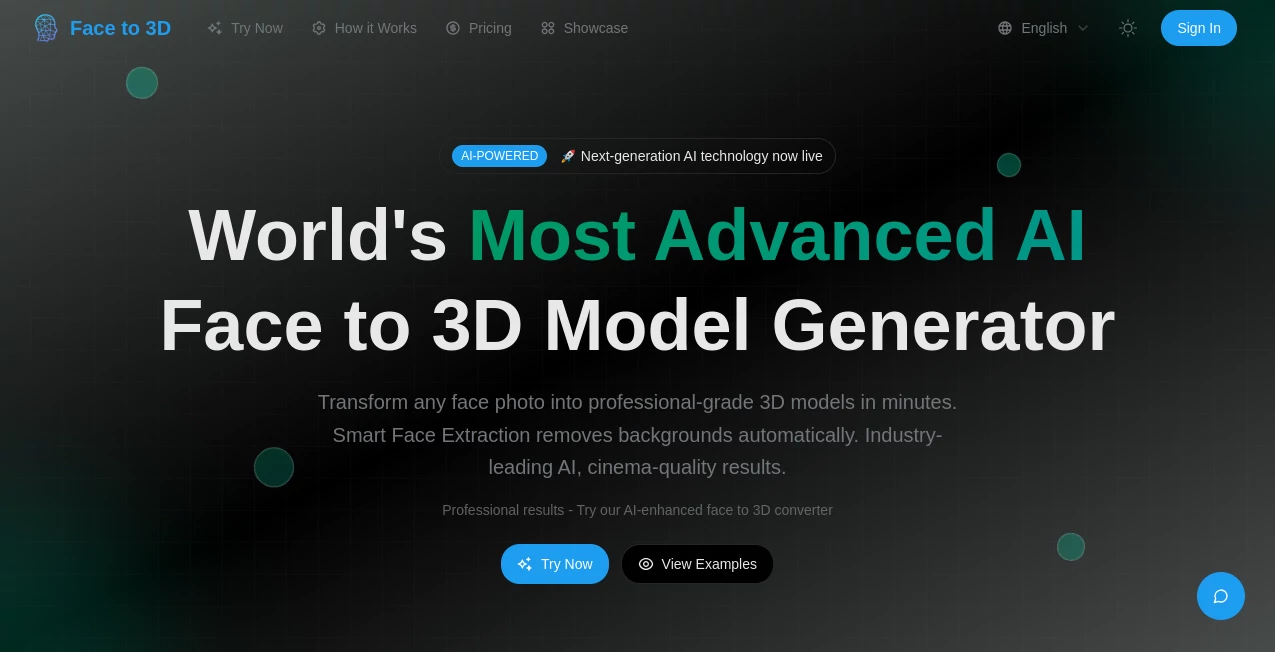
What is FaceTo3D?
There’s a quiet thrill in seeing a flat portrait suddenly gain depth and personality—eyes that follow you, cheekbones that catch light just right, all from a single snapshot. This tool captures that moment beautifully, letting anyone pull a lifelike 3D head out of an ordinary photo in seconds. I once fed it a candid shot of my niece laughing, and the result had her unmistakable grin preserved in three dimensions; it felt personal and surprisingly real, like she was right there in the model viewer.
Introduction
What makes this stand out is how little it asks of you: no need for perfect studio lighting, multiple angles, or even a neutral expression. Just drop in one clear face photo and it builds a head with proper topology, realistic skin tones, and subtle expressions that carry over naturally. Creators who’ve tried it often say it’s the fastest way they’ve found to get usable 3D faces for avatars, game characters, or virtual try-ons. The models come out clean and rigged-ready, which saves so much cleanup time that it almost feels unfair to older workflows.
Key Features
User Interface
The page greets you with a large, friendly upload area—no account nagging upfront, just drop your photo and watch. Once processing finishes, a smooth 3D viewer spins up with simple orbit controls and a few export buttons underneath. Everything stays on one screen; no hidden menus or confusing steps. It’s the kind of design that lets you stay in the creative flow instead of fighting the interface.
Accuracy & Performance
The face reconstruction holds up impressively well even with casual selfies—symmetry stays natural, ears and hairlines don’t drift, and the skin texture feels organic rather than plastic. Generation usually wraps in under 30 seconds, sometimes faster on good inputs. In my own tests, portraits taken in natural daylight came back with lighting and shadow details that matched the original photo almost perfectly.
Capabilities
It delivers manifold, quad-based meshes with decent topology, ready for subdivision or direct import into most 3D software. Exports include GLB (with baked textures), OBJ (geometry + MTL), and FBX (with basic rigging hints). The models carry over expression cues from the input photo, so a smiling shot keeps the smile, which is surprisingly useful for character work or animation tests.
Security & Privacy
Uploads are processed quickly and not stored permanently; once you download your model the image is gone from their servers. There’s no forced login for basic use, so you’re not leaving a trail unless you choose to. It’s a respectful approach that lets you experiment freely without second thoughts.
Use Cases
Indie animators use it to prototype character heads from concept sketches, skipping weeks of manual sculpting. VR avatar creators drop in selfies and get heads that feel personal right away. Cosplay builders scan reference photos to test makeup and wig placements in 3D before committing. Even portrait photographers offer clients a quick 3D keepsake from their session shots—small touches like that turn one-time services into memorable extras.
Pros and Cons
Pros:
- Surprisingly good results from single casual photos—no need for perfect conditions.
- Clean topology and usable UVs that actually work in downstream tools.
- Multiple export formats covering most common pipelines.
- No signup pressure for trying it out.
Cons:
- Heavily occluded faces or extreme angles can produce artifacts (though still better than most single-shot tools).
- Hair detail remains basic—fine strands often simplify into broader shapes.
- Free tier limits the number of generations per day.
Pricing Plans
You can start without spending anything—enough daily credits to play seriously and see the quality. When you want more runs, unlimited access, or priority queue during busy times, the paid tiers are straightforward and reasonably priced. No complicated feature gates; it’s mostly about volume and speed once you move past the free allowance.
How to Use It
Open the page, drag in a photo (or use the picker), make sure the face is reasonably frontal and well-lit, then hit generate. Wait a short while, rotate the preview to check the result, and download in your preferred format. For better outcomes, crop tightly around the head beforehand and avoid heavy shadows across the face. That’s it—simple enough to do while waiting for coffee.
Comparison with Similar Tools
Many single-image 3D face generators struggle with topology or produce overly smoothed results that need heavy retopo later. This one prioritizes clean, usable meshes with decent edge flow right out of the gate, which saves a surprising amount of time in real projects. It sits comfortably between quick toy converters and heavy professional pipelines—more capable than the former, far less intimidating than the latter.
Conclusion
It’s rare to find a tool that makes something as technical as 3D face reconstruction feel approachable and genuinely fun. The quality-to-effort ratio is excellent, and the models come out ready to work with rather than fight against. Whether you’re mocking up a character, testing a digital double, or just playing with family photos, it delivers that satisfying “wow, that actually looks like them” moment more often than not. Give it a photo you like—the result might surprise you.
Frequently Asked Questions (FAQ)
How many photos do I need?
Just one good frontal shot works well; extra side views improve detail but aren’t required.
What file formats can I export?
GLB (with textures), OBJ + MTL, and FBX—covers most common needs.
Can I use the models commercially?
Yes, you own the output and can use it however you like.
Does it handle glasses or hats?
Reasonably well if they don’t obscure too much of the face; heavy occlusion can cause artifacts.
Is there a daily limit on free use?
Yes, a reasonable number of generations per day—plenty for testing and small projects.
Photo & Image Editor , AI Design Generator , AI 3D Model Generator , AI Image to 3D Model .
These classifications represent its core capabilities and areas of application. For related tools, explore the linked categories above.
FaceTo3D details
Pricing
- Free
Apps
- Web Tools
Categories

FaceTo3D Alternatives Product

AI Signature…

FLUX 2
AI 3D World

Nano Banana …

SAM 3D
Nano Banana …

ImageKontext…

Beardless Fi…

insMind
