🧠 AI Quiz
Think you really understand Artificial Intelligence?
Test yourself and see how well you know the world of AI.
Answer AI-related questions, compete with other users, and prove that
you’re among the best when it comes to AI knowledge.
Reach the top of our leaderboard.


















Beel

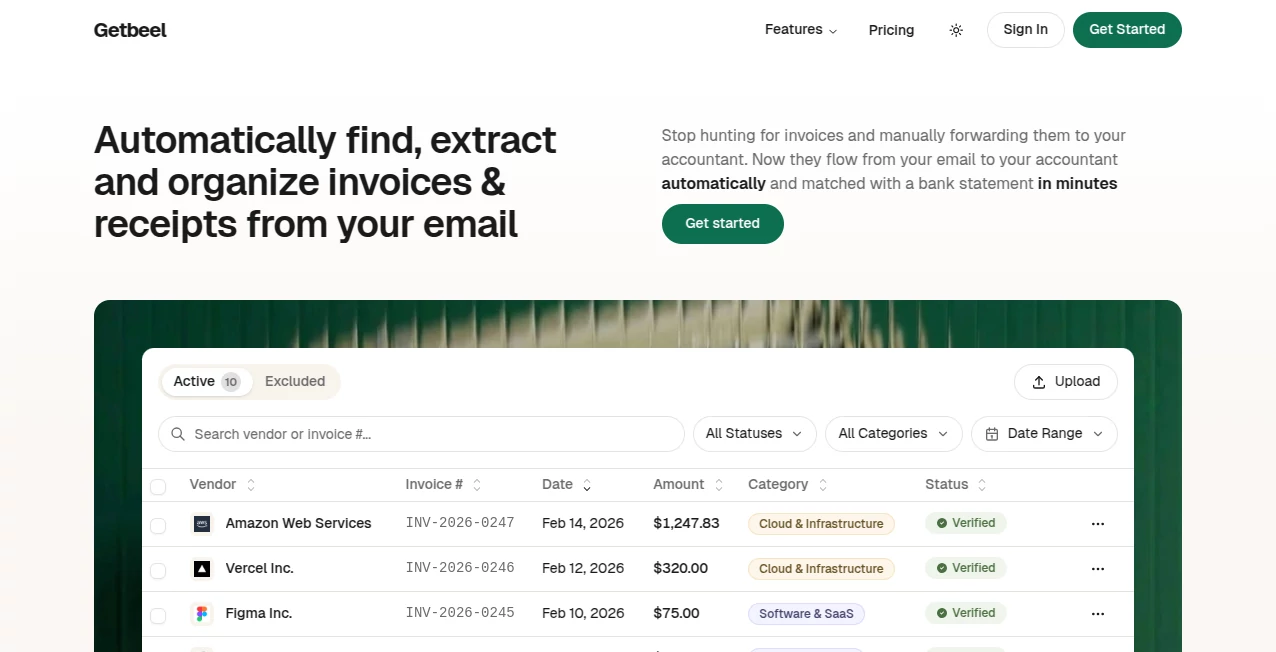
What is Beel?
Building an email list the old way—long opt-in forms, generic freebies, endless tweaks—feels like pushing a boulder uphill. This tool flips that completely. You describe what your audience wants in plain English, and it generates a high-converting lead magnet (PDF guide, checklist, template, mini-course, whatever fits) in minutes, complete with beautiful design and ready-to-use opt-in page. I’ve seen creators go from “my list is stuck at 300” to adding 50–100 new subscribers a week after launching one thoughtful magnet made here. It’s not magic; it’s just smart, fast, and surprisingly good at understanding what people actually download.
Introduction
Most creators know email is still king for real business ownership, but actually growing the list feels painful. Generic swipe files and Canva templates rarely convert, and custom design takes forever. This platform bridges that gap beautifully: it turns your knowledge into polished, audience-specific lead magnets without you touching design software or copywriting from scratch. Submit a short description of your niche and offer, pick a style, and get a complete package—content, visuals, opt-in copy, thank-you page, even delivery email. It’s become the quiet weapon for newsletter writers, course creators, coaches, and solopreneurs who want serious list growth without burning out on production.
Key Features
User Interface
The flow is dead simple and honestly refreshing. A single prompt box where you describe your audience and what problem you solve, a few dropdowns for magnet type and tone, then “Generate.” Seconds later you’re looking at a full preview: cover, table of contents, formatted content, opt-in headline & copy, thank-you page. Everything is editable inline if you want to tweak wording or swap images. No learning curve, no dashboard overwhelm—just get in, create, export.
Accuracy & Performance
The AI really gets niche language and pain points—whether you’re in fitness, indie hacking, parenting, or B2B SaaS, the content feels written for your people, not generic filler. Design quality punches way above “AI-generated”—clean layouts, thoughtful typography, on-brand color suggestions. Generation is fast (under 60 seconds for most magnets), and outputs are production-ready: PDF + HTML opt-in page + copy-paste email sequences. Consistency across niches is impressive; it rarely feels like boilerplate.
Capabilities
Generates full lead magnets (PDFs 5–25 pages), matching opt-in pages, thank-you pages, delivery emails, social media promo snippets, and even follow-up email sequences. Supports checklists, cheat sheets, templates, mini-guides, planners, resource lists, and more. Multiple design themes (minimal, bold, cozy, professional, etc.), customizable fonts/colors, and export in PDF + HTML + raw copy. It also suggests titles, subtitles, and hooks tailored to your audience. Everything is 100% yours to edit and brand.
Security & Privacy
Your prompts and generated content stay private—no training on user data, no public gallery unless you choose to share. Exports download directly to your device; nothing is stored long-term on their servers unless you opt into saving projects. For creators protecting niche strategies or client-facing content, that clean boundary feels right.
Use Cases
A newsletter writer in personal finance creates a “Debt Payoff Cheat Sheet” and adds 80 subscribers in the first week from one pinned tweet. A yoga teacher generates a “7-Day Morning Stretch Guide” and sees waitlist sign-ups triple. An indie hacker launches a “Notion Setup Template for Solopreneurs” and grows from 200 to 1,200 subscribers in two months. A course creator bundles a free “Pre-Launch Checklist” and fills their beta cohort faster than ever. Wherever trust + value = email sign-ups, this tool quietly accelerates the flywheel.
Pros and Cons
Pros:
- Magnets feel genuinely useful and niche-specific, not generic fluff.
- End-to-end package (content + design + opt-in + delivery) saves massive time.
- High perceived value—recipients treat it like a real product.
- Fast iteration: generate, tweak, relaunch in under 10 minutes.
- Affordable pricing for the hours it saves every month.
Cons:
- Very niche or highly technical topics may need heavier editing.
- Unlimited generations and advanced branding live in higher plans.
- Requires decent prompt clarity for best results (though examples help).
Pricing Plans
Free tier lets you generate 1–2 solid magnets per month—enough to test and see conversion lifts. Paid plans start low and unlock unlimited generations, premium templates, custom branding, priority support, and advanced export options (editable source files, multi-language support). Many creators say the Starter plan pays for itself after one good launch. Flexible monthly or annual billing keeps it accessible.
How to Use GetBeel
Sign up (free tier available), describe your audience and the problem you solve (“busy moms who want quick healthy dinners” or “indie hackers building side projects”). Choose magnet type (guide, checklist, template, etc.) and tone. Hit generate—review content, tweak headlines or sections if needed, approve design. Download the full package: PDF magnet, HTML opt-in page, copy-paste email sequence. Upload opt-in page to your site/hosting, share the link, and watch sign-ups roll in. Iterate by generating new versions for different audience segments.
Comparison with Similar Tools
Many AI content tools spit out text walls with no design or conversion focus. Others offer pretty templates but force you to write everything yourself. This one delivers the complete lead-capture package—content + visuals + opt-in flow—in minutes, tuned specifically for email list growth. It sits in a sweet spot: more polished and conversion-oriented than raw AI writers, more automated and strategic than design-only tools.
Conclusion
Email lists remain one of the few true assets creators fully own. Growing them shouldn’t require endless design work or copywriting burnout. This platform removes those roadblocks, letting you focus on what you’re best at—creating value—while it handles the packaging and delivery of that value as a high-converting magnet. When your list starts growing steadily from one thoughtful freebie, the compounding effect becomes obvious. For anyone serious about audience ownership, this is one of the smartest shortcuts available.
Frequently Asked Questions (FAQ)
How long does generation take?
Usually 30–90 seconds for a full magnet + opt-in package.
Can I edit the content after generation?
Yes—everything is fully editable before you download.
Do I need my own hosting for the opt-in page?
Yes, but it’s simple HTML—works with Carrd, Gumroad, ConvertKit landing pages, etc.
Can I use these magnets commercially?
Absolutely—100% your content to give away, gate, or repurpose.
What if my niche is very specific?
The more detail you give in the prompt, the better it adapts. Examples and iterations help a lot.
AI Creative Writing , AI Content Generator , AI Digital Marketing Generator , AI Marketing Plan Generator .
These classifications represent its core capabilities and areas of application. For related tools, explore the linked categories above.
Beel details
This tool is no longer available on submitaitools.org; find alternatives on Alternative to Beel.
Pricing
- Free
Apps
- Web Tools
Categories

Beel Alternatives Product

SupaTraffic

Humanize AI …

Diss Track G…

Fuser Studio

SocialRails

Z-Image

PromptBuilder

Marketbetter…

Jasper