
🧠 AI Quiz
Think you really understand Artificial Intelligence?
Test yourself and see how well you know the world of AI.
Answer AI-related questions, compete with other users, and prove that
you’re among the best when it comes to AI knowledge.
Reach the top of our leaderboard.


















GPT Image 1.5
What is GPT Image 1.5?
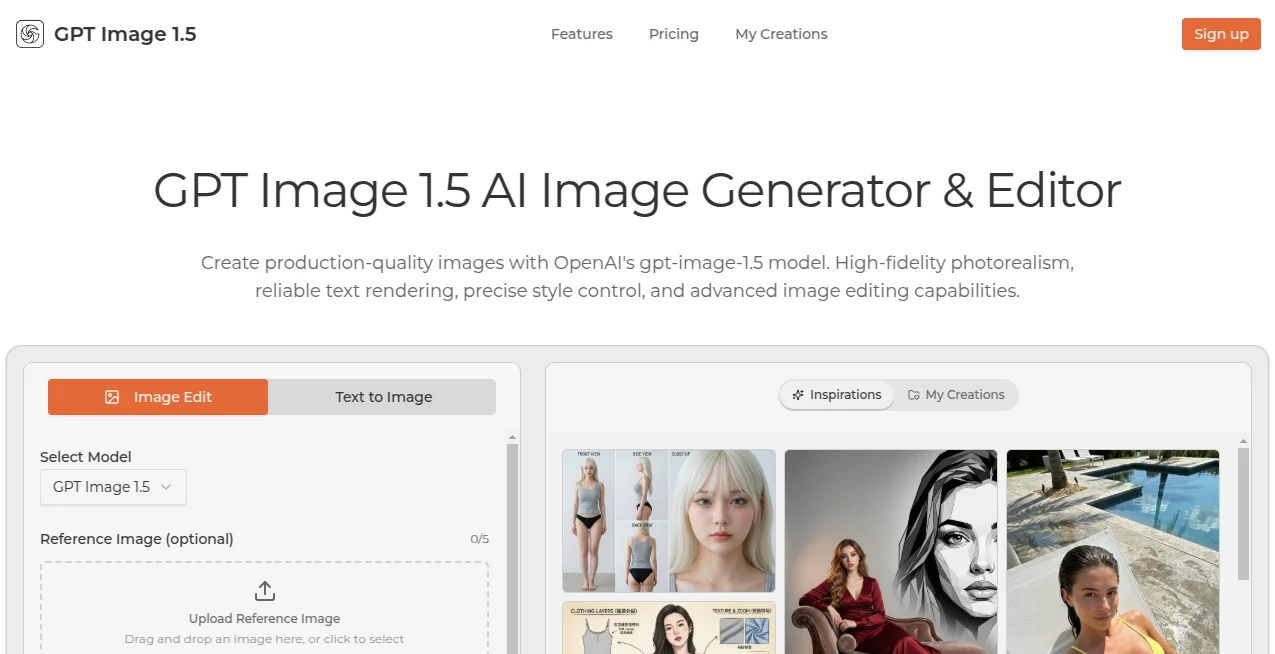
There's something downright thrilling about describing a wild idea in plain words and watching it materialize into a crisp, professional image that looks like it took hours in a studio. This tool nails that feeling every time, powered by OpenAI's latest wizardry that understands nuances like no other—whether you're tweaking a photo or building from scratch. I've tinkered with plenty of generators, but this one stands out for how reliably it delivers outputs you can use right away, no heavy fixes needed.
Introduction
When OpenAI dropped their newest image model late last year, it flipped the script on what we expect from AI visuals—sharper details, better text that actually reads right, and edits that feel surgical without wrecking the rest. This platform wraps that power in a straightforward web app, letting you dive into text-to-image or full-on editing with reference uploads that guide the magic perfectly. It's caught on fast among designers and marketers who need production-ready stuff quick, sharing wins like flawless infographics or character sheets that stay consistent across iterations. For anyone who's wrestled with prompts that go sideways, this feels like a breath of fresh air—reliable, fast, and packed with that high-fidelity polish that makes your work shine.
Key Features
User Interface
It keeps things delightfully simple: a big prompt box up top, spots to drag in references (up to five if you're feeling fancy), a quality slider, and a generate button that doesn't make you hunt. Switch between create and edit modes with a toggle, and your creations stack neatly for easy revisits or hovers to peek at prompts. My first session felt like chatting with a skilled artist who gets it—type a structured description, add a ref photo, and results pop up clean and zoomable, ready for download without fuss.
Accuracy & Performance
The way it clings to your instructions is uncanny, handling long, detailed prompts with multiple elements without dropping the ball on lighting or composition. Generations fly—often seconds for simpler asks—and the text rendering? Finally, something that nails small fonts or dense copy without turning it into gibberish. In my trials, it aced style transfers and object swaps that left other tools looking clumsy, delivering that photoreal punch with natural shadows and details intact.
Capabilities
Beyond basic generations, it excels at precise edits—like swapping outfits while keeping faces and poses spot-on, or removing distractions seamlessly. Throw in references for character consistency across shots, craft UI mockups that look clickable, or build comic strips with readable dialogue. Export high-res in your pick of formats, perfect for print or web, and the iterative chat-like refinement keeps context so tweaks build on wins without starting over.
Security & Privacy
Creations stay private on paid tiers, with storage you control and no unnecessary sharing—ideal for commercial gigs or sensitive concepts. It follows solid standards, giving that quiet confidence when uploading client assets or personal refs, knowing things are handled responsibly without the usual data worries.
Use Cases
Designers mock up app interfaces that fool stakeholders into thinking they're screenshots. Marketers whip infographics loaded with charts and text that read crystal clear. Comic enthusiasts turn scripts into paneled stories with recurring heroes that don't shift faces mid-arc. E-commerce folks stage virtual try-ons or clean product shots, saving shoots while boosting conversions. Even writers visualize book covers or scenes that capture the mood perfectly, sparking the next chapter.
Pros and Cons
Pros:
- Unrivaled prompt following that gets complex ideas right on the first or second try.
- Flawless text in images, a game-changer for posters or branded visuals.
- Surgical edits that preserve identity and details beautifully.
- Fast and flexible, with reference support that elevates everything.
Cons:
- Credit-based system means watching usage on heavy days.
- Best results come from thoughtful prompts—vague ones still need nudging.
Pricing Plans
Dip in affordably with Basic around sixteen bucks monthly for a solid stack of credits and no watermarks. Pro at twenty bumps that up with priority speed and support, the sweet spot for regulars. Max at forty handles high-volume needs with plenty of room to experiment. Commercial licenses across the board, and the value hits hard when you factor in the quality jump over free alternatives.
How to Use GPT Image 1.5
Start with a clear prompt—background first, then subject, details, and style. Upload refs if you've got 'em for guidance, pick quality, and generate. Not quite? Refine with a follow-up like "warm up the lighting" while keeping history. Hover past wins for inspiration, download in PNG or whatever suits, and build galleries of favorites for quick access next time.
Comparison with Similar Tools
It pulls ahead with that OpenAI edge—crisper text, better consistency, and edits that feel intuitive where others stumble or overdo. Faster than many heavies, yet more precise on instructions, making it the pick for pros who need dependable outputs over endless variations.
Conclusion
This one's a quiet powerhouse, blending raw capability with everyday ease to make visual creation feel exciting again. Whether you're prototyping ideas or polishing finals, it delivers that rare mix of speed and sophistication that turns good concepts into great assets. Give it a spin; the difference shows in every pixel.
Frequently Asked Questions (FAQ)
How good is the text in images?
Top-tier—handles small, dense, or formatted copy reliably, no more blurry nonsense.
Can I edit existing photos?
Yes, with precision that keeps faces and vibes intact while changing what you want.
Reference images help how much?
A ton—for styles, compositions, or consistency across generations.
Commercial use okay?
Fully licensed on paid plans, go wild with client work.
Speed for complex prompts?
Still quick, with higher quality settings for when details matter most.
AI Text to Image , AI Photo & Image Generator , Photo & Image Editor , AI Art Generator .
These classifications represent its core capabilities and areas of application. For related tools, explore the linked categories above.
GPT Image 1.5 details
Pricing
- Free
Apps
- Web Tools
Categories

GPT Image 1.5 Alternatives Product

insMind

Banana AI

Flux 2 Cloud

Nano Banana 2

AI Image Edi…

BananaPro

NanoEditor
Nano Banana …

Grok Imagine
