🧠 AI Quiz
Think you really understand Artificial Intelligence?
Test yourself and see how well you know the world of AI.
Answer AI-related questions, compete with other users, and prove that
you’re among the best when it comes to AI knowledge.
Reach the top of our leaderboard.


















Invoice Tracker

What is Invoice Tracker?
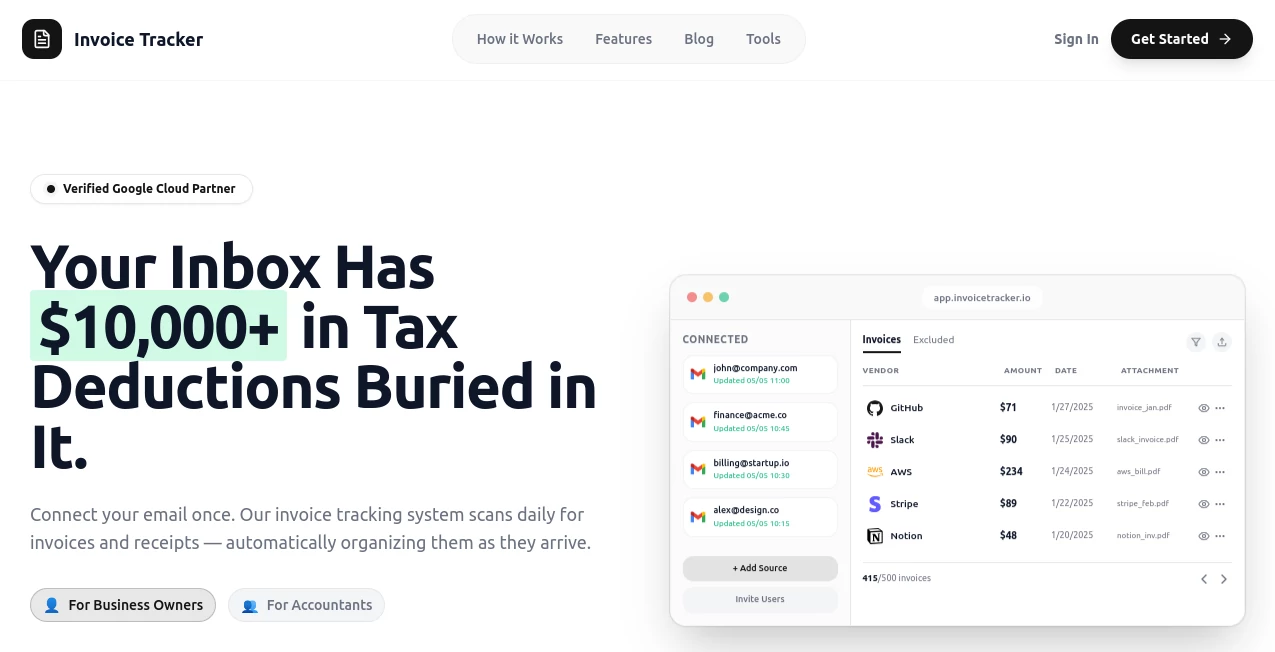
Keeping tabs on recurring bills and one-off invoices can feel like herding cats, but this platform turns that chaos into something remarkably straightforward. It pulls everything into one tidy spot, spotting patterns and flagging upcoming charges before they sneak up on you. I've started forwarding my email receipts there, and suddenly those forgotten subscriptions aren't draining the account anymore—it's like having a vigilant friend watching your wallet.
Introduction
Built for anyone juggling multiple payments—freelancers, small teams, or just folks tired of surprise charges—this tool shines with its smart extraction from emails and attached files. Connect your inbox, and it quietly scans for invoices, categorizing them and offering insights on spending trends. What stands out is how it blends automation with clear overviews, helping you cancel unused services or negotiate better rates without digging through folders. In a time when subscriptions pile up fast, it's a practical lifeline that saves both money and headaches.
Key Features
User Interface
The dashboard greets you with a calm layout—lists of upcoming dues, recent additions, and spending breakdowns that load quick and make sense at a glance. Filters and search feel intuitive, and adding manual entries is a breeze if something slips the net. It's the sort of design that doesn't demand tutorials; you jump in and start organizing right away.
Accuracy & Performance
Extraction pulls key details like amounts, dates, and vendors with impressive reliability, even from cluttered PDFs or email threads. It processes new forwards promptly, updating your view without delays, and the insights spot recurring patterns accurately to forecast monthly outflows.
Capabilities
Automatic invoice detection from connected emails, categorization of subscriptions, reminders for due dates, and visual reports on spending habits. Export options for tax time, manual overrides for custom tracking, and alerts for unusual charges keep everything under control.
Security & Privacy
Email integration uses secure read-only access, with data encrypted and no unnecessary sharing. You control connections and deletions, ensuring sensitive financial info stays private—a solid approach that builds trust for everyday use.
Use Cases
Freelancers monitor client payments and tool subscriptions, catching overlaps before budgets tighten. Households track streaming services and utilities, identifying cancels that free up cash monthly. Small businesses oversee vendor bills and software licenses, gaining clarity for better negotiations or switches.
Pros and Cons
Pros:
- Seamless email pull that catches most invoices automatically.
- Clear insights revealing hidden spending leaks.
- Gentle reminders preventing late fees or forgotten renewals.
- Straightforward setup that fits busy schedules.
Cons:
- Relies on email forwards for non-connected inboxes.
- Deeper analytics might grow with more advanced tiers.
Pricing Plans
A free starting point covers core tracking for personal use, with premium options unlocking unlimited connections, advanced reports, and team shares at reasonable monthly rates. It's structured to grow with you, keeping essentials accessible while rewarding heavier users with extras.
How to Use Invoice Tracker
Connect your main email or forward receipts to the dedicated address, watch it populate your dashboard with extracted details. Categorize as needed, set reminders for big ones, and review the insights tab for trends. Add manual entries for cash payments, export reports come tax season—simple steps that build into serious savings over time.
Comparison with Similar Tools
Unlike spreadsheet juggles or basic banking apps that miss the nuance, this one focuses squarely on invoice flow with smarter extraction and proactive nudges. It edges out general finance trackers by specializing in subscriptions and bills, offering that targeted clarity without the bloat.
Conclusion
This tool brings welcome order to the often-overlooked world of recurring payments, empowering you to take control without constant vigilance. It's a thoughtful companion for smarter financial habits, turning potential oversights into opportunities for savings and peace of mind. Give it a spin if you're ready to tame the bill beast once and for all.
Frequently Asked Questions (FAQ)
Does it connect to all email providers?
Major ones like Gmail and Outlook integrate directly, with forwards working for others.
How accurate is the extraction?
Highly reliable for standard invoices, with easy manual fixes for oddballs.
Can I track non-subscription invoices?
Yes—one-offs fit right in alongside recurring ones.
Is there a mobile app?
The web version works beautifully on phones, with quick checks anytime.
What about exporting data?
CSV or PDF reports ready for accountants or personal records.
AI Documents Assistant , AI Accounting Assistant , AI Productivity Tools .
These classifications represent its core capabilities and areas of application. For related tools, explore the linked categories above.
Invoice Tracker details
This tool is no longer available on submitaitools.org; find alternatives on Alternative to Invoice Tracker.
Pricing
- Free
Apps
- Web Tools
Categories

Invoice Tracker Alternatives Product

ResumeFreePro

TO MD

Ryne AI

AntForms

PDFgear

Markdown to …

YouMind

Remove Handw…

Alai