
🧠 AI Quiz
Think you really understand Artificial Intelligence?
Test yourself and see how well you know the world of AI.
Answer AI-related questions, compete with other users, and prove that
you’re among the best when it comes to AI knowledge.
Reach the top of our leaderboard.


















Knowmax AI

What is Knowmax AI?
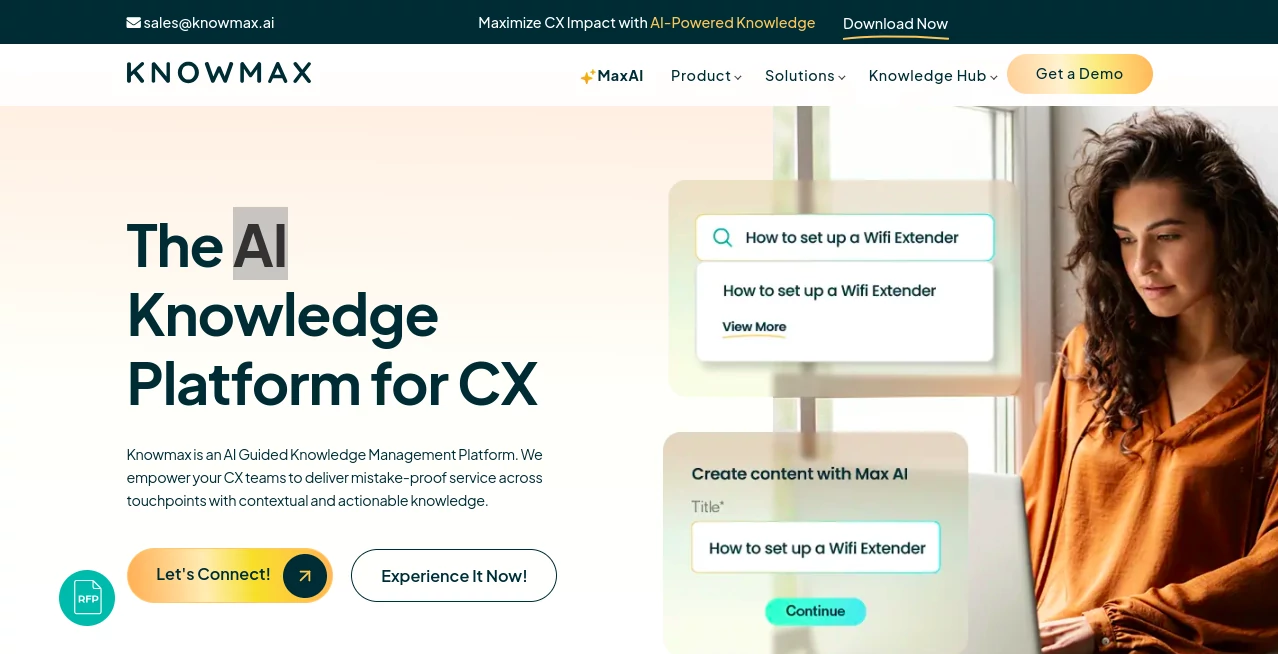
Knowmax steps in as a game-changer for teams handling customer interactions, blending smart tech with practical tools to keep everyone on the same page. This platform turns scattered info into a smooth flow of guidance, helping agents resolve issues faster and customers find answers on their own. It's the kind of setup that feels like having a sharp-minded coach in your corner, whispering just the right next step when things get tricky.
Introduction
Knowmax came about from the real headaches of customer service folks drowning in outdated docs and disjointed systems, dreamed up by a team that knew the drill all too well. It launched with a bang, quickly picking up steam among big names in telecom, banking, and beyond, who were tired of the same old slow resolutions. Picture this: a contact center where agents grab the perfect response in seconds, or customers sort their own snags without a call— that's the world it builds. Over the years, it's fine-tuned based on frontline feedback, evolving into a hub that not only stores knowledge but makes it dance to the rhythm of daily chaos, cutting down wait times and boosting those satisfaction scores that keep bosses smiling.
Key Features
User Interface
The dashboard hits you with a clean sweep, no overwhelming menus—just a search bar up top that feels like chatting with a buddy who knows your business inside out. Tabs for workflows and guides slide in easy, with drag-and-drop spots for building trees that guide decisions without a single line of code. Even the Chrome add-on slips right into your browser, popping open chats like tabs in a well-organized notebook, keeping things fluid whether you're juggling three conversations or ten.
Accuracy & Performance
When it pulls up info, it's spot-on, sifting through the noise to serve up exactly what fits the moment, often shaving minutes off each handle time. It runs steady under load, even in peak-hour rushes, with responses that adapt on the fly to keep things consistent. Teams report hitting those first-contact wins more often, thanks to the way it anticipates the twists in a customer's story, turning potential fumbles into smooth sails.
Capabilities
From weaving complex procedures into simple step-by-step paths to crafting visual breakdowns that make troubleshooting a breeze, it covers the bases with flair. Hook it to your CRM for personalized nudges, spin up self-help pages that work across chats, apps, or calls, or even run quick quizzes to sharpen agent skills. The migration magic alone is a standout, auditing old files and slotting them in without the usual mess, so you hit the ground running with everything in one spot.
Security & Privacy
It locks down tight with the big certifications—think GDPR, SOC, and HIPAA nods—that let you breathe easy when sensitive chats are in play. Data stays where it belongs, with controls that let you decide who sees what, and regular sweeps to keep things fresh and safe. In fields like finance or health, where one slip can sting, this setup earns quiet nods for handling the heavy stuff without a hitch.
Use Cases
In telecom hubs, it guides techs through outage fixes with visual maps that cut call times in half, while banks lean on it for compliant query paths that keep regulators happy. E-commerce crews use the self-serve bits to handle returns solo, freeing lines for the tough stuff, and insurance pros map claims with decision branches that spot patterns early. Even in media outfits, it's the go-to for billing blues, turning frustrated callers into quick closes without the back-and-forth.
Pros and Cons
Pros:
- Slashes search times and boosts self-serve rates, easing the load on teams.
- No-code builds make it a snap for non-techies to shape workflows.
- Visual aids and integrations turn clunky processes into smooth rides.
- Solid security badges that fit right into regulated worlds.
Cons:
- Initial setup might take a beat to sync with older systems.
- Heavy on the customization side, which can overwhelm small shops at first.
- Relies on clean data inputs to shine, so tidy-up work upfront pays off.
Pricing Plans
Knowmax keeps the details close, tailoring quotes to your scale, but expect tiers that start modest for growing teams and ramp up for enterprise spreads with all the bells like unlimited users and custom integrations. They often toss in a demo or trial to let you feel the fit before committing, making the leap less of a blind jump and more of a measured step.
How to Use Knowmax
Start by linking your sources to pull everything into one pool, then use the no-code builder to sketch out your first decision path—say, for a common query like billing mix-ups. Test it with a quick run, tweak the visuals for clarity, and push it live across channels. For agents, the extension becomes your sidekick in the browser, while self-serve pages go out to apps or sites. Keep it fresh with regular audits, and watch as those metrics climb from the first week.
Comparison with Similar Tools
Next to broad helpdesk giants like Zendesk, Knowmax zeros in on the knowledge angle with deeper workflow smarts, though those might edge out in sheer plugin variety. Against pure search setups, it layers on the guided paths and visuals that make a real difference in sticky spots, but could feel lighter if you're after all-in-one ticketing. It strikes a sweet balance for CX-focused crews, where the emphasis on actionable info outshines the generalists.
Conclusion
Knowmax wraps up the scramble of scattered smarts into a toolkit that truly empowers, letting teams focus on the human side of service rather than the hunt for answers. It's the unsung hero that turns good interactions into great ones, proving that a little guided glow can light up the whole operation. As customer worlds keep spinning faster, this platform stands ready to keep pace, one smart step at a time.
Frequently Asked Questions (FAQ)
How does it handle different channels?
It syncs across calls, chats, apps, and more, keeping guidance consistent no matter the touchpoint.
Is there a learning curve for setup?
The no-code side keeps it gentle, but a quick walkthrough gets most rolling smooth.
What about integrating with my CRM?
APIs make it a breeze to hook into Salesforce or Zendesk, pulling in customer bits on cue.
Can it work for small teams?
Absolutely, with flexible scales that fit from startups to sprawls.
How secure is the data flow?
Top-tier certs like GDPR and HIPAA keep everything locked and compliant.
AI Knowledge Base , AI Knowledge Management , AI Workflow Management , AI SOP .
These classifications represent its core capabilities and areas of application. For related tools, explore the linked categories above.
Knowmax AI details
This tool is no longer available on submitaitools.org; find alternatives on Alternative to Knowmax AI.
Pricing
- Free
Apps
- Web Tools
Categories

Knowmax AI Alternatives Product

vivgrid

LaunchBoard

Meet Submind

UPDF AI

Harvey

Miro

4ga Boards

Chatref

Somnio
