
🧠 AI Quiz
Think you really understand Artificial Intelligence?
Test yourself and see how well you know the world of AI.
Answer AI-related questions, compete with other users, and prove that
you’re among the best when it comes to AI knowledge.
Reach the top of our leaderboard.


















LensGo AI

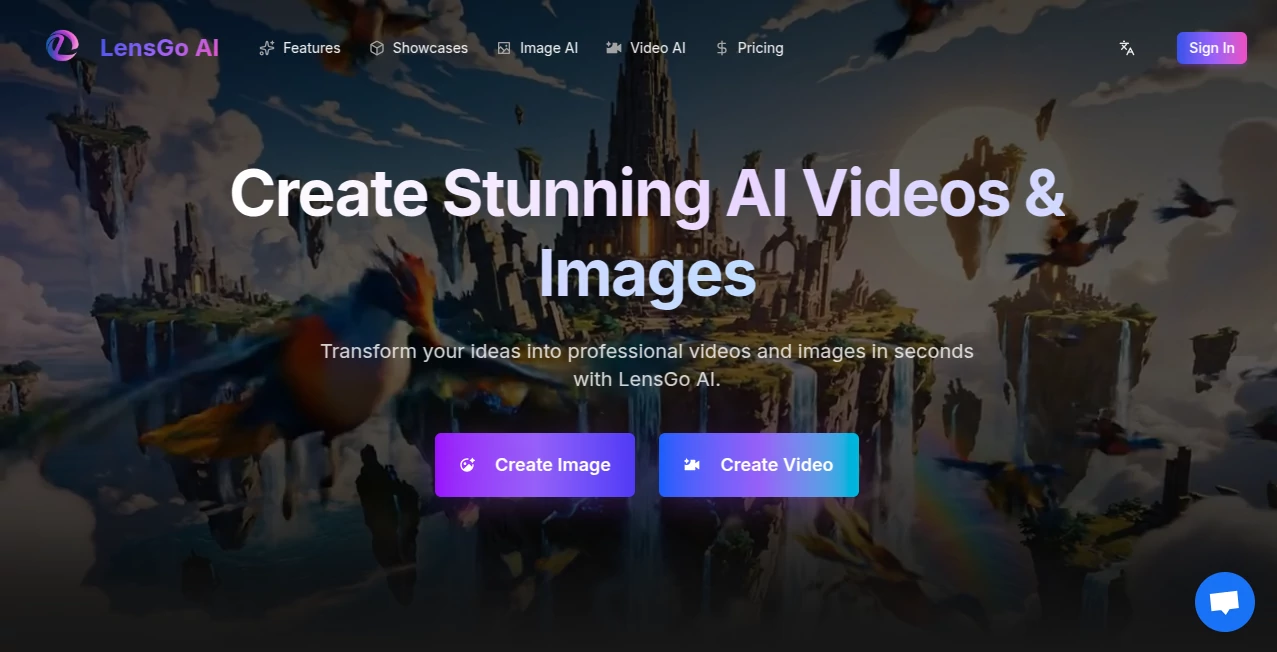
What is LensGo AI?
There's something genuinely exciting about typing a few words and watching a full cinematic clip unfold before your eyes—smooth motion, perfect lighting, characters that stay true from scene to scene. This platform makes that magic feel almost ordinary, letting anyone craft professional-looking videos and anime-inspired art without touching a single editing timeline. I tried it myself last week with a quick prompt about a rainy city street at night, and the result was so spot-on I almost forgot I hadn't filmed it. It's the kind of tool that turns "what if" thoughts into shareable pieces in minutes.
Introduction
In a sea of AI generators that promise the world but deliver half-baked clips, this one stands out by focusing on quality over quantity. It takes your text ideas and builds multi-scene videos with consistent characters, natural transitions, and even audio that syncs to the rhythm—plus a dedicated anime art mode that nails those vibrant, detailed illustrations. What hooked me was how approachable it is: no steep learning curve, no endless tweaking, just describe your vision and watch it come alive. Creators I've spoken with keep coming back because it saves hours (sometimes days) compared to traditional methods, yet the output looks like it came from a pro studio. It's built for the moment when inspiration strikes and you need results fast, without compromising on polish.
Key Features
User Interface
The dashboard keeps things dead simple: drop your prompt in a big box, pick a style or upload a reference, and hit go. Options for resolution, duration, and mode are right there without cluttering the screen. I appreciate how it feels intuitive from the first click—no buried menus or confusing icons. Even when I'm rushing, I can tweak a prompt and regenerate without losing my place. It's designed for real people who want to create, not wrestle with software.
Accuracy & Performance
Consistency is where it really wins—characters look the same across shots, movements flow naturally, and details like lighting or clothing stay spot-on. It handles complex prompts well, avoiding those weird artifacts that ruin the illusion. Generations are surprisingly quick, often under a minute for shorter clips, and the quality holds up even on higher resolutions. From my own tests, it rarely needs a second try if your description is clear, which saves a ton of time and frustration.
Capabilities
It shines at turning text into multi-shot videos with cinematic flair, plus a separate mode for anime art that's packed with vibrant colors and intricate designs. You can upload references to guide the look, control duration up to a solid length, and choose from photorealistic to stylized vibes. The video side handles motion and transitions beautifully, while the anime generator delivers illustrations that feel hand-drawn yet perfectly consistent. It's versatile enough for everything from social media shorts to concept art, all without needing extra software.
Security & Privacy
Your creations stay yours—processed securely and never shared without permission. The platform follows standard privacy practices, keeping inputs and outputs private, which matters a lot when you're experimenting with personal or client ideas. It's reassuring to know your wildest prompts aren't floating around somewhere.
Use Cases
Content creators use it to whip up engaging Reels or TikToks with custom visuals that match their brand. Marketers craft product teasers or explainer clips without hiring a crew. Anime fans generate character designs or scene concepts for fan projects or D&D campaigns. A friend in digital marketing told me she replaced stock footage with custom videos for her clients, saving hundreds per campaign. It's perfect whenever you need visuals fast but still want them to feel intentional and high-quality.
Pros and Cons
Pros:
- Videos look professional with smooth motion and consistent characters.
- Anime mode delivers stunning, detailed artwork that rivals hand-drawn pieces.
- Fast turnaround—great for quick iterations or tight deadlines.
- Simple enough for beginners, powerful enough for pros.
Cons:
- Free tier has limits, so heavy users will want to upgrade.
- Complex prompts might need a couple of tries to perfect.
Pricing Plans
It starts free with daily credits to play around and see the quality firsthand. Paid plans unlock unlimited generations, higher resolutions, and no watermarks—priced affordably so you can scale up without breaking the bank. The value feels right: you pay for the convenience and pro-level results, not endless tiers.
How to Use LensGo AI
Head to the dashboard, type your description in the prompt box (the more detail, the better), choose video or anime mode, and select any style or reference if you want. Hit generate and grab a coffee—the result appears in minutes. Preview it, tweak the prompt if needed, and download. I started with a simple "sunset beach anime scene" and ended up with something I'd proudly post. It's that straightforward.
Comparison with Similar Tools
While some generators produce single shots or struggle with motion, this one delivers true multi-scene videos with impressive consistency. Anime mode feels more authentic than many competitors, and the speed is noticeably better. It strikes a nice balance: powerful enough for serious creators, simple enough for casual use. You get pro results without the pro price tag or learning curve.
Conclusion
This platform makes video and anime creation feel like a natural extension of your imagination. It's fast, reliable, and produces work that looks far more expensive than it actually is. Whether you're building a portfolio, promoting something, or just playing with ideas, it's a tool that keeps delivering. Give it a try—you'll probably find yourself coming back more than you expect.
Frequently Asked Questions (FAQ)
How long are the videos?
Typically up to 5-10 seconds per generation, perfect for social media or teasers.
Can I upload my own images or clips?
Yes, use them as references to guide style or characters.
Is the free version usable?
Definitely—daily credits let you create solid work without paying.
Does it handle complex prompts?
Very well, especially with clear descriptions; it often nails them on the first try.
What about anime style specifically?
It's one of the strongest modes—detailed, vibrant, and consistent.
AI Photo & Image Generator , AI Anime Art , AI Video Generator , AI Text to Video .
These classifications represent its core capabilities and areas of application. For related tools, explore the linked categories above.
LensGo AI details
This tool is no longer available on submitaitools.org; find alternatives on Alternative to LensGo AI.
Pricing
- Free
Apps
- Web Tools
Categories

LensGo AI Alternatives Product
Veo 3.2 AI V…

Aura AI
seedance2-pro

KOOX AI

PicLumen AI …
AniFlow AI

AI Motion Co…

Seedance 2 V…

ModelsLab
