🧠 AI Quiz
Think you really understand Artificial Intelligence?
Test yourself and see how well you know the world of AI.
Answer AI-related questions, compete with other users, and prove that
you’re among the best when it comes to AI knowledge.
Reach the top of our leaderboard.


















MuseCraft.AI
What is MuseCraft.AI?
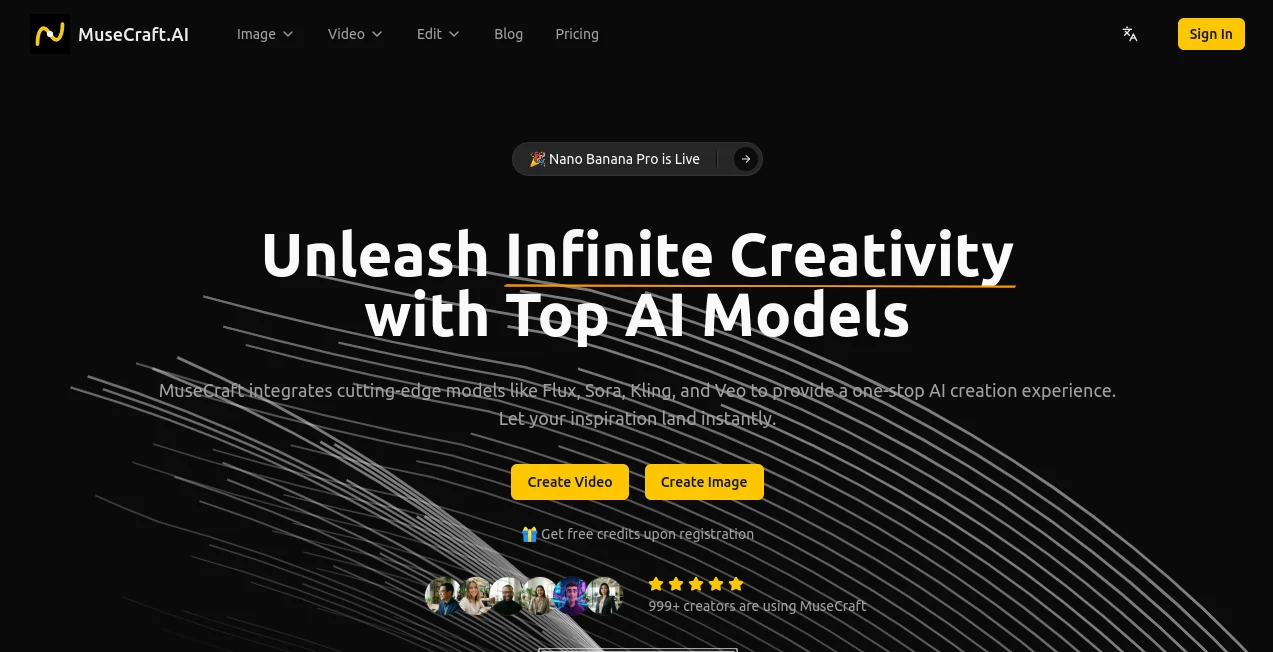
There's a real joy in firing off a wild idea and seeing it materialize as a crisp image or smooth video clip, all without juggling a dozen tabs or subscriptions. This platform gathers the best brains in AI under one roof, letting you play with powerhouse models that turn prompts into visuals worth sharing. I tried chaining a generated image straight into a video once, and the seamless flow had me grinning—it's the kind of effortless spark that keeps late-night experiments going strong.
Introduction
In a landscape cluttered with single-trick tools, this one stands apart by bundling elite options like Flux for razor-sharp images or Kling for fluid animations, all accessible with a shared credit pool. No more hopping sites or managing separate bills; just dive in and switch models mid-flow. Creators I've chatted with love how it cuts costs—one mentioned saving a chunk monthly by ditching individual plans—while delivering results that rival dedicated services. It's built for folks who crave variety without the hassle, turning scattered inspiration into a streamlined playground.
Key Features
User Interface
The dashboard feels like a well-organized studio: clear sections for images, videos, and edits, with direct links to specific models and simple prompts that guide without overwhelming. Uploads and generations happen in dedicated spots, previews load quick, and navigation keeps everything within reach. It's intuitive enough that a quick scan gets you creating, no steep dive required.
Accuracy & Performance
Outputs from these integrated models hold their own—detailed textures in stills, natural motion in clips, often nailing complex prompts on the first try. Generations zip along thanks to tuned infrastructure, with minimal waits even for high-res runs. The consistency across tools means less tweaking, more making.
Capabilities
Text-to-image with styles from Flux to Seedream, text-to-video cinematic clips via Sora or Runway, image-to-video animations that breathe life into statics using Kling or Hailuo. Toss in one-click background wipes for clean cuts and subtle skin smoothing for portraits. The real gem is chaining workflows—like crafting an image then animating it—without leaving the space.
Security & Privacy
Your projects stay contained, processed securely with the focus on giving you control over creations. It's straightforward handling that lets you experiment freely, especially handy for commercial tweaks or personal plays.
Use Cases
E-commerce sellers whip up product shots with perfect backgrounds removed, staging items in fresh scenes. Social posters generate quick clips for reels, blending text ideas with animated flair. Designers prototype visuals across models, testing styles before committing. Bloggers enhance portraits naturally or animate headers to draw eyes deeper.
Pros and Cons
Pros:
- All-star lineup in one spot, saving time and subscription sprawl.
- Smooth handoffs between image and video tasks.
- Handy edits like background removal that nail everyday needs.
- Free credits to start, easing into the full potential.
Cons:
- Credit-based, so heavy sessions add up over time.
- Depends on model availability, occasional queues for peaks.
Pricing Plans
Register for free credits to kick things off, then top up with a unified system that covers every model—no separate fees. Packs scale to your rhythm, keeping costs predictable while unlocking the full suite as ideas flow.
How to Use MuseCraft
Sign up for those starter credits, head to the image or video section, pick a model that catches your eye, and drop in your prompt or upload. Adjust basics like resolution, generate, and grab the result—or feed it forward for animation or edits. It's a loop that encourages tinkering, building from one creation to the next.
Comparison with Similar Tools
Standalone services lock you into one engine, but this aggregator opens the field, blending strengths for broader play without the fragmented feel. It's the practical choice for versatile creators, delivering comparable quality with added convenience that stacks up nicely.
Conclusion
This platform captures the thrill of boundless making, pulling together elite tools into a space that feels cohesive and inspiring. It's a smart pick for anyone tired of scattered setups, offering a clearer path to visuals that pop. Jump in with a prompt you've been mulling—the variety might just unlock something new.
Frequently Asked Questions (FAQ)
Do I need multiple accounts?
Nope—one login unlocks the whole collection.
What models are available?
Over 15 heavy hitters, from Flux and Sora to Kling and Veo.
Free to try?
Yes, credits on signup let you generate right away.
Commercial use allowed?
Outputs are yours for personal or business projects.
How about edits?
Built-in removers and enhancers handle quick fixes flawlessly.
AI Photo & Image Generator , Photo & Image Editor , AI Video Generator , AI Design Generator .
These classifications represent its core capabilities and areas of application. For related tools, explore the linked categories above.
MuseCraft.AI details
Pricing
- Free
Apps
- Web Tools
Categories

MuseCraft.AI Alternatives Product

Banana Promp…

Pixelied

Seedream 4.0…

Seedance Art

Text Behind …

Z Image

GPT Image 1.5

Seedance 2 V…

AI Raphael