🧠 AI Quiz
Think you really understand Artificial Intelligence?
Test yourself and see how well you know the world of AI.
Answer AI-related questions, compete with other users, and prove that
you’re among the best when it comes to AI knowledge.
Reach the top of our leaderboard.


















Nanosora
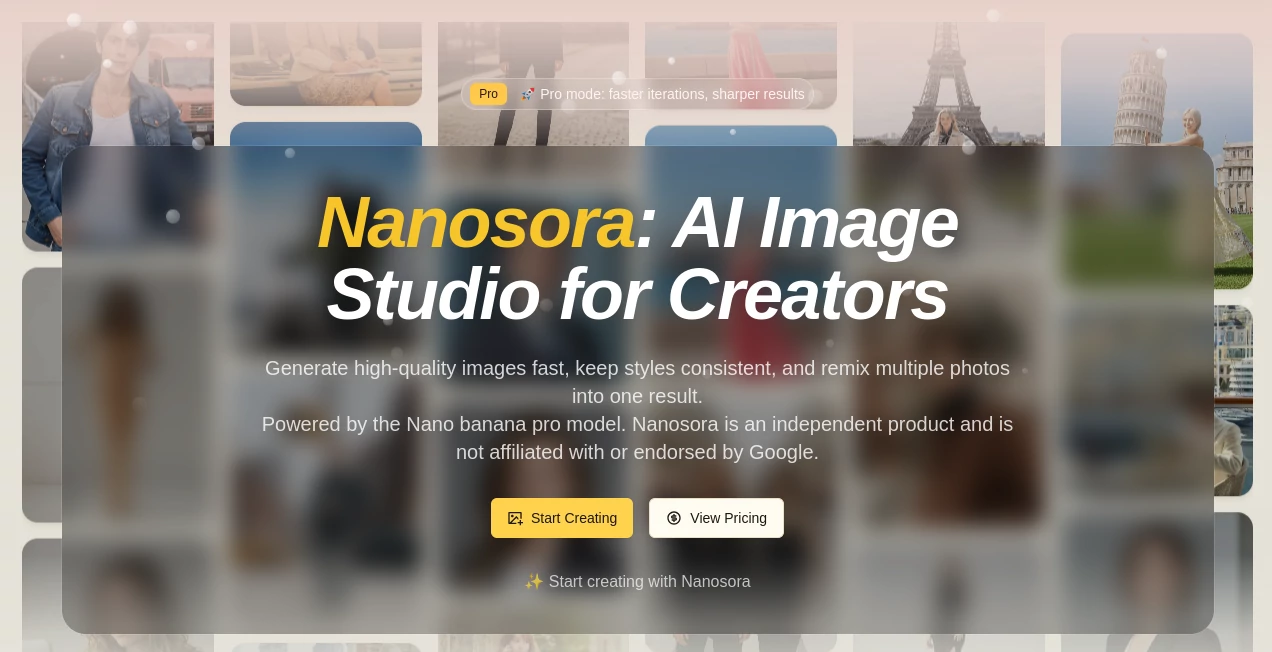
What is Nanosora?
There's something quietly addictive about watching a handful of reference photos and a casual description turn into a stunning, cohesive visual that looks like it took hours in a studio. This platform nails that thrill, blending uploads with natural language prompts to craft images that feel thoughtful and precise. I've tinkered with it on lazy evenings, fusing old snapshots into fresh concepts, and the way it holds onto styles or characters across tweaks just pulls you deeper—perfect for anyone chasing that polished look without the endless back-and-forth.
Introduction
Built around a powerhouse model that gets real-world logic and context, this studio lets creators chat their way through ideas, uploading pics to guide the process or fuse elements into something new. It's a haven for keeping characters steady through different eras or outfits, rendering crisp text for designs, or simply exploring styles from painterly oils to sharp photos. What draws people in is the conversational flow—no rigid commands, just talking it out like collaborating with a patient artist who refines until it clicks. Independent and straightforward, it's carving out space for folks who want pro-grade results with everyday ease.
Key Features
User Interface
The workspace keeps it uncomplicated: a prompt area that encourages keywords for light or composition, slots for references that stack up neatly, and a generate button that delivers previews worth lingering over. Upload a few shots, describe the blend, and watch it weave them together—my go-to for quick mood tests, where adjusting a phrase shifts the whole vibe without starting over.
Accuracy & Performance
It grasps layered instructions with a reliability that surprises, holding character details tight across changes or fusing multiples without awkward seams. Outputs arrive brisk, scaling to high detail that holds up for prints or screens, and the reasoning baked in means fewer odd artifacts—just solid, context-aware renders that respect the physics of light and form.
Capabilities
Handle up to fourteen references for guidance, fuse three into one coherent piece, or target local edits with pinpoint prompts. Styles transfer smoothly, text pops clean in any font flavor, and resolutions climb to crisp 4K for those finer touches. It's versatile for series work, where consistency turns good singles into great collections.
Security & Privacy
As an independent setup, it focuses on straightforward processing without unnecessary ties, giving creators room to experiment privately. Your uploads fuel the moment, staying contained to deliver results you control fully.
Use Cases
Storytellers reimagine protagonists across timelines, swapping decades or dream careers while keeping the face familiar. Designers craft annotated infographics or posters where labels sit perfect and readable. Marketers build ad series with locked-in branding, fusing products into varied scenes that feel unified. Artists explore style hops, turning a photo base into watercolor whims or illustrative edges for print-ready assets.
Pros and Cons
Pros:
- Natural chat-like refining that builds ideas organically.
- Strong hold on consistency for characters and styles.
- Clean text and fusion that save design headaches.
- High-res finishes ready for real-world use.
Cons:
- Waitlist for full access might slow eager starters.
- Credit-based generations encourage mindful prompts.
Pricing Plans
It starts credit-simple, with generations tying to straightforward packs that fit occasional or steady use. Join the list for updates, and scale as your projects grow—transparent and creator-friendly from the ground up.
How to Use Nanosora
Tune your base settings, layer in references for subjects or styles, then describe the vision with tips on light or lens for extra punch. Generate, preview the magic, and refine conversationally—add more uploads or tweak words until it aligns. Export the keeper, and loop for series that stay true to your thread.
Comparison with Similar Tools
While broader playgrounds scatter options wide, this one hones in on thoughtful fusion and chat-driven edits, delivering tighter consistency and real-world smarts where others might wander. It's less about volume and more about depth, suiting creators who value refined workflows over endless noise.
Conclusion
This studio whispers possibility to anyone with a spark and some snaps, bridging rough ideas to refined visuals with a grace that's hard to shake. It's the kind of tool that grows on you, turning casual experiments into keepers worth sharing. Hop on the list if you're curious—the wait feels worth it for the polish waiting on the other side.
Frequently Asked Questions (FAQ)
What's the backing model?
Nano banana pro drives the generations, built for transparency and strength.
Any big affiliations?
Fully independent—no ties to giants like Google.
How many images can fuse?
Up to three for seamless blends via prompts.
Text handling strong?
Crisp and customizable, great for designs needing words.
Best way to stay in the loop?
Waitlist and roadmap checks keep you posted on fresh drops.
AI Text to Image , AI Photo & Image Generator , AI Art Generator , AI Design Generator .
These classifications represent its core capabilities and areas of application. For related tools, explore the linked categories above.
Nanosora details
Pricing
- Free
Apps
- Web Tools
Categories

Nanosora Alternatives Product

string art g…

Genmi AI

Imgezy
Project Genie

GenPPT AI

Freepik

Pixora

VIGGLE

meta ai image