
🧠 AI Quiz
Think you really understand Artificial Intelligence?
Test yourself and see how well you know the world of AI.
Answer AI-related questions, compete with other users, and prove that
you’re among the best when it comes to AI knowledge.
Reach the top of our leaderboard.


















Nicegram

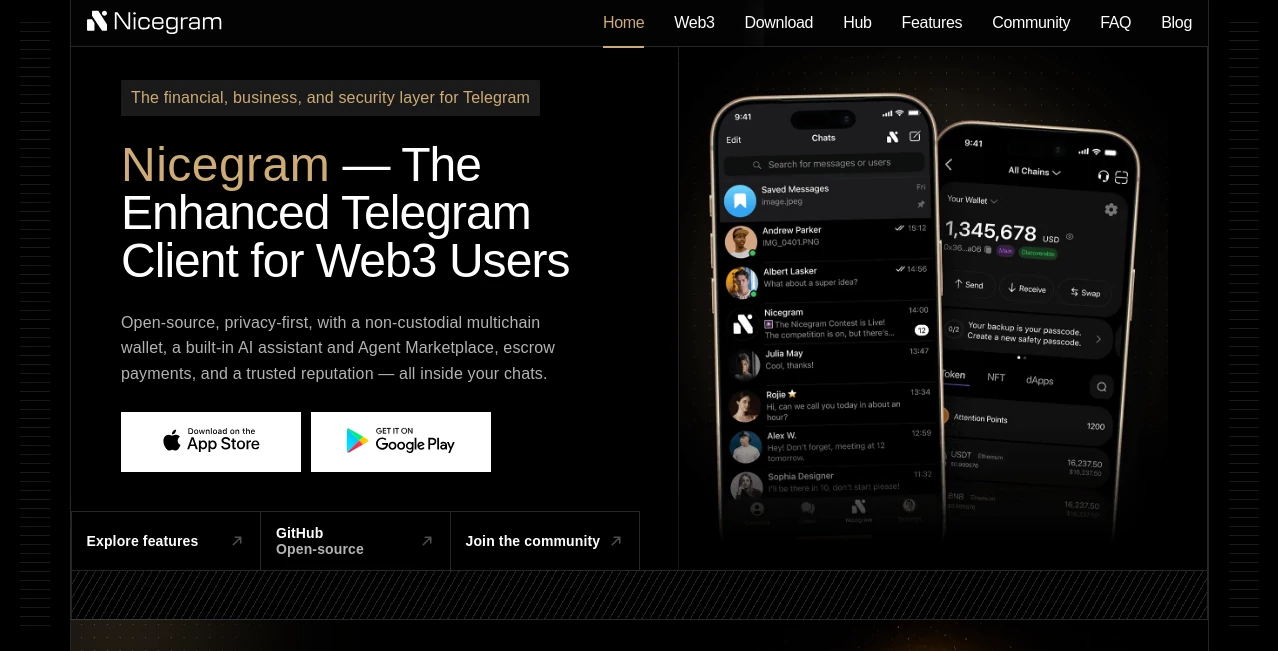
What is Nicegram?
Telegram is already great, but sometimes you want it to feel more yours—fewer restrictions, cleaner organization, better privacy controls, all without losing what makes the original special. This app quietly delivers exactly that. It keeps the familiar Telegram foundation but layers on thoughtful extras that make daily use smoother, safer, and more enjoyable. I’ve had friends switch over after one conversation and never look back—mostly because small things like hidden folders, better chat sorting, and real folder sync just work better here than anywhere else.
Introduction
Telegram’s official app is solid, but it has deliberate limits: no way to hide chats from search, restricted folder syncing across devices, certain content blocks in some regions, and a few privacy edges that power users wish were sharper. This client builds directly on Telegram’s open API and gently removes those friction points while adding conveniences that feel like they should have been there from day one. It’s especially loved by people who live in Telegram—business owners managing multiple accounts, community moderators juggling dozens of groups, privacy-conscious users who want more granular control, and anyone who simply hates seeing certain chats pop up when they search. The result is Telegram, but calmer, more organized, and more private—without ever feeling like a different app.
Key Features
User Interface
The look stays very close to official Telegram so there’s almost no learning curve, but small refinements make a big difference: smoother animations, cleaner tab bar, collapsible folders, and a more logical settings layout. Hidden chats stay truly hidden (even from search), folders sync perfectly across devices, and unread counters are more accurate. It feels like Telegram after someone spent months polishing the details you didn’t realize were bothering you.
Accuracy & Performance
Because it uses Telegram’s official API, message delivery, encryption, and sync are identical to the original—no delays, no missing notifications. The extra features (folder sync, advanced filters, hidden chats) run smoothly without noticeable battery or performance hit. In practice, it handles heavy use—multiple accounts, hundreds of chats, large groups—more gracefully than stock Telegram on the same device.
Capabilities
Unlimited folders with full cross-device sync, hidden private chats (completely invisible in search and lists), advanced filters (mute by keywords, auto-archive, custom notifications), multiple accounts with easy switching, built-in translator, enhanced media viewer (no forwarding restrictions), proxy & VPN integration, and region-unlock for content normally blocked. It keeps all Telegram’s core features (secret chats, self-destruct, channels, bots) while adding power-user conveniences that make heavy use feel effortless.
Security & Privacy
It inherits Telegram’s end-to-end encryption for secret chats and cloud encryption for regular messages. Additional privacy controls let you hide specific chats, disable read receipts per conversation, block screenshots in sensitive chats, and use built-in proxy/VPN options. No analytics tracking beyond what Telegram itself does, and no third-party data sharing. For users in restrictive regions or those who simply want tighter control over visibility, the extra layers feel like a natural upgrade, not a compromise.
Use Cases
A freelancer manages five client chats without them cluttering the main list—hidden folders keep everything separate and searchable only when needed. A community admin mutes spam keywords and auto-archives low-priority groups, making the app feel calm even with 50+ active channels. Someone in a region with Telegram blocks uses the built-in proxy to stay connected reliably. A privacy-conscious user hides personal conversations so they never appear in search or when someone glances at the phone. It quietly solves the daily annoyances that make people dread opening their messaging app.
Pros and Cons
Pros:
- Perfect folder sync across devices—something official Telegram still doesn’t do well.
- Hidden chats that stay truly private and invisible.
- Advanced filters and notification rules that tame even chaotic inboxes.
- Built-in translator and media tools save switching apps.
- Feels like a refined version of Telegram, not a completely different client.
Cons:
- Occasional delay in adopting the very latest Telegram backend features.
- iOS version has some App Store restrictions (features may vary slightly).
- Requires trusting a third-party client (though built on official API).
Pricing Plans
The core experience is completely free—no ads, no forced subscriptions. Premium unlocks extra themes, advanced folder icons, unlimited pinned chats, and priority support. Pricing is modest—cheaper than many other premium messengers—and many users say the folder sync and hidden chats alone make it worth the upgrade. Free version is generous enough that most people never feel pressured to pay.
How to Use Nicegram
Download from the official site or App Store (Android/iOS), sign in with your Telegram number (same as official app). Once logged in, go to Settings → Folders to create and organize your chats. Long-press any chat to hide it or move to a private folder. Set up filters (mute keywords, auto-archive) under Notifications & Sounds. Switch accounts from the side menu. Everything else works just like regular Telegram—only better organized and more private. Takes about five minutes to set up everything the way you like it.
Comparison with Similar Tools
Other Telegram clients add stickers or themes, but few focus on organization and privacy as thoughtfully. Official Telegram is reliable but lacks folder sync and true hidden chats. Many forks feel bloated or risky—this one stays close to the original while adding exactly the conveniences power users want. It’s less about flashy extras and more about making Telegram feel calmer and more under your control.
Conclusion
Telegram is already one of the best messengers out there, but this client makes it feel finished—like someone finally polished the rough edges. Better organization, smarter privacy, smoother multitasking, and thoughtful extras that solve real daily pain points. For anyone who spends serious time in Telegram, it turns “good enough” into “this is how it should have been all along.” Once you experience folder sync and hidden chats, going back feels like a downgrade.
Frequently Asked Questions (FAQ)
Is it safe to use?
Yes—it uses Telegram’s official API and encryption; no messages are intercepted or stored differently.
Does it work on all devices?
iOS and Android have full feature parity; desktop via web version also supported.
Will Telegram ban me for using it?
No—thousands use modified clients daily; this one stays within API rules.
Can I sync folders across phone and computer?
Yes—that’s one of the biggest reasons people switch.
Is there a free version?
Absolutely—most core features (folders, hidden chats, filters) are free forever.
AI Productivity Tools , AI Team Collaboration , AI Chatbot .
These classifications represent its core capabilities and areas of application. For related tools, explore the linked categories above.
Nicegram details
This tool is no longer available on submitaitools.org; find alternatives on Alternative to Nicegram.
Pricing
Apps
- Web Tools
- iOS Apps
- Android Apps
Categories

Nicegram Alternatives Product

Klyra AI

Toolquix

Liftburst

Your Own AI

Sourcetable

FINIITE AI

Xvibe

Keepmind

Futurwise
