
🧠 AI Quiz
Think you really understand Artificial Intelligence?
Test yourself and see how well you know the world of AI.
Answer AI-related questions, compete with other users, and prove that
you’re among the best when it comes to AI knowledge.
Reach the top of our leaderboard.


















PixExtender

What is PixExtender?
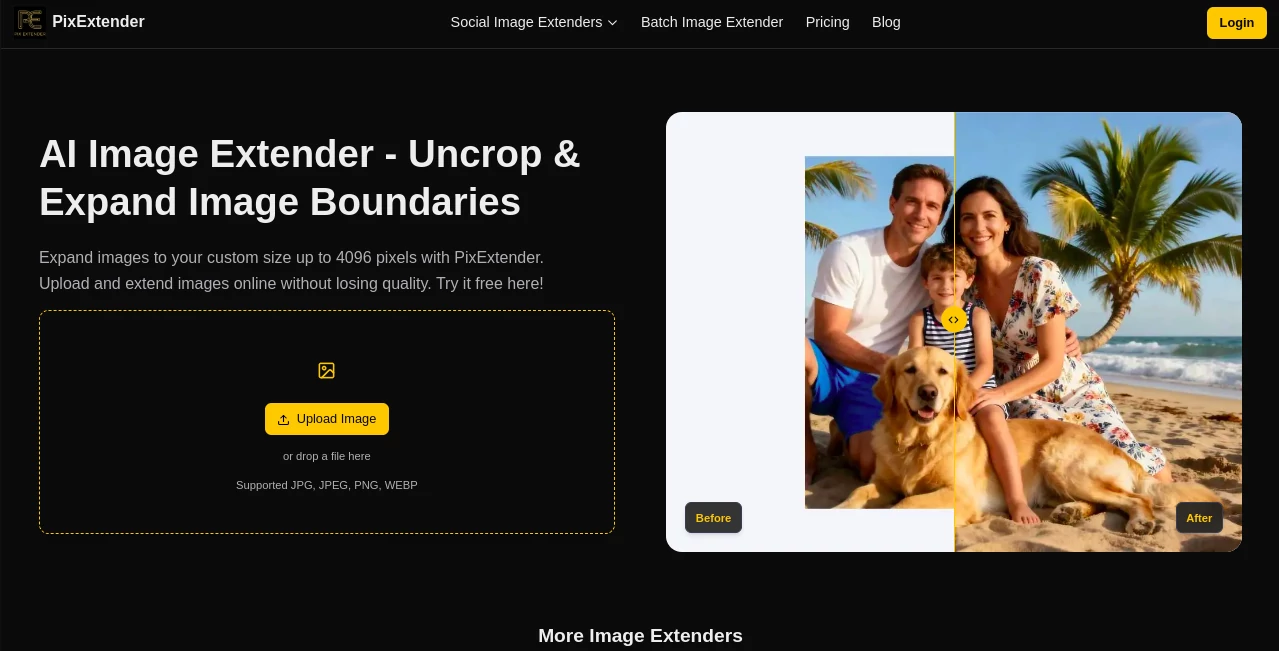
PixExtender slips into your creative routine like an old friend who always knows just what to add, taking those cropped corners and stretching them into full, breathing scenes without a hint of awkward seams. This browser-based wonder lets you uncrop a quick snap or widen a product shot, blending in details that feel like they were always there. Designers and shop owners alike have turned to it for those last-minute fixes that turn good visuals into great ones, often sharing how it saved a deadline or sparked a fresh layout idea.
Introduction
PixExtender came together a short while back, sparked by the all-too-common frustration of photos that just didn't fit the frame, whether for a social post or a sales page. A small team of image enthusiasts built it to cut through the hassle of manual edits or pricey hires, and it quickly found its way into workflows where time is tight but quality can't bend. Users started passing around examples of skies that stretched endlessly or backgrounds that bloomed naturally, turning what could have been hours of Photoshop fiddling into a few clicks. At its heart, it's about giving back the full picture, letting creators reclaim space and focus on what matters—the story the image tells, not the edges it lost.
Key Features
User Interface
The setup greets you with a wide, welcoming drag-and-drop area that feels as easy as sliding a postcard across a table, paired with a clean selector for sizes that pops up without overwhelming the screen. Once you pick your stretch—be it a quick preset or a custom fit—the results slide in side by side with the original, letting you swipe through options and tweak on the fly. It's that kind of thoughtful flow, light on the eyes and heavy on the intuition, where even folks who rarely touch design tools find themselves zipping through without a manual in sight.
Accuracy & Performance
It picks up on the subtle plays of light and shade in your upload, weaving in extensions that match the mood down to the grain, often leaving you second-guessing which part was added. Things move along briskly, handling a single shot or a batch of twenty without breaking a sweat, and the outputs hold sharp even when pushed to larger scales. Those who've run it through real tests talk about how it nails the continuity, dodging those telltale glitches that make edits scream "fake," and keeping the whole process feeling more like a gentle nudge than a heavy lift.
Capabilities
From filling out a portrait's horizon to padding a product against endless white space, it layers in context that respects the original's vibe, whether that's a soft bokeh blur or crisp edges on a logo. Batch mode shines for keeping a set of images in sync, perfect for campaign kits or catalog updates, and the presets nod to platform quirks like Instagram's vertical pull or YouTube's wide embrace. It goes beyond simple stretches, preserving text and details while opening up room for overlays, making it a quiet powerhouse for workflows that span screens to prints.
Security & Privacy
Your files get handled right in your browser, so they never wander off to distant servers, and once the magic's done, there's no trace left behind unless you choose to save. It skips the watermarks and fine-print traps, giving you clean hands for any use, from personal sketches to client pitches. That straightforward trust is what draws folks back, knowing their quick upload stays a quick secret, free from the usual worries about where their work might end up.
Use Cases
A marketer might grab a hero shot that's too snug for the banner, widening it to wrap around a page without losing the punch. E-commerce sellers feed it a lineup of listings, emerging with backgrounds that let products breathe and buyers linger. Photographers rescue a frame that's accidentally tight, adding sky or space to restore the shot's soul. Even casual creators play with it for social grids, turning square memories into stories that scroll just right.
Pros and Cons
Pros:
- Blends additions so naturally, it's hard to spot the join.
- Batch handling saves hours on group jobs big or small.
- No downloads or setups—just open and go in your browser.
- Free starters let you test without tying the knot.
Cons:
- Wild expansions on busy scenes might need a gentle hand to guide.
- Credit system paces heavy users toward an upgrade.
- Best on clear uploads; fuzzy starts can fuzz the finish.
Pricing Plans
New faces get ten free credits to kick things off, enough for a handful of heartfelt tries without a dime down. The basic tier lands around eight bucks a month for a steady stream of two thousand four hundred credits, covering a good chunk of monthly magic with room for batches and bigger sizes. Creators bump up to twenty for more firepower and sharper limits, while masters at forty handle the heavy loads with top resolutions. Yearly commitments soften the sting, and that no-strings trial keeps the entry light.
How to Use PixExtender
Drag your image right into the open spot, or tap to browse if that's your style, then eye the presets or dial in your own dimensions. Give it the go-ahead, and watch the variants appear—pick the one that whispers right, maybe nudge for another round if the light's off. Snag the file in your format of choice, and slot it back into your project, ready to roll without a ripple.
Comparison with Similar Tools
Where some apps just scale up the pixels or slice away the sides, PixExtender digs deeper to invent what's missing, though those quicker fixes might suit if you're after bare-bones speed. Against full-suite editors that demand downloads and degrees, it keeps things web-light and wallet-friendly, trading bells for that focused fill. It finds its stride for folks who want the smart stretch without the sprawl, edging out the basics with a blend that's both clever and clean.
Conclusion
PixExtender quietly expands not just your images, but the possibilities tucked in their edges, turning tight frames into tales with room to roam. It reminds us that the best tools fade into the background, letting the work take the spotlight. As visuals keep crowding our feeds and shops, this one's poised to keep creators one step ahead, one seamless stretch at a time.
Frequently Asked Questions (FAQ)
What makes this different from just resizing?
It doesn't stretch what's there—it builds new bits that fit like they belong, keeping the look lively.
Can I run a bunch at once?
Absolutely, up to twenty in a go, perfect for keeping a set looking sharp together.
What file types does it take?
JPG, PNG, and WEBP slide right in, spitting back the same for easy swaps.
How do I get natural-looking adds?
Start with a crisp, lit image and ease into the size—big jumps work best on simple scenes.
Any rules on what I can use it for?
Go wild commercially, just steer clear of anything too edgy or off-limits.
Photo & Image Editor , AI Photo Enhancer , AI Background Remover , AI Image to Image .
These classifications represent its core capabilities and areas of application. For related tools, explore the linked categories above.
PixExtender details
This tool is no longer available on submitaitools.org; find alternatives on Alternative to PixExtender.
Pricing
- Free
Apps
- Web Tools
Categories

PixExtender Alternatives Product

AI Polaroid …
AI Photo Edi…
Kirkify Al

AI Image Edi…

Retro Image …

Image Text E…
Free PNG to …

Image Unblur

free ai face…
