🧠 AI Quiz
Think you really understand Artificial Intelligence?
Test yourself and see how well you know the world of AI.
Answer AI-related questions, compete with other users, and prove that
you’re among the best when it comes to AI knowledge.
Reach the top of our leaderboard.


















RiceBowl | Sora Watermark Remover

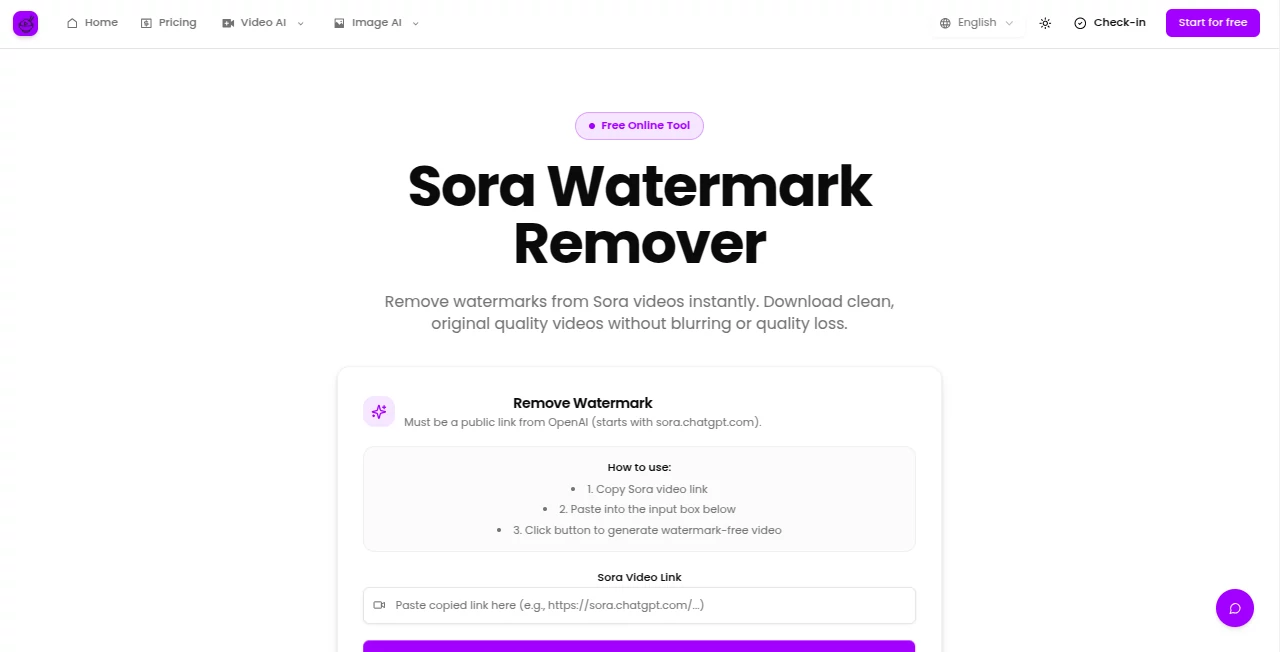
What is RiceBowl | Sora Watermark Remover?
Sora Watermark Remover steps in as a handy fix for anyone frustrated with those stubborn overlays on fresh video clips, whisking them away while keeping every detail crisp and untouched. This straightforward service grabs a simple link and delivers a spotless version ready for whatever comes next, whether it's a quick share or a deeper edit. Many who've given it a spin talk about the relief of skipping clunky workarounds, turning what could be a headache into a breeze that leaves the original charm intact.
Introduction
Sora Watermark Remover came about amid the buzz around new video tools, sparked by creators who wanted more freedom from built-in marks without sacrificing the spark. It started as a targeted helper for a specific style of clips, but word spread fast among hobby filmmakers and social sharers who passed around tips on snagging cleaner files. Over time, it's carved out a niche by focusing on speed and fidelity, with users swapping stories of how it saved sessions that might've dragged on otherwise. What draws folks back is that no-fuss reliability, making it feel like a trusty sidekick rather than another layer of hassle in the creative mix.
Key Features
User Interface
The setup couldn't be simpler, kicking off with a lone box where you drop in your link, followed by a single button that sets things in motion. It works just as well on a phone screen as a desktop, with a handy slider that lets you flip between the marked-up original and the fresh take side by side. No extra menus or hidden toggles—just a clean path from paste to preview that keeps the focus on the fun part, even if you're juggling it during a commute.
Accuracy & Performance
It zeros in on the overlay without nicking the edges of what's underneath, pulling out a version that matches the source down to the last frame. The whole job wraps up in a handful of seconds, no matter the clip's length, delivering results that hold up under close looks without any fuzzy fallout. Those who've tested it against other routes often point out how it sidesteps the glitches that come from makeshift grabs, keeping the flow smooth and the output true.
Capabilities
Tailored tight for handling those particular video shares, it extracts the core stream to ensure nothing gets lost in the shuffle, supporting the full range of what gets passed along publicly. While it sticks to its lane, the quick turnaround opens doors for layering into bigger projects, like stitching into montages or tweaking for posts. It's that laser focus that lets it punch above its weight, turning a single-task wonder into a staple for folks deep in video workflows.
Security & Privacy
Links get processed on the fly and then cleared out, with no hanging on to extras unless you choose to stash the results yourself. It keeps things light on the data front, giving you control over what sticks around, so you can tinker without trailing worries. Creators lean on that straightforward handling, knowing their quick shares stay just that—quick and contained.
Use Cases
Content makers grab a shared clip for a tutorial series, stripping the tag to blend seamlessly into their own reel without distractions. Social posters clean up a fun demo before dropping it into stories, watching engagement tick up from the unmarred view. Teams pass around prototypes for feedback rounds, free of watermarks that might muddy the message. Even casual viewers snag favorites for personal archives, turning fleeting watches into keepsakes that play pure.
Pros and Cons
Pros:
- Blazing quick turns that fit right into tight schedules.
- Holds onto every bit of the original without a hint of haze.
- Easy entry point with no steep setup to stumble over.
Cons:
- Stays narrow on what links it can grab, skipping the private ones.
- Credit dips with each go, which might pinch light users.
- No room for batch runs in the basic setup.
Pricing Plans
You can jump in without a dime for the basics, good for a test drive or the odd fix, though it pulls a small chunk from your starting pot each time. Step up to the lighter option around ten bucks a month if you lock in for the year, netting enough for a steady stream of clips plus some bonus perks like wider tool access. The fuller package lands mid-teens annually, packing in heaps more runs and extras for those who make it a habit, with flexible outs anytime to keep things loose.
How to Use Sora Watermark Remover
Spot the share spot on the video page and snag the link to your clipboard, then head over and paste it into the waiting field. Tap the button to kick it off, and in a flash, you'll see the clean pair pop up for a side glance. Snip the one you like and tuck it away, ready to roll into your next edit or upload without a second thought.
Comparison with Similar Tools
Where broader editors might chew through more steps for mixed media, this one hones in on the task at hand, trading bells for that pinpoint speed, though those could cover more ground for variety seekers. Against free-for-all removers, it edges out with the quality hold that skips the slip-ups, but might bow to suites that bundle in extras for the all-in-one crowd. It suits folks who want the win without the wander, cutting straight to the clean.
Conclusion
Sora Watermark Remover wraps up the worry of marked-up media with a swift, sure hand, handing back clips that breathe easy and look lived-in. It shines as a shortcut in a sea of setups, proving that sometimes the sharpest tools are the ones that do one thing extraordinarily well. As video vibes keep evolving, this one's poised to stay a step ahead, keeping creators' flows free and their visions vivid.
Frequently Asked Questions (FAQ)
What kind of links does it take?
Public ones from the standard shares work best, keeping things open and easy.
Does it mess with the video's sharpness?
Not a bit—it pulls the pure stream to match what you started with.
How long till I see the results?
A few seconds at most, quick enough to keep the momentum going.
Can I run it on my phone?
Absolutely, the whole thing's tuned for touchscreens without a hitch.
What if I hit my credit limit?
Bump to a plan for more room, or wait for the reset to roll around.
Photo & Image Editor , AI Video Editor , AI Video Enhancer , AI Video to Video .
These classifications represent its core capabilities and areas of application. For related tools, explore the linked categories above.
RiceBowl | Sora Watermark Remover details
This tool is no longer available on submitaitools.org; find alternatives on Alternative to RiceBowl | Sora Watermark Remover.
Pricing
- Free
Apps
- Web Tools
Categories

RiceBowl | Sora Watermark Remover Alternatives Product

WonderShare …

Nano Image AI

Mage

ChatGPT Imag…

JSON to Video

Quso AI

Image to STL

AI Age Progr…

FLUX 2