
🧠 AI Quiz
Think you really understand Artificial Intelligence?
Test yourself and see how well you know the world of AI.
Answer AI-related questions, compete with other users, and prove that
you’re among the best when it comes to AI knowledge.
Reach the top of our leaderboard.


















Tryonr
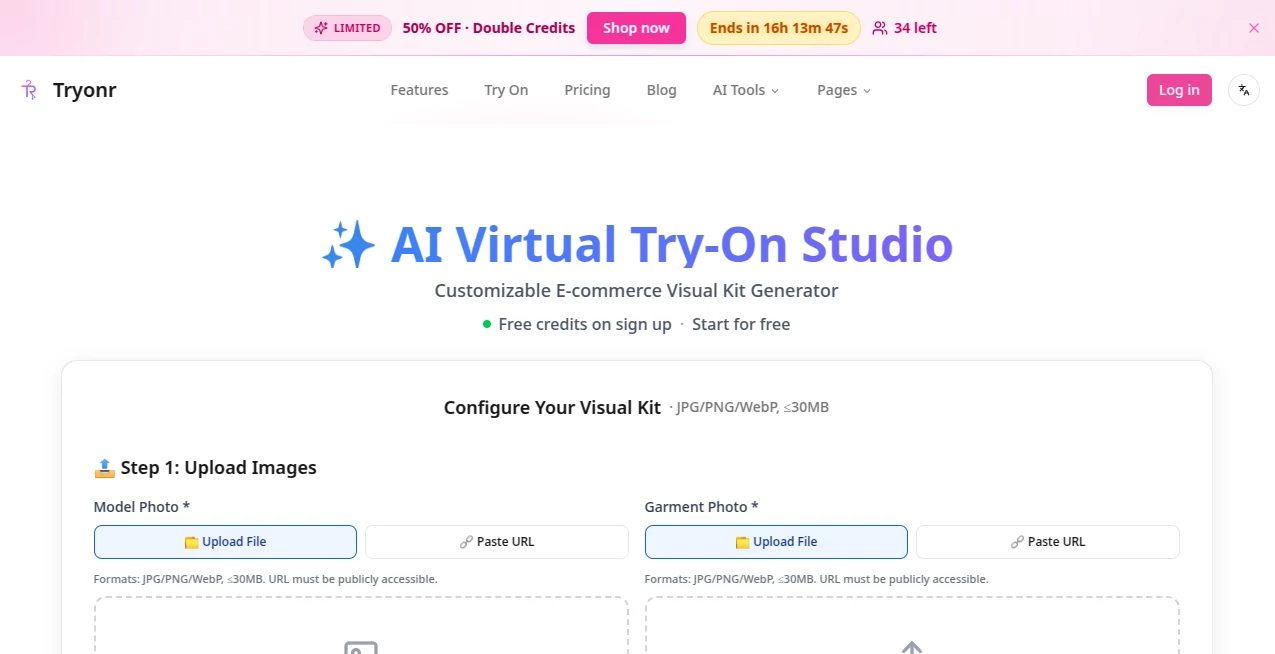
What is Tryonr?
Ever uploaded a plain product shot and watched it transform into a full-fledged model photo, complete with perfect fit and lighting that makes everything pop? That's the everyday thrill this platform delivers, making pro-level e-commerce visuals feel almost too easy. I've seen sellers turn basic flat-lays into catalog-ready gems that boost clicks and cut returns, all without booking a single shoot. It's the kind of tool that quietly levels the playing field, letting small shops look as polished as the big players.
Introduction
Running an online store means juggling a thousand things, and product photos often eat up way too much time and budget—this setup flips that on its head with smart virtual staging that feels authentic. Upload your garment snap and a model reference, and it handles the rest, draping fabrics just right while keeping textures and colors true. What started as a fix for skyrocketing shoot costs has grown into a lifeline for hundreds of sellers across fashion, accessories, and beyond. Picture a busy Etsy creator refreshing her lineup overnight instead of weeks; that's the real shift here, blending speed with quality that holds up on Amazon or Shopify feeds.
Key Features
User Interface
It's all laid out like a straightforward studio dashboard—drag your product and model files in, pick your mode from a simple dropdown, and watch previews build as you tweak. No overwhelming options or hidden menus; just clean steps that guide you from upload to export, with a credit tracker keeping things transparent. My first run felt like second nature, swiping through samples and fine-tuning poses without a single confusing click.
Accuracy & Performance
The fit and drape come out remarkably true-to-life, respecting fabric flow and details like prints or stitching that cheaper alternatives often blur. Generations clock in under five seconds most times, scaling smoothly for batches without slowdowns, and the hyper-realistic touch keeps everything platform-compliant. Sellers mention how it nails those tricky elements, like logos staying sharp or hems falling naturally, turning good inputs into standout outputs every time.
Capabilities
Beyond basic try-ons, it spins multi-angle views, zoomed details, and even 360 spins from one shot, plus smart labels on features like buttons or cuffs. Mix outfits for lookbooks, craft consistent character sheets with varied poses, and export HD files ready for listings. It's versatile across 20+ categories, from apparel to beauty, giving you unlimited variations that feel custom without the custom price tag.
Security & Privacy
Uploads get processed securely, with images stashed in your dashboard for a week if needed, then cleared out—no lingering data or shares without your go-ahead. It's built with e-commerce in mind, keeping proprietary designs safe while you iterate, offering that quiet reassurance for brands guarding their next drop.
Use Cases
Fashion sellers stage full collections on diverse models, cutting shoot costs while hitting inclusivity notes that resonate with buyers. Accessory makers zoom in on details like bag straps or jewelry clasps in lifestyle settings, boosting detail views. Beauty brands annotate skincare benefits right on the visuals, or mix cosmetics for before-after vibes. Even home goods creators turn packshots into styled scenes, helping customers envision the fit in their space.
Pros and Cons
Pros:
- Saves massive on traditional shoots, scaling effortlessly for growing catalogs.
- Hyper-realistic fits that reduce returns by showing true wear.
- Extra tools like annotations and multi-angles add real value beyond basics.
- Fast, reliable generations that fit into tight launch schedules.
Cons:
- Best results demand clean starting photos—messy ones might need prep.
- Watermarks on lower tiers, though easy to bypass with upgrades.
Pricing Plans
Kick off with free credits to feel the flow, then Plus at twenty bucks monthly (or cheaper annually) bags 800 credits for solid try-ons and HD exports. Pro, the crowd favorite at forty, throws in priority speed, no watermarks, and multi-angles with 2,000 credits. Max at a hundred unlocks the fastest queues, dedicated help, and upcoming API for 9,000 credits—annual deals shave off nicely, making it scalable without surprises.
How to Use Tryonr
Grab a clear product shot—flat-lay or mannequin works wonders—and a model reference, drag them into the slots, then select your mode like virtual try-on. Tweak poses or styles if the mood strikes, hit generate, and preview the lineup in seconds. Download the keepers in HD, or batch more for a full refresh—it's that loop of upload, magic, export that turns a weekend task into an evening win.
Comparison with Similar Tools
While some rivals stick to basic swaps that lose details in the drape, this one layers in angles, annotations, and realism that feel a cut above, especially for e-commerce specifics. It's less about gimmicks and more about practical polish, outpacing free scattershots with consistency and speed that busy sellers rely on.
Conclusion
This platform redefines what solo sellers or growing brands can achieve visually, handing over studio-quality shots on demand without the drama. It's a genuine time-saver that elevates listings and confidence alike, turning "good enough" photos into ones that truly sell the dream. If you're tired of compromising on visuals, give it a spin—you'll wonder how you managed without that effortless upgrade.
Frequently Asked Questions (FAQ)
What file types work best?
JPG, PNG, or WebP up to 30MB—clear and well-lit for that flawless drape.
How fast are generations?
Under five seconds usually, with priority perks speeding things further.
Any watermarks?
Only on free or basic—Pro and above go clean.
Supports accessories too?
Absolutely, from bags to jewelry with detailed close-ups.
API available?
Coming soon on the top tier for seamless integrations.
AI Photo & Image Generator , Photo & Image Editor , AI Clothing Generator , AI Design Generator .
These classifications represent its core capabilities and areas of application. For related tools, explore the linked categories above.
Tryonr details
Pricing
- Free
Apps
- Web Tools
Categories

Tryonr Alternatives Product
Edensign

SeeDream 4.5

loraai.me

Nano Figure

VIGGLE

Nanosora

Curved Text …

HypeClip

Generador De…
