🧠 AI Quiz
Think you really understand Artificial Intelligence?
Test yourself and see how well you know the world of AI.
Answer AI-related questions, compete with other users, and prove that
you’re among the best when it comes to AI knowledge.
Reach the top of our leaderboard.


















Vibe my image
Infuse Your Photos with Instant Style Shifts

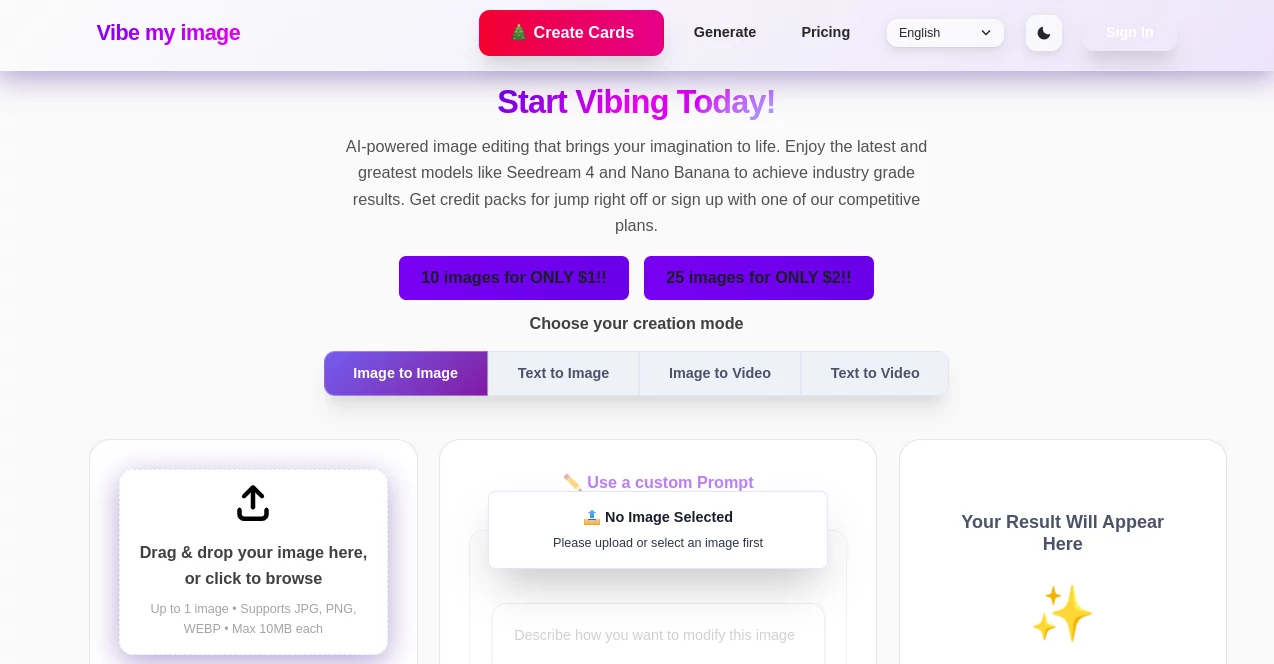
What is Vibe my image?
VibeMyImage grabs your everyday snaps and dresses them up in moods that match your wildest whims, from sun-kissed beaches to gritty urban nights, all with a few taps. This nifty spot has folks raving about how it turns flat shots into stories that pop, pulling in likes and shares without the hassle of heavy editing apps. It's that quick hit of inspiration for social scrollers and casual shooters who want their feed to feel alive and curated.
Introduction
VibeMyImage sprang up a year or so back, cooked up by a handful of photo fiends who'd burned out on fiddly filters that never quite nailed the feel. They wanted something that listened to your gut—type 'cozy cabin fog' and boom, your city pic morphs into a misty retreat. Word got around fast in creative circles, with users posting before-and-afters that blurred the line between amateur hour and pro polish. What started as a weekend project now hums with daily uploads, proving that sometimes the best tweaks come from handing the reins to a system that gets your vision without the chit-chat.
Key Features
User Interface
The landing page hits you with a big upload zone that swallows pics like candy, followed by a chatty box where you spill the vibe in plain words—no dropdowns or sliders to muddle things. As options roll in, a swipeable carousel lets you pinch and zoom, with a live preview that overlays your original for easy side-by-sides. It's all mobile-first, feeling like a breezy app rather than a clunky site, so you can vibe-check on the subway without missing a beat.
Accuracy & Performance
Describe a scene, and it delivers matches that echo your words down to the lighting and texture, rarely veering into weird territory that needs a do-over. Jobs wrap up in under ten seconds, even for group shots, keeping the spark alive without those agonizing waits. Testers note how it holds onto faces and details sharp, turning 'vintage polaroid' prompts into nostalgic gems that fool even eagle-eyed friends.
Capabilities
It juggles everything from subtle glow-ups like 'golden hour glow' to full fantasy flips such as 'cyberpunk neon haze,' blending elements seamlessly across landscapes or portraits. Batch your faves for consistent series, or layer in extras like weather tweaks for that rainy day drama. Exports come in crisp formats ready for prints or posts, with options to save presets for your signature looks that speed up future fun.
Security & Privacy
Uploads get a quick process and zap, with no storage unless you opt in for a gallery, keeping your raw files off the grid. It runs on encrypted channels that lock down your sessions, and you control shares with one-click links that expire on your say-so. Privacy nuts appreciate the no-tracking policy, letting you experiment freely without ads lurking or data deals in the shadows.
Use Cases
Weekend warriors snap trail views and twist them into ethereal mists for epic journals. Influencers batch vacation rolls into themed reels, matching 'tropical escape' across dozens without a sweat. Families jazz up reunion pics with 'vintage family album' warmth, printing heirlooms that tug heartstrings. Even realtors drop listings into 'cozy home vibe' mode, making empty rooms whisper welcome to buyers.
Pros and Cons
Pros:
- Grabs your mood and runs with it, nailing styles that feel spot-on.
- Lightning-fast turns keep the creative juice flowing non-stop.
- Versatile enough for quick fixes or deep dives into themes.
- Light on the wallet for casual play, with room to grow.
Cons:
- Wordy prompts shine brighter than vague ones, needing a bit of flair.
- Batch limits on free rides push upgrades for heavy hitters.
- Occasional odd blends in crowded scenes call for a retry.
Pricing Plans
Free tier dishes out five vibes a day, enough to spice up your stories without a hitch. Pro kicks in at seven bucks monthly for unlimited spins and batch magic, while the creator pack at fifteen adds custom saves and priority queues. Snag a yearly deal to trim twenty percent, and trials give a full week to vibe out risk-free.
How to Use VibeMyImage
Drag your pic to the pad, then type the scene you crave—like 'sunset beach serenity'—and watch the variants flood in. Swipe to your pick, fiddle with intensity if needed, and hit download for the full-res file. String a few together for a set, share via link for feedback, or stash in your board for later layers. It's that loop of upload, dream, grab that hooks you from the first go.
Comparison with Similar Tools
Unlike filter banks that box you into presets, VibeMyImage lets words roam free, though those might suit scroll-and-tap fans better. Against full editors, it skips the tool clutter for pure prompt power, saving time but maybe missing pixel-level pokes. It owns the niche for vibe-driven whims, outshining basics with depth and rivals with ease.
Conclusion
VibeMyImage slips into your routine like a favorite playlist, turning ho-hum shots into mood masterpieces that linger. It democratizes that pro touch, whispering possibilities into every frame without stealing the show. As snaps pile up in our pockets, this tool keeps the magic close, reminding us that the right vibe can turn a moment into a memory worth framing.
Frequently Asked Questions (FAQ)
What kinds of images work best?
Anything from selfies to scenery—clearer shots yield sharper vibes.
Can I use my own words for prompts?
Totally, the more vivid, the better it captures your spark.
Does it alter the original file?
Nope, you get fresh versions; originals stay untouched.
How many styles can I try?
Endless combos, from real to surreal, all prompt-powered.
Is there an app version?
Web magic that plays nice on phones, no download needed.
Photo & Image Editor , AI Photo Enhancer , AI Image to Image , AI Art Generator .
These classifications represent its core capabilities and areas of application. For related tools, explore the linked categories above.
Vibe my image details
This tool is no longer available on submitaitools.org; find alternatives on Alternative to Vibe my image.
Pricing
- Free
Apps
- Web Tools
Categories

Vibe my image Alternatives Product

Sketch To

Freepik

FLUX 2

Imgezy

Text Remover…

Berrioo

AI Raphael

NanoBanana P…

ChatGPT Imag…