


















HttpStatus.com
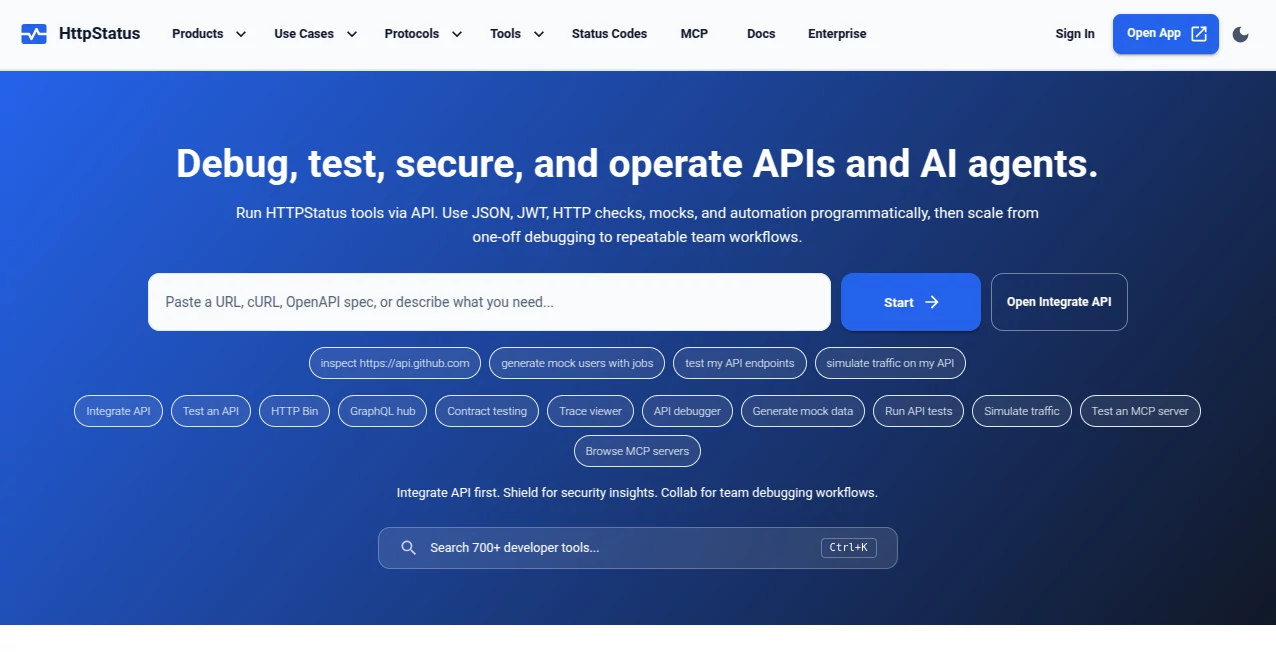
What is HttpStatus.com?
Every developer has been there. You're deep in a debugging session at 11pm, you need to test an API endpoint, validate a JWT token, spin up a quick mock server, and check why your CORS headers are misbehaving — all at once. Most of the time, that means jumping between four different browser tabs, two paid subscriptions, and a Stack Overflow thread from 2019.
This is a developer platform that collapses all of that into one place. Over 100 utilities covering API testing, mock server generation, HTTP inspection, traffic simulation, uptime monitoring, security tooling, and MCP server testing — available from a single platform with no signup required. It's the kind of tool that makes you wonder why this didn't exist years ago.
The platform is built for developers who are serious about their workflow. Not a toy, not a collection of half-finished utilities — this is a cohesive developer environment where every tool is genuinely useful on its own and even more powerful when used together.
Key Features
User Interface
The interface sits at that rare intersection of minimal and functional. The dark theme with a near-black background feels right for the kind of late-night debugging sessions this tool was clearly designed for. Navigation is organized by tool category — JSON, JWT, Regex, API, Security, and so on — so finding the right utility takes seconds, not minutes of clicking around.
Individual tools open clean and focused. There's no visual clutter competing for your attention when you're trying to compare two JSON payloads or decode a token under pressure. The layout doesn't talk down to you or over-explain things — it assumes you know what you're doing and gets out of the way.
That said, the tool organization is genuinely thoughtful. Related utilities are grouped into hubs, so if you land on the JSON formatter and realize you also need schema validation or YAML conversion, it's one click away rather than a separate search.
Accuracy & Performance
Everything runs either in the browser or via API — and critically, no data is stored on the platform's servers. For a developer tool handling tokens, hashes, API keys, and sensitive request payloads, this is exactly the right architecture decision. Client-side processing means your data doesn't leave your machine unless you explicitly use a server-side feature like the HTTP Inspector or mock endpoints.
The AI-powered mock generation deserves specific mention here. Describe what you need in plain language — a users endpoint, a product catalog, a paginated list — and the system produces a ready-to-use mock. REST and GraphQL both supported. The quality of generated mocks is noticeably higher than template-based alternatives because the AI actually interprets the intent behind your description rather than pattern-matching keywords.
The HTTP Status Codes reference isn't just a lookup table — it includes a live inspector and mock endpoints for every code, which means you can test how your application handles a 429 or a 503 without needing to engineer that failure state manually in your own environment.
Capabilities
The breadth here is genuinely impressive. Key tool hubs include:
- JSON Tools: Formatter, validator, minifier, converter, and schema validation — the full JSON workflow in one place.
- JWT Tools: Decode, verify, sign, and inspect JSON Web Tokens. Essential for anyone working with authentication flows.
- Regex Tools: Tester, explainer, and a pattern library. The explainer feature alone saves hours of documentation-reading.
- API Tools: Request builder, response inspector, and endpoint testing with a full-featured interface.
- Security Tools: CORS tester, CSP builder, and header analyzer — covering the security checks that typically get deferred until something breaks in production.
- OpenAPI Tools: Validate, lint, and explore OpenAPI specs without needing a local environment set up.
- Mock Server: AI-powered instant mock endpoint generation for REST and GraphQL.
- API Simulator: Load testing and traffic simulation to understand how your API behaves under pressure.
- HTTP Inspector: Real-time request and response inspection.
- Diff Tools: Side-by-side comparison for JSON, text, YAML, and XML — genuinely useful during code reviews and debugging sessions.
- Hash Tools: MD5, SHA-256, SHA-512, HMAC, and bcrypt generators.
- Cron Tools: Build, explain, and test cron expressions — the explainer is particularly valuable for teams inheriting legacy scheduled jobs.
MCP server testing is also included — a forward-looking feature as AI agent tooling becomes a more common part of developer infrastructure. If you're building or integrating Model Context Protocol servers, having dedicated testing utilities in the same environment as your other API tools is a meaningful workflow improvement.
Security & Privacy
The privacy architecture is developer-grade. All tools run client-side or via the platform's API, and no data is stored on the servers. For utilities that handle JWT tokens, API credentials, hash inputs, and HTTP headers — the kind of data you genuinely do not want logging somewhere — this is not a minor detail, it's a foundational trust decision.
The security tools hub itself includes CORS testing, Content Security Policy building, and header analysis. These are the checks that distinguish teams who ship secure APIs from teams who discover their misconfiguration in a post-mortem. Having them accessible without setup friction means they actually get used during development, not just after an incident.
Use Cases
The range of supported workflows makes this relevant across quite a few different developer contexts:
- Backend developers building and debugging REST or GraphQL APIs who need rapid request testing, response inspection, and mock endpoint generation without spinning up a local stub server.
- Frontend developers who need reliable API mocks to develop against while backend endpoints are still being built — particularly useful in parallel-track sprints.
- DevOps and platform engineers using the uptime monitoring, load simulation, and HTTP inspector tools to understand real-world API behavior before and after deployments.
- Security engineers who need to validate CORS configurations, audit response headers, and test CSP policies without building a dedicated testing environment.
- Developers working with AI agents and MCP servers — the MCP testing tools make this increasingly relevant for the growing space of AI-native developer tooling.
- Teams reviewing or inheriting legacy systems — the diff tools, cron expression explainer, and OpenAPI linting are all excellent for understanding what a system is doing before you touch it.
There's also a straightforward use case for solo developers and freelancers. Having a single, free-to-access platform covering this many utilities removes a significant amount of tooling overhead from individual projects where maintaining multiple subscriptions isn't justifiable.
Pros and Cons
What works well:
- No signup required for the core toolset — you can be productive immediately without an account creation flow
- Over 100 tools in a single platform eliminates the context-switching cost of managing multiple separate utilities
- Client-side processing for sensitive data means JWT tokens, hashes, and API credentials aren't passed to a third-party server
- AI-powered mock generation produces genuinely useful outputs from plain-language descriptions — not just template outputs
- MCP server testing is an uncommon and forward-looking feature that will become more valuable as AI agent tooling matures
- The HTTP Status Codes reference with live mock endpoints is significantly more useful than a static reference page
- Dark theme and clean interface feel purpose-built for developer use rather than repurposed from a general-purpose SaaS design
Limitations worth knowing about:
- The depth of individual tools may not match dedicated single-purpose platforms for very specialized workflows — someone with complex Postman collection management needs, for example, may still need a dedicated tool
- Some advanced platform features likely require an account or paid tier — the full pricing structure isn't prominently surfaced
- The breadth of available tools means new users may need time to discover the full extent of what's available — discoverability takes a brief investment
Pricing Plans
A significant portion of the platform is accessible without any account or payment. The core utilities — JSON tools, JWT tools, hash generators, URL encoding, diff tools, and much of the HTTP reference — are available immediately with no signup required. This is a deliberate and welcome decision; developer tools that gate basic functionality behind email capture tend to lose exactly the users who would eventually pay for premium features.
For platform features like the mock server, API simulator, uptime monitoring, and HTTP inspector, access levels may vary. The platform's architecture suggests a freemium model where individual utilities are free and collaborative or infrastructure features (persistent mocks, monitoring, team access) operate on paid tiers. For teams making this a production part of their workflow, checking the current plan details directly on the platform is recommended since these specifics evolve as the product develops.
How to Use HTTPStatus
Getting started requires nothing. Open the platform, navigate to the tool category you need, and use it. There's no account wall between you and a functional JSON formatter or a JWT decoder.
For first-time users, a practical starting sequence looks something like this:
- Step 1 — Explore the tools directory: Spend five minutes browsing the tool hubs by category. The breadth of what's available is genuinely surprising, and knowing what exists means you'll reach for the right tool when you need it rather than opening a search engine out of habit.
- Step 2 — Use the HTTP Status Codes reference: Beyond being a useful reference, the mock endpoints for each status code let you immediately test how your application handles specific response scenarios without engineering the failure state yourself.
- Step 3 — Try the AI mock generator: Describe an API in plain language — "a product catalog endpoint with name, price, and inventory count" — and generate a working mock endpoint. This is genuinely faster than any other approach for rapid prototyping.
- Step 4 — Set up the HTTP Inspector: For ongoing debugging, the real-time request and response inspector is worth configuring early. Being able to observe exactly what's being sent and received removes most of the guesswork from integration debugging.
- Step 5 — Run the security tools before shipping: Before pushing any new API surface to production, run the CORS tester and header analyzer. Catching misconfigured headers in development is considerably less stressful than catching them after go-live.
Comparison with Similar Tools
The comparison landscape is interesting because there's no single direct competitor — most tools in this space specialize rather than generalize.
Postman is the most obvious reference point for API testing and collection management. It's a mature, feature-rich platform with excellent team collaboration features. The trade-off is that it's account-dependent, has a meaningful learning curve, and is overkill for developers who need quick endpoint testing or utility access. This platform fills the gap for everything that doesn't require a full Postman workflow.
RequestBin and similar HTTP inspection tools offer real-time request capture but lack the broader utility ecosystem. They're excellent for webhook debugging specifically; this platform covers that use case alongside dozens of others without requiring a separate tool.
For individual utilities — CyberChef for encoding and hashing, jwt.io for JWT decoding, regex101 for pattern testing — each has a dedicated audience and more depth in their specific niche. The argument for this platform isn't that it beats each of those tools in their specialty. It's that having all of them in one environment, with a consistent interface and no-signup access, removes real friction from daily development work.
The MCP server testing capability currently has very few direct comparisons — it's a relatively new category and having it integrated into a broader developer platform rather than as a standalone experimental tool is a genuine differentiator for teams working in the AI agent space.
Conclusion
Developer tooling has a fragmentation problem. Most developers maintain a mental map of six or eight different utilities they use regularly, scattered across different tabs, accounts, and bookmarks. The cognitive overhead of that fragmentation is real, even if it's rarely quantified.
This platform makes a compelling case that a single, well-organized environment covering the full developer utility stack is more valuable than the sum of its parts. The no-signup approach for core tools removes the main objection for first-time use. The AI-powered mock generation adds genuine capability that isn't just a repackaging of existing functionality. And the inclusion of MCP server testing signals that this is a platform paying attention to where developer infrastructure is heading, not just where it's been.
For individual developers looking to simplify their tooling setup, or for teams wanting a consistent utility environment that doesn't require per-seat licensing for basic functionality, this is worth making part of your regular workflow.
Frequently Asked Questions (FAQ)
Do I need to create an account to use the tools?
No. The core utilities — JSON tools, JWT decoder, hash generators, URL tools, diff tools, the HTTP status code reference, and many others — are accessible immediately without any signup. Some platform features like persistent mocks, monitoring, or team collaboration may require an account.
Is my data safe when using the security and JWT tools?
Yes. All tools run either client-side in your browser or via the platform's API, and no data is stored on the servers. This means sensitive inputs like JWT tokens, API keys, or hash inputs are processed locally and not logged or retained by the platform.
What is the AI mock server and how does it work?
The AI-powered mock generator lets you describe an API endpoint in plain language — for example, "a user profile endpoint with name, email, and subscription status" — and instantly generates a working mock for REST or GraphQL. It interprets the intent of your description rather than using rigid templates, which produces more realistic and useful mock data.
What are MCP server testing tools?
Model Context Protocol (MCP) is an emerging standard for connecting AI agents to external tools and data sources. The platform includes testing utilities specifically for MCP servers, making it useful for developers building AI-native applications and agent infrastructure.
Can I use this for load testing?
Yes. The API Simulator supports load testing and traffic simulation, letting you observe how an endpoint behaves under increased request volumes without needing a separate performance testing setup.
How does the HTTP Inspector work?
The HTTP Inspector captures and displays requests and responses in real time. It's useful for debugging integrations, inspecting webhook payloads, and verifying that your API is sending and receiving exactly what you expect at each step of a transaction.
Is there a difference between the tools directory and the utilities page?
The tools directory organizes all available utilities by category for browsing and discovery. The utilities page provides direct access to 100+ standalone tools. Both are useful entry points depending on whether you know what you're looking for or are exploring what's available.
AI Testing & QA , AI API Design , AI Developer Tools , AI Search Engine .
These classifications represent its core capabilities and areas of application. For related tools, explore the linked categories above.

HttpStatus.com Alternatives Product

Porn Search …

Where Is Thi…

OGimage

Where Is Thi…

Standard Com…

Defapi

AllInOneTools

LPM 1.0

Simple Dev T…
