


















ChatGPT Image 2 Photo Editor
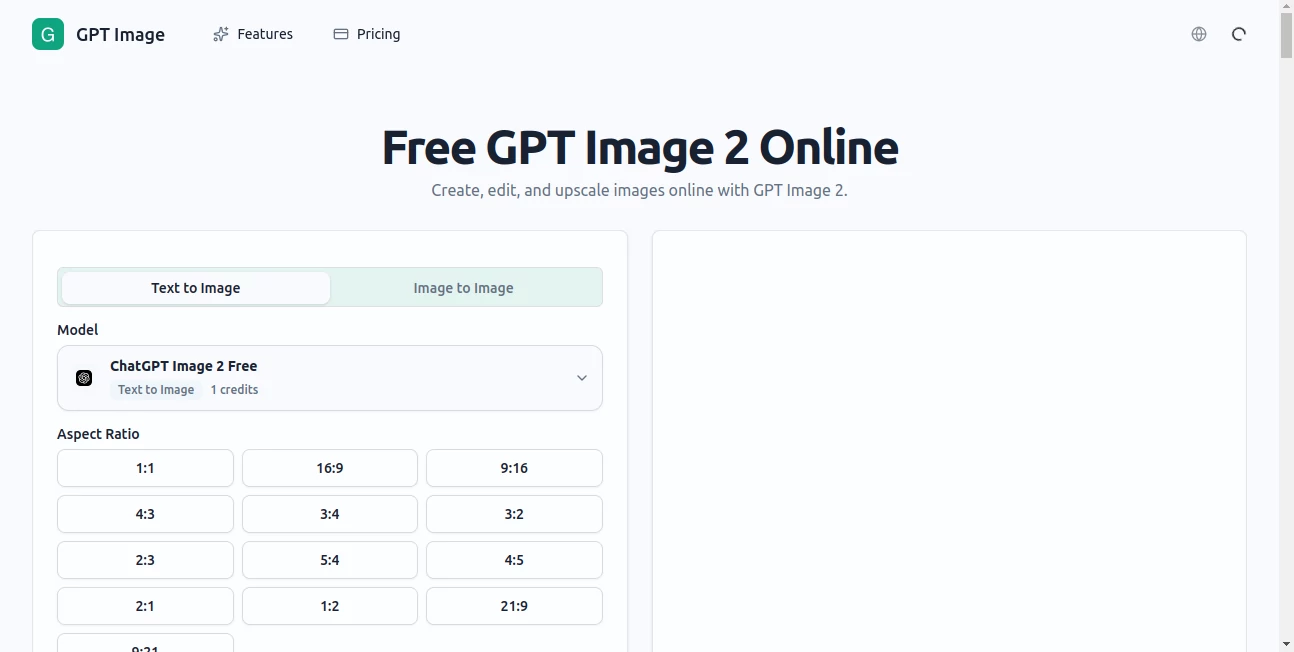
What is ChatGPT Image 2 Photo Editor?
There's a certain moment every creator knows — you have a clear picture in your head, but turning it into something visual takes hours you simply don't have. That's the gap this tool was built to close. Powered by OpenAI's GPT-4o engine, it lets you describe what you want and watch it appear on screen in seconds, with no design skills, no expensive software, and no steep learning curve.
AI image generation has come a long way in a short time, but the jump from "technically impressive" to "actually useful for everyday work" is where most tools still fall short. This one lands firmly on the useful side. Whether you're a marketer putting together campaign visuals, a developer prototyping a product interface, or a content creator who just needs a sharp thumbnail by tomorrow morning — it handles all of it without making you feel like you're fighting the tool to get there.
The platform taps into some of the most capable models available today — including GPT-4o, Flux, and Stable Diffusion — giving you access to different stylistic strengths from a single interface. That's a meaningful difference from tools that lock you into one model and one aesthetic.
Key Features
User Interface
The interface is clean in the way that actually matters — not just visually tidy, but functionally clear. You don't arrive at a dashboard full of settings you have to configure before generating your first image. The prompt field is front and center, the model selector is easy to find, and the output appears quickly without unnecessary loading screens or modal interruptions.
For users who've bounced off other AI image tools because the workflow felt clunky, this is a refreshing change. The experience is close to conversational — type what you want, adjust if needed, download when you're happy. That's it. No account required to start, which removes the friction that causes most casual visitors to leave before they've tried anything.
Accuracy & Performance
Output quality is where the GPT-4o backbone really earns its place. Earlier image generation models had a well-known blind spot: text. Put words in a prompt, and you'd get garbled letters, invented characters, and layouts that made no visual sense. That problem is largely solved here. Menus, labels, infographics, poster copy — the model renders readable text with a reliability that changes what kinds of assets you can actually produce.
Spatial reasoning has also improved substantially. Asking for a specific layout — say, a product on the left, a headline on the right, a background that doesn't compete — tends to produce something close to what you described rather than a creative reinterpretation of it. For commercial use cases where consistency matters, this isn't a small improvement.
Generation speed is solid. Most requests come back within seconds, which makes the iteration cycle fast enough to be practical in a real workflow rather than something you leave running and come back to.
Capabilities
The range of what you can produce is genuinely broad. Key capabilities include:
- Text-to-image generation: Describe any scene, subject, or concept and receive a high-quality image. Supports photorealistic outputs, stylized illustrations, abstract art, architectural renderings, and more.
- Image-to-image transformation: Upload an existing photo or sketch and ask the AI to reimagine it — change the style, adjust the mood, or build on a rough concept to get a polished result.
- Reference image support: Provide one or more reference images alongside your prompt. The model uses them as visual context, which is particularly useful for maintaining brand consistency or matching a specific aesthetic.
- Multi-model access: Switch between GPT-4o, Flux, Stable Diffusion, and other top-tier models depending on the style and quality level your project needs.
- Commercial usage rights: Paid plans include full commercial rights, meaning the images you generate can be used in client work, marketing materials, websites, and product assets without licensing concerns.
- Multiple resolution outputs: Generate images at standard and high resolutions suitable for both digital and print use cases.
Security & Privacy
User data and generated content are handled with standard security practices appropriate for a professional creative tool. Images generated on paid plans are treated as the user's commercial property. Free-tier outputs are available for personal and exploratory use, with commercial rights unlocking at the paid tiers.
The platform does not require extensive personal data to get started — the no-signup entry point means casual users aren't handing over account credentials just to test the tool. For regular users who do create accounts, standard data protection practices apply.
Content moderation filters are in place, consistent with OpenAI's usage policies. This means certain categories of content won't generate, which is the appropriate trade-off for a platform built on responsible AI infrastructure.
Use Cases
The honest answer is that the use cases are wide enough that the more useful question is: what are you currently spending time on that involves creating or sourcing visuals? Chances are, this tool belongs somewhere in that workflow.
- Marketing and advertising: Social media graphics, ad creatives, banner images, and email visuals — all generated to brief in minutes rather than commissioned or assembled from stock libraries.
- Content creation: Blog post headers, YouTube thumbnails, newsletter illustrations, and podcast cover art. The kind of supporting visuals that make content look professional but don't warrant a designer's full attention.
- Product prototyping: Indie developers and startup teams use it to generate UI mockups, app store screenshots, and landing page hero images before committing budget to production design.
- E-commerce: Product lifestyle shots, background variants, and promotional graphics. Especially useful for small sellers who can't afford regular product photography sessions.
- Education and presentations: Diagrams, concept visualizations, and illustrative graphics for slide decks, course materials, and explainer content.
- Creative exploration: Artists, writers, and designers use it as a brainstorming layer — generating reference visuals, mood boards, or concept art that informs work created through other means.
A freelance content designer recently described their workflow like this: brief comes in on Monday, rough visual concepts are generated and approved by Tuesday, refined assets are delivered by Thursday. What used to require a stock library subscription plus several hours of Photoshop work now takes a fraction of the time. That kind of workflow compression is what makes this genuinely valuable rather than just interesting.
Pros and Cons
What stands out positively:
- No signup required to start — you can generate images and judge the quality before committing to anything
- Multi-model support means you're not locked into a single aesthetic or quality ceiling
- Text rendering quality is among the best available, which opens up a whole category of visual assets that other tools can't produce reliably
- Both text-to-image and image-to-image workflows supported in one place
- Commercial rights included on paid plans — no separate licensing layer to navigate
- Fast generation speed makes real iteration cycles possible
Limitations worth knowing:
- Free tier is limited in credits — heavy users will hit the ceiling fairly quickly
- Very complex multi-element scenes sometimes require a few prompt iterations to get right
- Fine-tuning on specific brand characters or identities is not supported at the model level — consistent character generation across many outputs requires careful prompting rather than trained LoRA models
- NSFW content generation is not available, consistent with the underlying model's content policies
Pricing Plans
The credit-based pricing model is straightforward. Most standard operations cost one credit per image; more complex generations or premium models run two to three credits.
- Free Plan: 10 credits on signup, no credit card required. Full access to the tool's core features. A genuine free trial rather than a locked demo — you can generate real images and assess quality before deciding whether to upgrade.
- Lite Plan: 600 credits per month. Suited to individual creators, freelancers, and small teams with moderate generation needs. Includes commercial usage rights.
- Pro Plan: 1,600 credits per month at $29/month (billed monthly) or approximately $25/month on an annual plan — a roughly 50% saving on per-month billing over the year. The right tier for active content teams and commercial users with consistent volume.
Annual billing offers meaningful savings across both paid tiers. If image generation is a regular part of your workflow rather than an occasional experiment, the annual commitment pays for itself quickly.
How to Use Image GPT
Getting started takes about thirty seconds. There's no configuration required and no tutorial you have to sit through first.
- Step 1 — Open the tool: No account needed for your first generation. The prompt field loads immediately.
- Step 2 — Choose your mode: Select text-to-image if you're generating from scratch, or image-to-image if you're transforming an existing file.
- Step 3 — Select a model: Pick from the available models based on what you're making. GPT-4o is the go-to for most use cases, particularly anything involving text in the image. Flux variants work well for photorealistic outputs. Stable Diffusion options cover more stylized or artistic directions.
- Step 4 — Write your prompt: Be specific. The more detail you give — subject, style, lighting, mood, composition — the closer the output will be to what you're picturing. Short prompts work too, but richer descriptions tend to produce more useful first results.
- Step 5 — Generate and iterate: Review the output. If it's not quite right, adjust the prompt and regenerate. Most users land on something usable within two or three attempts.
- Step 6 — Download: Save your image directly. Paid plan users can use it commercially without any additional steps.
Comparison with Similar Tools
The AI image generation space has several strong players, and being honest about the differences helps you pick the right tool for your actual needs.
Midjourney produces some of the most artistically beautiful outputs available — rich textures, cinematic lighting, images with genuine aesthetic depth. Where it trades off is instruction following. Midjourney interprets your prompt and adds its own creative judgment, which is wonderful when that judgment aligns with yours and frustrating when it doesn't. It also still struggles with text rendering in images. If you need atmospheric art, Midjourney is hard to beat. If you need a specific layout with readable copy, it's the wrong tool.
DALL-E 3 (via ChatGPT) offers solid quality with a conversational editing loop that many users find natural. The main constraint is that you're working within ChatGPT's interface and message limits, and the model selection is fixed. The GPT-4o-based tool covered here gives you similar core quality with more model flexibility and a purpose-built image generation workflow.
Adobe Firefly is the right choice if you're already inside the Adobe ecosystem and want tight Photoshop or Illustrator integration. For users who aren't paying for Creative Cloud, it's an expensive entry point for image generation alone.
Stable Diffusion (self-hosted) offers the most flexibility of any option — custom models, unlimited generation, NSFW options, LoRA fine-tuning for character consistency. The trade-off is setup complexity, hardware requirements, and a learning curve that most non-technical users won't want to climb. The tool discussed here gives you Stable Diffusion as one model option inside a polished interface, without any of the setup.
The genuine differentiation here is breadth without friction: multiple top-tier models, both generation modes, commercial rights, and a no-signup entry point — in a single tool that doesn't require you to become a power user to get professional results.
Conclusion
Most people who try AI image generation for the first time walk away with one of two reactions: either the output quality surprises them, or the workflow frustrates them. The best tools in this space have figured out how to deliver on both. Strong results, first time out, without making users work too hard to get there.
This platform hits that mark. The multi-model architecture means you're not betting everything on one underlying model's strengths. The text rendering quality opens up commercial use cases that simply weren't practical with earlier tools. And the no-signup free tier removes the single biggest friction point in trying any new software — the moment you're asked to hand over your email before you've seen what it can do.
For creators, marketers, and teams who are currently spending meaningful time sourcing or producing visual assets, this is a tool worth incorporating into the workflow. The 10 free credits are enough to form a real opinion. And if you like what you see, the paid plans are priced sensibly for the output quality on offer.
Frequently Asked Questions (FAQ)
Do I need to create an account to use it?
No. You can start generating images immediately without signing up or providing payment details. New users receive 10 free credits to explore the full range of tools. An account becomes necessary if you want to subscribe to a paid plan or access your generation history across sessions.
Can I use the generated images commercially?
Yes, on paid plans. Both the Lite and Pro tiers include commercial usage rights, meaning you can use generated images in client work, marketing materials, product assets, and websites. Free tier images are suitable for personal and exploratory use.
What AI models are available?
The platform provides access to multiple leading models including GPT-4o, Flux 1.1 Pro, Flux Schnell, Stable Diffusion 3.5, DALL-E 3, Recraft V3, and Ideogram v2, among others. Each model has different strengths — GPT-4o excels at instruction following and text rendering, Flux variants deliver strong photorealism, and Stable Diffusion options cover a wide range of artistic styles.
How many credits does each generation use?
Most standard operations cost one credit per image. More complex generations — such as high-resolution outputs or requests processed through more advanced AI models — typically cost two to three credits. A detailed breakdown of credit consumption per feature is available within the platform.
Is there a meaningful quality difference between the free and paid tiers?
The tools and models available are the same across tiers — the difference is volume. Free users work within 10 credits, which is enough to evaluate quality thoroughly. Paid plans simply provide more credits per month and unlock commercial rights. You're not getting a degraded version of the tool on the free tier.
How does it handle image-to-image generation?
Upload your source image — a photograph, sketch, screenshot, or any other visual — and provide a text prompt describing the transformation you want. The AI analyzes the reference and generates a new image that incorporates your instructions while drawing on the original as context. This works well for style transfers, concept refinements, and creative remixes of existing visual material.
AI Photo & Image Generator , Photo & Image Editor , AI Background Generator , AI Text to Image .
These classifications represent its core capabilities and areas of application. For related tools, explore the linked categories above.
ChatGPT Image 2 Photo Editor details
Website unavailable — View Alternatives
Pricing
- Free
Apps
- Web App
Categories

ChatGPT Image 2 Photo Editor Alternatives Product

Image3

FLUX.1 Konte…
seedream 6
Resize Image…

Lymio

RenderFlow AI
Krea 2 AI

Stylize Image

GPT Image 2
