


















Integrateapi
What is Integrateapi?
Nothing slows down a product launch like rebuilding the same Stripe webhook handler or Slack notification system for the tenth time. Most developers know the pain: hours spent reading docs, debugging OAuth flows, and writing boilerplate that nobody on the team wants to maintain. This tool cuts through that noise. With one simple CLI command, it drops production-ready, fully typed integration code straight into your project. You own it completely—no runtime dependencies, no surprise vendor lock-in. I’ve watched teams go from “we’ll add payments next sprint” to “Stripe is live and shipping today” in under an hour. It’s the kind of practical magic that makes shipping feel fun again.
Introduction
Every SaaS eventually becomes an integration-heavy app. Whether it’s billing, notifications, CRM sync, or auth, these connections eat up development time that could be spent on your actual product. IntegrateAPI was built by people who got tired of rewriting the same patterns. It maintains a growing registry of high-quality templates for popular services and installs them directly into your codebase with framework-aware code. The result is clean, typed, and ready to run—no more wrestling with outdated SDKs or half-baked examples from Stack Overflow. For indie hackers, small teams, and even larger engineering groups, it turns weeks of integration work into minutes.
Key Features
User Interface
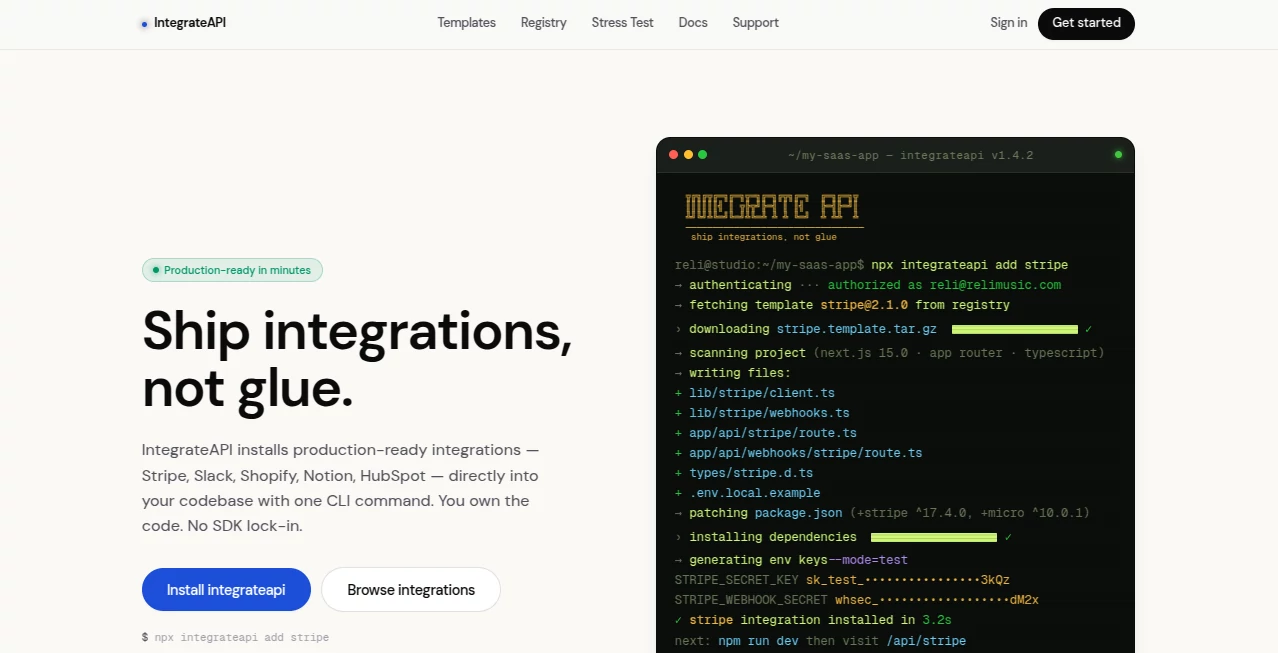
The entire experience lives in your terminal, exactly where developers already are. Run one command like `npx integrateapi add stripe`, and the CLI intelligently detects your framework (Next.js, Express, etc.), pulls the right template, and writes the files into the proper folders. It even patches your package.json with the right versions and creates .env templates. There’s no clunky web dashboard to learn—just fast, transparent installation that feels like using a well-designed npm package.
Accuracy & Performance
The templates are production-grade: proper error handling, webhook signature verification, OAuth flows that actually work, and strict TypeScript throughout. Because you own the code, performance stays under your control—no extra network hops or mysterious SDK overhead. Teams report that the installed code runs cleanly from day one, with far fewer debugging sessions than when they built integrations manually.
Capabilities
It currently supports dozens of popular services including Stripe, Slack, Shopify, Notion, HubSpot, Clerk, Supabase, OpenAI, and many more. Each template includes typed clients, webhook handlers, auth scaffolding, and environment setup. The CLI is smart enough to place files correctly based on your project structure. You can contribute new templates via GitHub, making the registry community-driven and constantly improving. Once installed, everything runs in your own environment—no ongoing dependency on the platform itself.
Security & Privacy
Since the code lives entirely in your repository, there’s no runtime dependency or data flowing through a third-party service after installation. You control the secrets, the deployment, and the maintenance. This self-contained approach gives teams much-needed peace of mind when handling sensitive customer data or payment flows.
Use Cases
A bootstrapped SaaS founder adds Stripe payments and webhooks in one afternoon instead of three days. A product team integrates Slack notifications across multiple microservices without duplicating code. An agency quickly sets up Notion sync for multiple client dashboards. A solo developer experimenting with AI features adds OpenAI integration cleanly without pulling in heavy SDK baggage. It shines anywhere integrations would otherwise become maintenance headaches.
Pros and Cons
Pros:
- One-command installation that actually works with your existing stack.
- You own the code—no vendor lock-in or runtime fees.
- High-quality, production-ready templates with proper security practices.
- Framework-aware code placement saves even more time.
- Community-driven registry keeps growing with new integrations.
Cons:
- Currently focused on popular services (though the list is expanding quickly).
- Very custom or niche integrations may still need manual work.
- Best results come when your project already follows common structures.
Pricing Plans
The core CLI and many templates are completely free to use. Paid plans exist for teams that want priority support, private templates, or advanced features. The model is refreshingly developer-friendly: pay only when you need extra help or exclusivity, not for the integrations themselves. Most solo developers and small teams find the free tier more than sufficient for real shipping velocity.
How to Use IntegrateAPI
Open your terminal in your project folder. Run `npx integrateapi add stripe` (or whichever service you need). Review the files it creates, add your environment variables, and test. That’s literally it. The CLI handles detection, installation, and setup. For future integrations, the process is the same—one command, done. You can even contribute your own well-tested templates back to the community if you build something unique.
Comparison with Similar Tools
Traditional SDKs often come with heavy dependencies and version conflicts. No-code integration platforms add runtime costs and lock you in. This tool sits in the sweet middle: you get production-quality code without the bloat, and you keep full ownership. It’s faster than building from scratch and cleaner than most copy-paste examples. For teams that value code ownership and shipping speed, it’s often the clearest winner.
Conclusion
Integrations shouldn’t be the bottleneck that slows your product down. This tool turns what used to be painful glue code into a repeatable, reliable process. It respects your time, your codebase, and your need to ship. Whether you’re a solo founder racing to MVP or part of a team maintaining multiple services, it delivers the kind of practical advantage that compounds over every new feature. Stop rebuilding the same things. Start shipping the features that matter.
Frequently Asked Questions (FAQ)
Do I lose control of the code after installation?
No—you own everything. There’s no runtime dependency on IntegrateAPI after the files are added.
Which frameworks does it support?
Next.js (App Router), Express, and most Node.js setups. The CLI detects your project and writes appropriate code.
Can I use this for commercial products?
Yes—templates are designed for production use and commercial projects.
Is there a cost for using the integrations?
The CLI and public templates are free. Paid plans are optional for extra support and features.
Can I add my own integrations to the registry?
Absolutely—the registry is open and welcomes community contributions via GitHub.
AI No-Code & Low-Code , AI API Design , AI Developer Docs , AI Developer Tools .
These classifications represent its core capabilities and areas of application. For related tools, explore the linked categories above.

Integrateapi Alternatives Product

axiom.ai

Designmd.fun

DeepSeek V4

Vurge

PatentFig AI

Reverse Imag…

Defapi

Somnio

ClawBridge
