
🧠 AI Quiz
Think you really understand Artificial Intelligence?
Test yourself and see how well you know the world of AI.
Answer AI-related questions, compete with other users, and prove that
you’re among the best when it comes to AI knowledge.
Reach the top of our leaderboard.


















NameThisPic

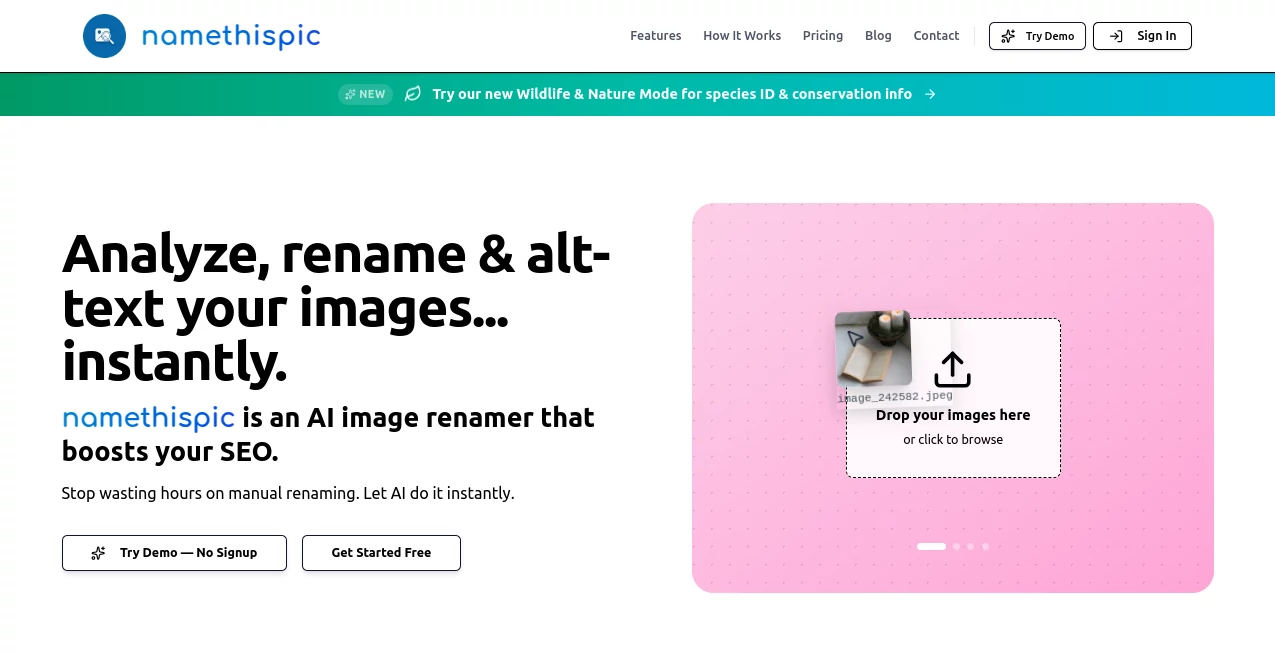
What is NameThisPic?
Ever stare at a folder full of vacation snaps and think, "What was this one again?" This tool takes that frustration and turns it into something genuinely fun. You drop in your photo, and in seconds it spits out clever, spot-on captions that actually make you smile. I've tried it on everything from blurry sunset shots to random street food pics, and the suggestions always feel thoughtful—like someone who knows your sense of humor is writing them for you.
Introduction
Most of us have thousands of photos sitting in our phones, and half the time we can't remember the story behind them. This little gem changes that by giving every picture a name that sticks—something witty, descriptive, or downright hilarious. It started as a simple idea to help people organize their memories better, but it's turned into a favorite for anyone who wants their photo library to feel alive again. A friend of mine used it on her travel album and ended up with captions so good she started sharing them on Instagram stories. Suddenly her feed had personality, and people were asking where she got such perfect titles. That's the quiet magic here: it doesn't just label photos, it brings them back to life.
Key Features
User Interface
The whole thing is dead simple—just drag your photo into the box, or click to upload, and you're done. No menus to dig through, no settings to fiddle with. The suggestions appear almost instantly, and you can copy them with one click. It's the kind of clean design that makes you wonder why other tools make it so complicated. I love how it feels like you're just chatting with a witty friend who knows exactly what to say.
Accuracy & Performance
What really sets it apart is how well it "gets" the photo. It picks up on tiny details—whether it's the lighting in a portrait or the vibe of a landscape—and suggests names that actually fit. Even with group shots or busy scenes, it rarely misses the mark. I've thrown everything at it from cat memes to food close-ups, and the results are consistently sharp. It loads fast too; no waiting around while it thinks.
Capabilities
You can ask for different tones—funny, poetic, sarcastic, or straight-up descriptive—and it adjusts on the fly. It handles multiple languages too, so if you're captioning for an international audience, you're covered. The best part? It suggests variations, so you can pick the one that feels most "you." It's perfect for anyone who wants their photos to tell a story without spending hours thinking up titles.
Security & Privacy
Your photos are processed and gone in a flash—nothing gets stored on their servers. It's reassuring to know that your personal snaps aren't hanging around somewhere. They make it clear that privacy is a priority, which is rare for tools that handle images. That peace of mind lets you upload without hesitation.
Use Cases
Travel bloggers use it to caption their adventures in seconds, giving each photo a title that matches the mood. Families love it for organizing years of photos—suddenly the blurry birthday shot from 2018 has a name that makes everyone laugh. Social media managers batch captions for client posts, saving hours every week. Even casual users like me end up with a photo library that feels curated and fun, not just a pile of forgotten files.
Pros and Cons
Pros:
- Dead simple to use—no learning curve, just drag and go.
- Captions are genuinely clever, not generic filler.
- Fast and accurate, even on tricky or busy photos.
- Privacy-focused—your images aren't saved anywhere.
Cons:
- Sometimes the humor is a bit too niche, but you can always regenerate.
- Free version has limits, though the paid one is very affordable.
Pricing Plans
You can start for free with a handful of captions per day—plenty to get a feel for it. The paid plan is dirt cheap, giving unlimited access and priority processing. It's the kind of pricing that feels fair: you pay only if you love it enough to use it all the time. No hidden fees, no upsells—just straightforward value.
How to Use NameThisPic
Open the site, drag your photo into the upload area (or click to browse), and wait a second. A list of caption ideas appears—pick the one you like best, or hit regenerate if none quite hit the mark. Copy it with one tap, and you're done. I usually do a few at a time when I'm sorting albums, and it turns a tedious chore into something I actually look forward to.
Comparison with Similar Tools
Most caption generators spit out bland, predictable lines. This one stands out because it actually tries to be funny or poetic, not just descriptive. The privacy focus is another big plus—many others keep your photos longer than necessary. It's not trying to be everything; it just does this one thing really well, and that's why it feels so much more useful than the competition.
Conclusion
If you've ever wished your photos came with better stories, this tool is the answer. It takes the guesswork out of naming pictures and turns a chore into something enjoyable. The captions are sharp, the process is effortless, and your memories suddenly feel more alive. Give it a try—you'll probably end up captioning way more photos than you planned, just because it's so much fun.
Frequently Asked Questions (FAQ)
How many photos can I caption for free?
You get a generous daily limit—enough to test it thoroughly without paying.
Do you keep my photos?
No—everything is processed and deleted immediately after.
Can I choose the style of caption?
Yes, just let it know if you want funny, poetic, or straight descriptive.
What if I don't like any suggestions?
Hit regenerate—usually the next batch nails it.
Does it work on mobile photos?
Perfectly—most people use it right from their phone.
AI Photo & Image Generator , AI Fun Tools , AI Content Generator , Photo & Image Editor .
These classifications represent its core capabilities and areas of application. For related tools, explore the linked categories above.
NameThisPic details
This tool is no longer available on submitaitools.org; find alternatives on Alternative to NameThisPic.
Pricing
- Free
Apps
- Web Tools
Categories

NameThisPic Alternatives Product

Nanosora

nano banana

Pixora
promptcat

Seedream 4.0…

AI Hairstyle

Caricature A…

Dating photos

Imgezy
