


















Receipt Taxer
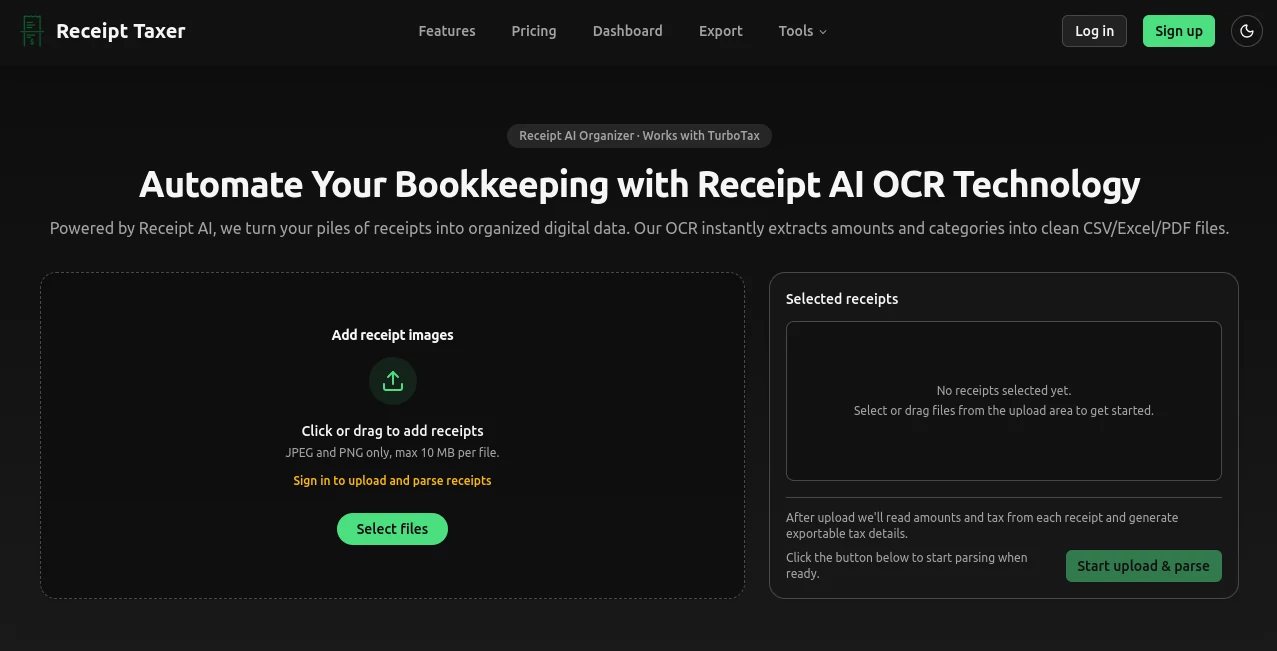
What is Receipt Taxer?
Keeping track of receipts is one of those small tasks that quietly eats away at your time and sanity—especially when tax season rolls around. This tool changes that experience completely. You snap or upload a receipt, and it instantly reads the details, categorizes the expense, estimates the deductible amount, and gets everything ready for export. No more staring at blurry ink trying to decipher numbers. I've watched freelancers go from shoeboxes full of crumpled papers to clean, organized reports in minutes. It feels less like software and more like having a very organized friend who actually enjoys bookkeeping.
Introduction
Most small business owners and freelancers dread expense tracking. Receipts pile up, categorization feels tedious, and when April comes, panic sets in. Receipt Taxer steps in as a calm, capable assistant that uses smart OCR to extract amounts, dates, merchants, and categories automatically. It even estimates potential tax deductions so you can see the impact right away. The best part? It exports directly into formats that work beautifully with TurboTax and other accounting tools. It’s built for real people who just want their books in order without spending their evenings on data entry.
Key Features
User Interface
The design is refreshingly straightforward. Drop your receipts (photos, PDFs, scans) into a clean upload area, and everything processes in one view. You see thumbnails, extracted data, suggested categories, and a simple status (recognized, needs review, failed). Totals update live as you go, and the export button is always visible when you’re ready. No complicated menus or hidden settings — just a focused workspace that makes the task feel manageable instead of overwhelming.
Accuracy & Performance
The OCR handles real-world receipts surprisingly well — even crumpled, low-light, or slightly blurry ones. It pulls merchant names, dates, amounts, and tax lines with good accuracy, then suggests logical categories (dining, transportation, office, etc.). When it’s unsure, it flags the item clearly for quick manual correction. Processing is fast, and the system learns from your corrections over time, making future batches even smoother.
Capabilities
Bulk upload support, automatic categorization, tax deduction estimates, full export to CSV, Excel, or PDF, and specific formatting optimized for TurboTax Schedule C. You can filter by date range, category, or status, add notes, and generate clean summaries for your accountant or reimbursement claims. It turns chaos into structured data you can actually use.
Security & Privacy
Your receipts contain sensitive financial information, so the tool handles them with care. Data is processed securely, and you stay in control of what gets exported or stored. It’s designed for people who need to trust the system with their business expenses, which makes the straightforward approach especially reassuring.
Use Cases
A freelancer scans a month’s worth of coffee shop and co-working receipts during a lunch break and has a ready-to-import CSV for their accountant by evening. A small business owner uses it during travel to log expenses on the go, avoiding that dreaded pile at month-end. A consultant preparing for taxes uploads everything in one batch, reviews the suggested deductions, and feels confident walking into their filing appointment. It shines whenever receipts threaten to become a burden.
Pros and Cons
Pros:
- Turns messy receipt piles into organized, export-ready data in minutes.
- Smart categorization and tax estimates save real time during filing season.
- Works with photos, PDFs, and scans — no special scanning equipment needed.
- Clean TurboTax-friendly exports reduce manual entry errors.
- Simple enough for non-accountants but powerful enough for regular use.
Cons:
- Very damaged or extremely blurry receipts may still need manual entry.
- Heavy monthly volume works best on paid plans.
Pricing Plans
It starts with a practical free tier that lets you test the system and handle lighter volumes. Paid plans offer higher monthly receipt limits, priority processing, and advanced export options. The pricing is straightforward and reasonable — many users say it pays for itself quickly through time saved and reduced stress during tax season.
How to Use Receipt Taxer
Upload your receipts individually or in batches (photos work great). Let the AI extract and categorize everything. Review any items flagged for attention — corrections are quick and easy. Once satisfied, choose your date range and export format (CSV for accounting software, PDF for records, or Excel for editing). Download and import into TurboTax or your preferred tool. The whole process feels surprisingly light for something so useful.
Comparison with Similar Tools
Many receipt apps focus only on scanning or basic tracking. This one stands out by combining smart extraction with practical tax-focused features and clean exports. It’s less overwhelming than full accounting suites but more powerful than simple scanners, striking a sweet spot for freelancers and small businesses who want help without complexity.
Conclusion
Expense tracking doesn’t have to be painful. This tool takes one of the most dreaded parts of running a business or freelancing and makes it almost painless. By turning physical receipts into structured, verifiable data quickly and accurately, it gives you back time and peace of mind — especially when taxes are due. For anyone tired of shoeboxes and spreadsheets, it’s a small but meaningful upgrade that actually delivers on its promise.
Frequently Asked Questions (FAQ)
How accurate is the scanning?
Very good on clear receipts. Blurry or damaged ones may need light review, but most process cleanly.
Can I export directly for TurboTax?
Yes — the CSV and Excel exports are formatted to make Schedule C entry much easier.
Do I need to create an account?
You can try basic features without one, though an account unlocks saving history and higher limits.
Is it suitable for businesses or just freelancers?
Both — it scales nicely for small teams and individual users alike.
What if a receipt fails to scan?
It clearly marks failed items so you can add them manually or try a clearer photo.
AI Document Extraction , AI Documents Assistant , AI Accounting Assistant , AI Productivity Tools .
These classifications represent its core capabilities and areas of application. For related tools, explore the linked categories above.

Receipt Taxer Alternatives Product

VisualGPT

The #1 Compa…

GPT Image 2 …

AI OCR

Lynote

CursiveKit

Image to URL…

Enji

Audio Convert
