VRChat Avatar Maker - Create Texture & Rig 3D Avatars Online
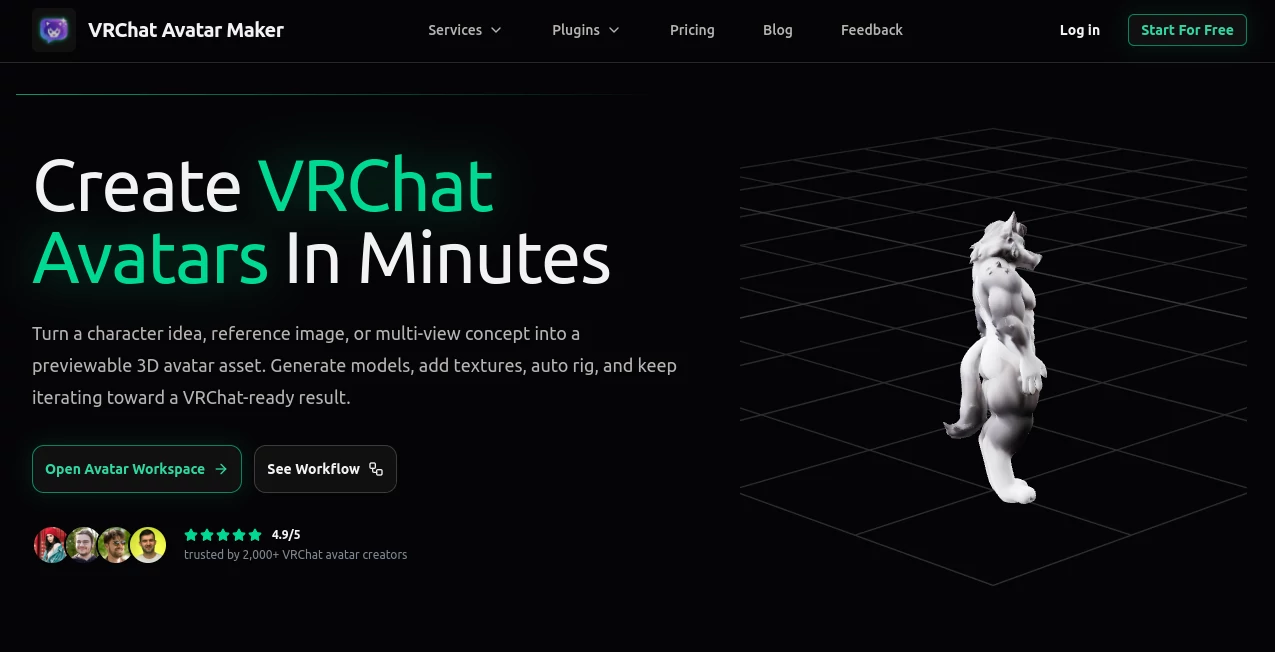
What is VRChat Avatar Maker - Create Texture & Rig 3D Avatars Online?
Anyone who's spent time in VRChat knows that your avatar is more than just a visual — it's your identity in a virtual space shared with thousands of other people. For years, creating a truly custom avatar meant either learning Blender from scratch, hiring a commission artist, or settling for something pre-made that dozens of other users are also wearing.
This platform changes that equation significantly. It's a dedicated creator workspace that takes you from a character idea all the way through to a textured, rigged, downloadable 3D avatar — without requiring you to open a single external application. Trusted by over 2,000 VRChat avatar creators and rated 4.9 out of 5, it's become a serious contender in the space for anyone who wants a proper custom avatar without a six-week wait or a steep technical learning curve.
Whether you're an anime fan building a VTuber-style identity, a furry creator designing a wolf character, or someone who just wants something genuinely unique in a cyberpunk or fantasy style, the workflow here is built around how avatar creators actually work — not how 3D software tutorials expect you to work.
Key Features
User Interface
The workspace is refreshingly direct. You pick a creation mode, submit your input, and the platform guides you through the pipeline in a step-by-step structure that never feels overwhelming. There's no cluttered toolbar or buried setting that only professionals would know to look for.
Status visibility is one of the small things that makes a real difference here. You can see exactly whether a task is generating, complete, deferred, or failed — and preview the result directly in the workspace before deciding whether to download, refine, or retry. For creators iterating through multiple character directions in a single session, this real-time feedback loop is genuinely useful.
The interface also supports multiple languages, including Japanese, which reflects the platform's awareness of where its community actually comes from.
Accuracy & Performance
The model generation quality is notably consistent across styles. Anime characters tend to come out with clean proportions and accurate facial structure when given clear reference inputs. Furry and creature-based characters benefit substantially from the multi-view input option — providing front, side, and back references reduces the ambiguity that typically makes non-humanoid characters harder to generate well.
Auto rigging, which is often the weakest link in AI-based avatar pipelines, performs solidly here. Motion presets like idle and walk let you preview how the rig behaves before committing to a download, which saves the frustration of discovering bone placement issues after the fact.
Output formats are GLB and FBX — both widely compatible with downstream 3D and VR workflows.
Capabilities
The platform runs six distinct creation modes, each designed to cover a real stage in the avatar creation process:
- Text to Avatar: Generate a 3D avatar model from a written prompt. Supports style direction, clothing descriptions, mood, and silhouette guidance. Ideal for early-stage concept exploration when you don't have reference images yet.
- Text to Image: Produce character concept art before committing to a 3D model. Supports negative prompts and helps validate visual direction before the more credit-intensive modeling step.
- Image to Avatar: Upload a single reference image and generate a 3D model from it. Better results for characters with clear proportions and defined surface detail.
- Multi-image to Avatar: Provide front, left, back, and right reference views for significantly improved structural consistency. This is the recommended workflow for creators who have reference sheets or detailed character designs.
- Add Texture: Take an existing generated model and apply or repaint surface materials using text, one image, or multiple image references. Lets you refine color, material direction, and overall appearance without regenerating from scratch.
- Auto Rigging: Apply automatic rigging to a generated model and preview it with motion presets. Moves the asset considerably further toward an export-ready state.
Security & Privacy
Paid plans include private asset access, which means generated models and images are kept within your account rather than being visible in public galleries. For creators building original characters — especially those tied to personal or commercial identity — this matters more than it might initially seem.
The platform uses Creem for payment processing, keeping billing infrastructure separate from the creative workspace. Privacy Policy, Cookie Policy, and Terms of Service are clearly documented and accessible from the site footer.
Use Cases
The practical range of who benefits from this platform is wider than you might expect at first glance.
The most obvious users are VRChat players who want a personal avatar that actually represents them — or a character they've been imagining — rather than something pulled from a public library. The ability to go from a text description to a rigged, downloadable 3D model in a single session, without any 3D software knowledge, is a genuine capability shift for that audience.
VTubers and streamers in early development are another strong fit. Testing multiple character directions quickly — exploring whether the design reads better as anime, chibi, or semi-realistic before committing to commissions or professional modeling — is exactly what the Text to Image and Text to Avatar modes are built for.
- Personal avatar creators wanting a unique identity in VRChat without the cost or wait of commissioning an artist
- VTubers and content creators exploring character designs before investing in full production
- Furry and niche community creators building creature-based characters in styles that commission pipelines often struggle to standardize
- Small indie game teams using the platform for rapid character prototyping and concept validation
- Art directors and outsourcing leads generating first-pass 3D drafts to clarify briefs before handing off to human artists
- Educators and event organizers in virtual worlds who need branded or thematic avatars without a dedicated 3D artist on staff
One particularly practical scenario: a creator who has a detailed character reference sheet from a commissioned illustration can feed that directly into the multi-view workflow and get a 3D model that actually reflects their character's proportions — rather than having an AI guess at the structure from a single front-facing image.
Pros and Cons
What stands out positively:
- The end-to-end pipeline — concept, model, texture, rig, download — inside a single workspace is a genuine workflow advantage over using multiple disconnected tools
- Multi-view input support meaningfully improves output quality for complex characters
- Auto rigging with motion preview reduces the most technically demanding step in the process
- GLB and FBX export formats are compatible with real downstream workflows, not just screenshots
- The free plan includes 20 starter credits, enough to meaningfully test the core workflow before spending anything
- Rated 4.9/5 by an active community of over 2,000 creators — that's not a small sample
- Works well across anime, furry, cyberpunk, fantasy, and other popular VRChat styles
Limitations worth knowing:
- Auto rigging costs 35 credits per job — for heavy iteration workflows, credits can move faster than expected on the lower-tier plans
- The output is a solid starting point, but complex or highly detailed characters may still need refinement in Blender or Unity before VRChat upload
- Free plan assets are public-facing, which may not suit creators working on original or commercially sensitive characters
- The platform is specifically built around VRChat avatar creation — creators needing avatars for other platforms (Ready Player Me, VRM-based apps) will need to verify compatibility
Pricing Plans
Pricing is credit-based, with subscriptions offering monthly credit allocations and optional top-up packs available separately. Yearly billing saves 34% across all paid tiers.
- Free — $0/month: 20 one-time credits, basic model processing, basic customization options, public asset access. Enough to run a Text to Image generation (5 credits), a Text to 3D without texture (10 credits), and still have credits to spare. Good for first-time users evaluating the workflow.
- Creator — $19/month (billed yearly) or $29/month (monthly): 350 credits per month, priority model processing, advanced customization options, private asset access, and the ability to buy extra credits. Suited to creators who generate avatars regularly but not at industrial volume.
- Pro — $39/month (billed yearly) or $59/month (monthly): 900 credits per month with the same priority processing and private asset features as Creator. Designed for high-volume creators, power users, and small teams who are iterating frequently across multiple avatar assets each month.
- Custom — contact for pricing: For teams with larger volume, custom billing requirements, or special workflow needs. Includes priority support, custom onboarding, and flexible billing options.
Credit packs can also be purchased independently, letting you stay on your current plan and add capacity when a particular project demands more generations without committing to a plan upgrade.
How to Use VRChat Avatar Maker
The workflow is structured around four core steps that apply regardless of which creation mode you start with:
- Step 1 — Choose your creation mode: Start from where you are. If you have a clear written idea, use Text to Avatar or Text to Image. If you have a reference illustration, use Image to Avatar. If you have a full character reference sheet with multiple views, go straight to Multi-image to Avatar. If you already have a model and want to improve it, jump to Add Texture or Auto Rigging.
- Step 2 — Submit your input: Write a character description, upload your reference image or images, or select an existing generated model from your workspace. The more detail you provide — style, clothing, color direction, mood — the more aligned the output tends to be with what you're imagining.
- Step 3 — Preview and evaluate: Track the task status in real time. Once complete, preview the image, model, or rig directly in the workspace. Decide whether to download, refine with additional texture or rigging work, or retry with adjusted inputs.
- Step 4 — Download and continue: Export in GLB or FBX for downstream use. If the result needs further polish — adding textures to a base model, or rigging a model you've already textured — continue in the same workspace without starting over.
The key workflow habit that makes the platform more efficient: treat each output as a building block rather than a final product. A Text to Avatar result becomes the input for Add Texture. A textured model becomes the input for Auto Rigging. That iterative chain is exactly what the workspace is designed to support.
Comparison with Similar Tools
The main alternatives for VRChat avatar creation fall into a few categories, each with different trade-offs.
Commission platforms — Fiverr, independent artists, and dedicated VRChat avatar commission services — produce the highest quality results but come with real costs in time and money. Wait times of several weeks and prices ranging from $100 to $500+ are common. For creators who need something unique and have budget and patience, commissions remain excellent. For anyone who needs to iterate quickly, test multiple character directions, or work within a tighter budget, a commission pipeline simply doesn't fit the workflow.
Gumroad and similar marketplaces offer pre-made avatar assets at lower price points, but the customization ceiling is low and the same assets are being used by many other people in the same virtual spaces. If your goal is a distinct personal identity, a shared asset undercuts that entirely.
General 3D generation tools like Meshy or Tripo3D can produce 3D models from text or image inputs, but they're not designed around the VRChat avatar workflow specifically. They lack the rigging pipeline, the motion preview, and the awareness of VRChat-specific character styles that make a tool genuinely useful for this community.
The platform reviewed here occupies a distinct position: it combines the accessibility of an AI generation tool with the pipeline depth of a purpose-built avatar creation workspace, at a price point that makes regular iteration realistic for individual creators.
Conclusion
The gap between "I have a character idea" and "I have a rigged, downloadable avatar" has historically required either significant technical skill, significant money, or significant time — often all three. This platform compresses that gap in a way that's genuinely useful rather than just technically impressive.
The fact that it's built specifically for VRChat avatar creation, rather than being a general 3D tool repurposed for the community, shows throughout the experience. The creation modes match how avatar creators actually think and work. The output formats are the ones that matter for downstream VR workflows. The style support covers the directions that VRChat users actually create in.
For anyone in the VRChat community who has wanted a custom avatar but found the existing options either too expensive, too slow, or too technically demanding, this is a platform that's worth exploring with the free tier before committing to anything. Twenty starter credits is enough to genuinely understand what the pipeline can do — and that's a low-risk entry point for a tool that could meaningfully change how you approach avatar creation.
Frequently Asked Questions (FAQ)
Do I need any 3D modeling experience to use this?
No. The platform is specifically built to lower the barrier for creators who want a VRChat avatar asset without already knowing Blender, Unity, or the VRChat SDK. The workspace guides you through each step with clear inputs and previews.
What file formats can I download?
Generated assets can be downloaded as GLB or FBX files, both of which are compatible with standard 3D and VR asset workflows for preview and downstream editing.
How many credits does each action use?
Text to Image costs 5 credits. Text to 3D costs 10 credits without texture or 20 credits with texture. Image to 3D costs 20 or 30 credits depending on whether texture is included. Multi-view to 3D follows the same structure. Auto Rigging costs 35 credits per job.
Can I use my own character reference images?
Yes. The Image to Avatar mode accepts a single reference image, and the Multi-image to Avatar mode accepts front, left, back, and right views for improved structural accuracy. This is the recommended workflow for creators who have existing character art or reference sheets.
Is the free plan actually usable, or is it just a demo?
The free plan includes 20 one-time credits — enough to run a concept image generation and a Text to 3D job, for example. It gives a meaningful look at the core workflow before you decide whether a subscription makes sense for your needs.
What styles work well with this platform?
Anime, furry (fox, wolf, cat, dragon, and similar creature characters), cyberpunk, fantasy, and cute or chibi styles are all well-supported and commonly used by creators on the platform.
Can I continue editing an avatar I generated earlier?
Yes. The workflow is designed so any generated output can become the input for the next stage — adding texture to a base model, or running auto rigging on a model you've already refined. You don't need to restart from scratch each time.
AI 3D Model Generator , AI Avatar Generator , AI Image to 3D Model , AI Text to 3D .
These classifications represent its core capabilities and areas of application. For related tools, explore the linked categories above.
VRChat Avatar Maker - Create Texture & Rig 3D Avatars Online details
Website unavailable — View Alternatives
Pricing
- Free
Apps
- Web App
Categories

VRChat Avatar Maker - Create Texture & Rig 3D Avatars Online Alternatives Product

aiiStudio

trellis 2

Image to STL
Meshy AI

Pixal3D
Shapify AI
PNG to 3D

Yodayo AI

SAM 3D