
Enough
What is Enough?
Let's be real for a second – most financial advice out there is either too complicated or just plain useless. You've got apps that show you fancy charts but never tell you what to actually do. And then there are those generic blog posts that assume everyone has the same spending habits. That's not how real life works, right?
That's exactly where this platform steps in. I stumbled upon it last month when I was desperately trying to figure out where my paycheck disappears every month. And honestly? It felt different from the start. No confusing financial jargon, no judgmental notifications about that extra coffee you bought. Just straight-up, practical help that makes sense for regular people who want to get their money together without needing a finance degree.
This tool is built for anyone who's tired of guessing and wants a clear, actionable path toward better financial health. Whether you're saving for a house, trying to pay down debt, or just want to stop living paycheck to paycheck – this one's got your back.
Key Features
The platform packs some serious punch when it comes to features. But instead of throwing a million things at you, they've focused on what actually moves the needle for your finances. Here's what stood out during my time using it.
User Interface
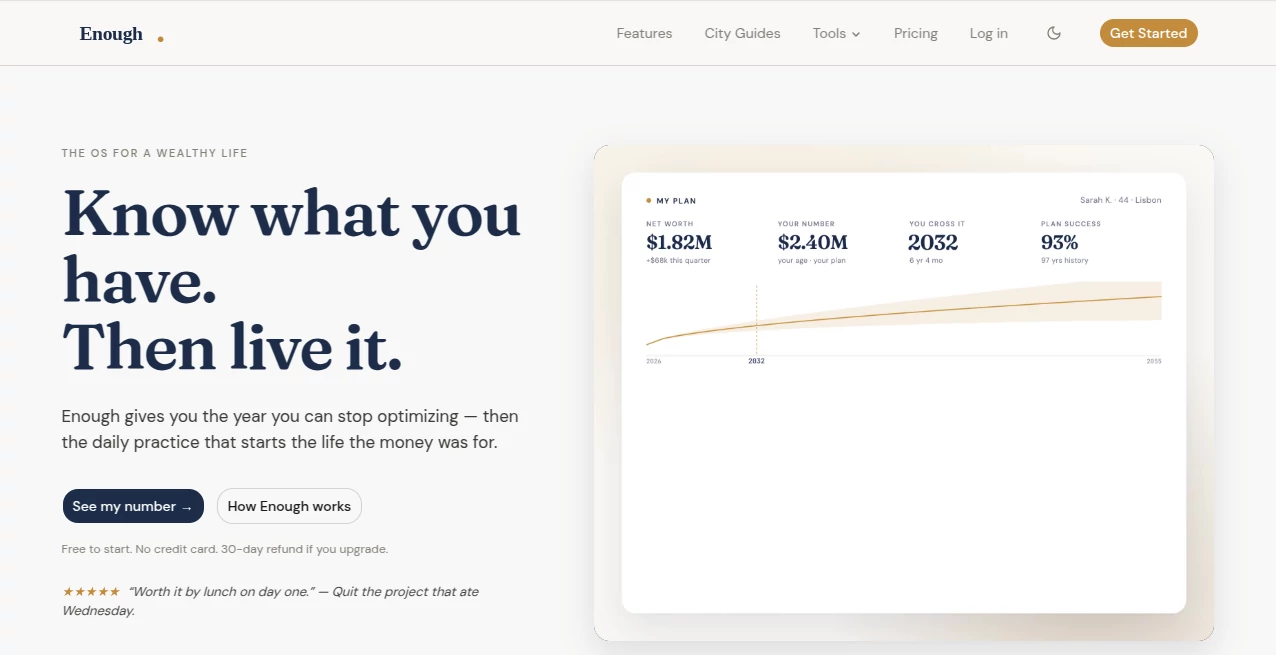
You know how some financial tools look like they were designed for stock traders in the 90s? Yeah, this isn't that. The interface is clean, modern, and actually pleasant to look at. Everything loads fast, and you won't find yourself clicking through seventeen menus just to check your basic budget. The dashboard gives you the big picture immediately – your income, expenses, savings rate, and any red flags that need attention. I showed it to my partner who normally hates anything finance-related, and even they said, "Okay, this one I could actually use."
Accuracy & Performance
Here's the thing about AI finance tools – they're only as good as their data. This platform connects to your accounts (banks, credit cards, investments) and pulls real numbers, not estimates. During my testing, the transaction categorization was surprisingly accurate. Maybe 2-3 transactions per week needed manual tweaking, which is pretty solid compared to other tools I've tried. The spending alerts are timely too. Got a notification within minutes of a large purchase, not two days later when it's already too late to think about it. Performance-wise, the system handles multiple accounts without slowing down, and syncing takes just a few seconds.
Capabilities
This isn't just a fancy expense tracker. The real magic is in the planning engine. You can set goals – like saving $10,000 for a down payment or paying off a credit card in six months – and the tool builds a realistic roadmap to get there. It considers your income patterns, fixed obligations, and even accounts for irregular expenses like car maintenance or annual insurance payments. What impressed me most? The "what-if" scenarios. Want to see what happens if you cut your dining out budget by 30%? Or if you pick up a side hustle that brings in an extra $500 a month? Just ask, and it shows you the impact over time. The debt payoff calculator actually compares different strategies (snowball vs. avalanche) and tells you which saves more interest. No guesswork.
Security & Privacy
Obviously, when you're connecting bank accounts, security is huge. This platform uses bank-level encryption (256-bit, same as what major financial institutions use). They don't store your login credentials – instead, they use read-only access tokens from your bank. That means they can see your balances and transactions but can't move money or make changes. Two-factor authentication is enabled by default, and you can see exactly which devices have accessed your account. I also checked their privacy policy (because I'm that person), and they're clear about not selling your data to third parties. The platform is read-only, so no transactions can be initiated from within the app. That gave me some peace of mind.
Use Cases
Different people will get different value from this tool, but here are a few scenarios where it really shines.
The debt fighter: You've got credit card balances, maybe a car loan or student debt. You're making payments but feel like you're not getting anywhere. This platform identifies which debt to attack first and shows you exactly how much interest you'll save by following a specific payoff plan.
The savings newbie: You know you should save more, but every month something comes up. The tool analyzes your spending and finds "leaks" you probably didn't even notice – that subscription you forgot about, the recurring delivery service you rarely use, the marked-up insurance you could switch. Then it builds an automatic savings plan that works with your actual cash flow, not against it.
The goal-setter: Maybe you're planning a wedding, a vacation, or a down payment. You need to know if your goal is realistic and what adjustments you'd need to make. Run the numbers once, get a clear answer, and track your progress every week without obsessing over spreadsheets.
The family budgeter: Trying to manage finances for a household is messy. This tool makes it easier to see combined spending, set shared goals, and stay on the same page without those awkward "how much did you spend on groceries?" conversations.
Pros and Cons
Let's keep it honest – no tool is perfect. Here's what works really well and where there's still room to grow.
- Pro: Super easy setup – connect your accounts in under five minutes and you're done.
- Pro: Actionable insights, not just data dumps. Every notification includes a suggested next step.
- Pro: Works across desktop and mobile seamlessly. Start something on your computer, check it on your phone later.
- Pro: The goal tracking feature is genuinely motivating. Watching that progress bar move keeps you going.
- Pro: No ads pushing credit cards or investment products. It's not trying to sell you stuff.
- Con: Currently only connects to US and Canadian financial institutions. International users might be out of luck for now.
- Con: The free tier has some limitations on how many goals you can track simultaneously.
- Con: Would love to see more integration with investment accounts beyond basic balance tracking – like portfolio analysis features.
Pricing Plans
The platform offers a few different options to fit various needs and budgets. There's a free tier that gives you basic budgeting and expense tracking – good for getting started and seeing if you like the interface. The premium plan unlocks the goal planning features, the debt payoff calculator, and all the "what-if" scenario tools. For most people, the free version is a solid starting point, but the premium features are where the real transformation happens. They also offer an annual plan that works out to a lower monthly cost if you decide to commit. No hidden fees, no surprises – everything is laid out clearly before you enter any payment info.
How to Use This Platform
Getting started takes literally minutes. Head to the website and click the sign-up button – you'll need an email address and a password. Once you're in, the platform will walk you through connecting your first financial account. You'll be asked to select your bank from a list (they support thousands of institutions) and log in through a secure portal. This is a one-time thing. After that, the tool starts pulling in your transaction history from the past 90 days. Give it a few minutes to analyze everything. The next step is setting up your budget categories – but honestly, you can skip this because the AI does a pretty good job on its own. You just confirm or tweak as needed. Finally, add any financial goals you're working toward. Not sure yet? No pressure. You can always add goals later from the dashboard. That's it. You're ready to start getting personalized financial guidance.
Comparison with Similar Tools
You've probably heard of other personal finance apps like Mint, YNAB, or Personal Capital. Here's how this one stacks up. Unlike Mint (which got shut down and migrated to Credit Karma), this platform is actively developed and improving. Compared to YNAB, which has a cult following but a steep learning curve, this tool is much more approachable for beginners. YNAB wants you to budget every single dollar before you spend it – that works for some people, but it's a lot of manual work. This platform takes a more automated, flexible approach. Against Personal Capital (now Empower), which focuses heavily on investment tracking, this tool puts more emphasis on daily spending and goal planning. It's for regular people trying to live better, not just wealthy folks managing portfolios. The AI insights here feel more personalized too – not just generic "you spent more on restaurants this month" but actual suggestions based on your unique patterns. And the price point? Much more accessible than hiring a financial advisor, obviously, but also competitive with other premium budgeting apps out there.
Conclusion
Look, managing money isn't fun for most people. It's stressful, confusing, and easy to put off until "next month." But tools like this make it a whole lot easier. The platform takes the guesswork out of the equation and gives you a clear, actionable plan based on your actual numbers – not some theoretical average person who doesn't exist. After using it for several weeks, I can honestly say it changed how I think about spending and saving. I caught subscriptions I'd forgotten about, found extra money in my budget I didn't know was there, and finally made real progress on a savings goal that had been sitting untouched for over a year. If you're serious about getting your finances in order but don't want to deal with complicated spreadsheets or judgmental apps, give this one a shot. The free tier lets you test drive everything without risk. Worst case? You learn something about your spending. Best case? You finally get ahead.
Frequently Asked Questions (FAQ)
Is my bank information safe?
Yes. The platform uses read-only access and bank-level encryption. Your login credentials are never stored, and no one can initiate transactions from the app.
Does this work with banks outside the US?
Currently, the platform supports US and Canadian financial institutions. International support is on the roadmap but not available yet.
Is there really a free version?
Yes. The free tier includes basic budgeting and expense tracking. Premium features (like goal planning and debt payoff calculators) require a subscription.
Can I use this with my partner?
Absolutely. You can connect multiple accounts from different people and manage shared budgets. It's great for couples or roommates.
What happens if I cancel my premium subscription?
You won't lose your data. Your account will revert to the free tier, so you'll keep basic tracking but lose access to premium planning features. You can always upgrade again later.
Does the AI actually give good advice?
Based on my experience – yes. The suggestions are specific to your spending patterns and goals, not generic tips you could find on any blog. But it's still an AI tool, so use your own judgment on major financial decisions.
How often does it sync with my accounts?
Transactions usually appear within a few hours, sometimes faster. You can also manually trigger a sync if you want real-time data.
AI Life Assistant , AI Productivity Tools , AI Research Tool , AI Analytics Assistant .
These classifications represent its core capabilities and areas of application. For related tools, explore the linked categories above.

Enough Alternatives Product

Coresite

AI Podcast I…

ShipBoost

Gemini Omni

Elicit

Schema Synth

Pinpoint Ans…

Manus

YouCam AI & …